
Check that an empty source list means an empty account
The Add a source form is not a fixed list. It is built from a live read of your Cloudflare account: the engine asks what exists, and the form offers what came back. That read is deliberately fail-open per product, and the consequence is worth a page of its own.
If your discovery token can list your KV namespaces but not your R2 buckets, the read does not fail. It returns your namespaces, returns an empty list for R2, and answers normally. The form shows no buckets. Nothing is red, because from the form’s point of view nothing went wrong.
Three states that look identical
An empty product list in that form is one of three things, and they look the same:
- The account holds none of that product. This is the common case.
- The token cannot see them. A 401 or 403 scope gap. The resources exist and you were never shown them.
- The listing was truncated. It hit a page cap, so resources past the cap exist and were never shown.
The second and third are data loss by omission, and they are quiet in the worst way: you configure backups for the sources you were shown, the estate looks covered, and the un-shown resources are never protected. There is no failed run to investigate, because nothing failed. The gap only appears when you go looking for something in an archive and find it was never in scope.
Fail-open is still the right default. A single missing scope should not stop you setting up the products the token can read. One discover request records six verdicts, and the first of them is the account step rather than a product (the DISCOVERY_PRODUCTS vocabulary in engine/src/admin/discovery-health.ts). The other five are product listings, read for each scanned account: KV, R2, D1, Secrets Store and zones. When no account is selected, the engine resolves the accounts first, and a failure there empties the form completely. Either way, an empty list is a question, not an answer.
What the console does tell you
If the whole discovery read fails, the Overview’s coverage tile says so and names the fix rather than leaving you to guess:
- Your session could not read discovery: sign in again, then refresh. If the note stays, ask an Owner to check that your role can read downpipes.
- The engine rate-limited the account read: it should resolve on the next refresh.
- The engine could not read your account, usually because it cannot unseal the stored discovery token: re-paste it on Sources.
- The engine could not be reached at all.
Each of those reports coverage as unknown, not zero and not fine.
If no discovery token is stored at all, the account-wide surfaces are not read and cannot be. Account discovery is opt-in, so this is the state a new deployment starts in. The engine answers with its own bindings and nothing else, and the Overview’s coverage grid says which surfaces that leaves it unable to see:
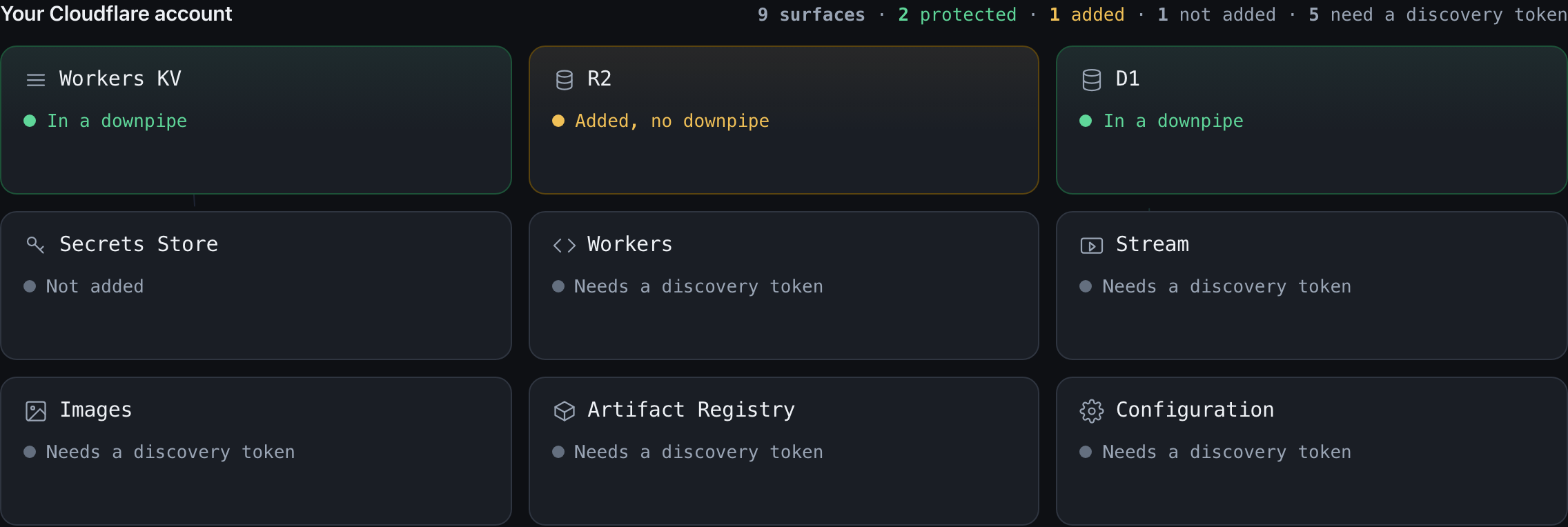
The four binding surfaces still read normally, because the engine reaches Workers KV, R2, D1 and Secrets Store through its own bindings rather than the account API. The five account-wide surfaces read Needs a discovery token and link to Sources, which is the control that clears them. Nothing here is a fault, and none of it means those surfaces are absent from your account: they have not been looked for yet.
If only one product degrades, that is the case this page exists for. The route still answers normally, so the Add a source wizard shows no error. The full catalogue on Sources prints a “Could not list” line for a failed listing, and the support pack records the per-product verdict. The recorded verdicts are a closed nine-member vocabulary. They distinguish ok and empty from truncated, denied, rate-limited, not-found, unavailable, http-other (any other non-2xx, including a refused redirect on a credentialed call) and transport (the fetch threw, so no status was ever seen), so the distinction is recoverable after the fact. An empty account is not treated as a fault; a truncated listing is.
How to check before you rely on it
Compare against what you know exists. If you know the account has R2 buckets and the form offers none, that is state 2 or 3, not state 1. This sounds obvious and it is the whole check: nobody else can make it, because only you know what should be there.
Check the token’s scope per product, not overall. A token that reads KV and not R2 is not a broken token, and it will not present as one. Scope is granted per product and the failure is per product.
Read the record counts on the first run. A source you expect to contribute thousands of records contributing none is the same signal as an empty form, arriving after the fact. It is worth looking on the first run rather than at recovery.
If you are near a page cap, verify the tail rather than the head. A truncated listing shows you the beginning of the list, so the resources you are most likely to notice missing are the ones you would check last.
Where this fits
- Selectors and scope is the other way to end up with an empty scope and a green run, by a prefix that matches nothing.
- Connect a source covers the discovery token and the scopes it needs.
Last updated .