
Recover your data: the restore flow from dry-run plan to receipt
This is the hero flow of downpipes, walked end to end. It is written for an approver or a recovery owner who is about to run a real restore. They want to know what each step does and what it costs. Everything up to the apply is read-only; the apply is the one act that writes archived data back into your live account, and the engine does not roll it back.
The flow is the same from every entry point: the Runs activity, a deep link to a specific run, the restore screen’s own picker, or its calendar. You always restore from a run identified by its id: the calendar marks the days that hold one and lists that day’s times, but choosing one still resolves to a specific run, never an arbitrary-time cursor. The portal builds the recent-run history as a bounded ring of the most recent runs (fifty per downpipe), which the picker and the calendar both draw from, so you can pick one at a glance, but you can also restore from any run id directly, including one that has rolled off the ring.
The flow opens on a form that is pure input: you name the run and choose the blast radius, and nothing is built until you ask for the plan.
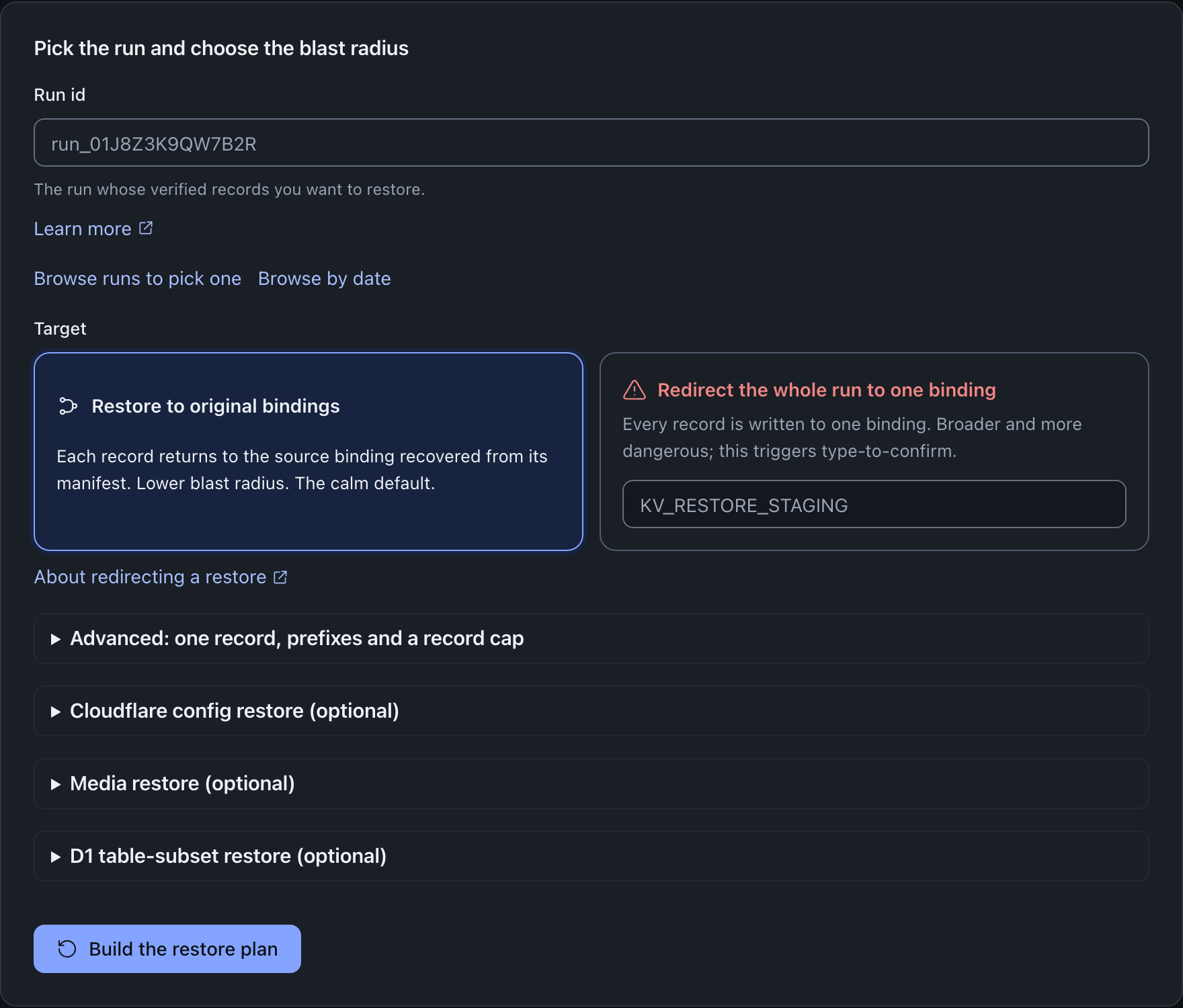
A cold arrival at the restore screen does not ask you for the run id first. The card opens by saying you do not need it and offers two buttons, one to pick from your recent runs and one to browse by the date you want to go back to; the run id field sits beneath them under “Already have the run id?” for the case where you do. Arriving with a run already in hand, from a deep link or a retry, puts the field back on top, because there it carries the answer rather than asking the question. The figure above shows that second arrival, with the field leading and the browse row beneath it.
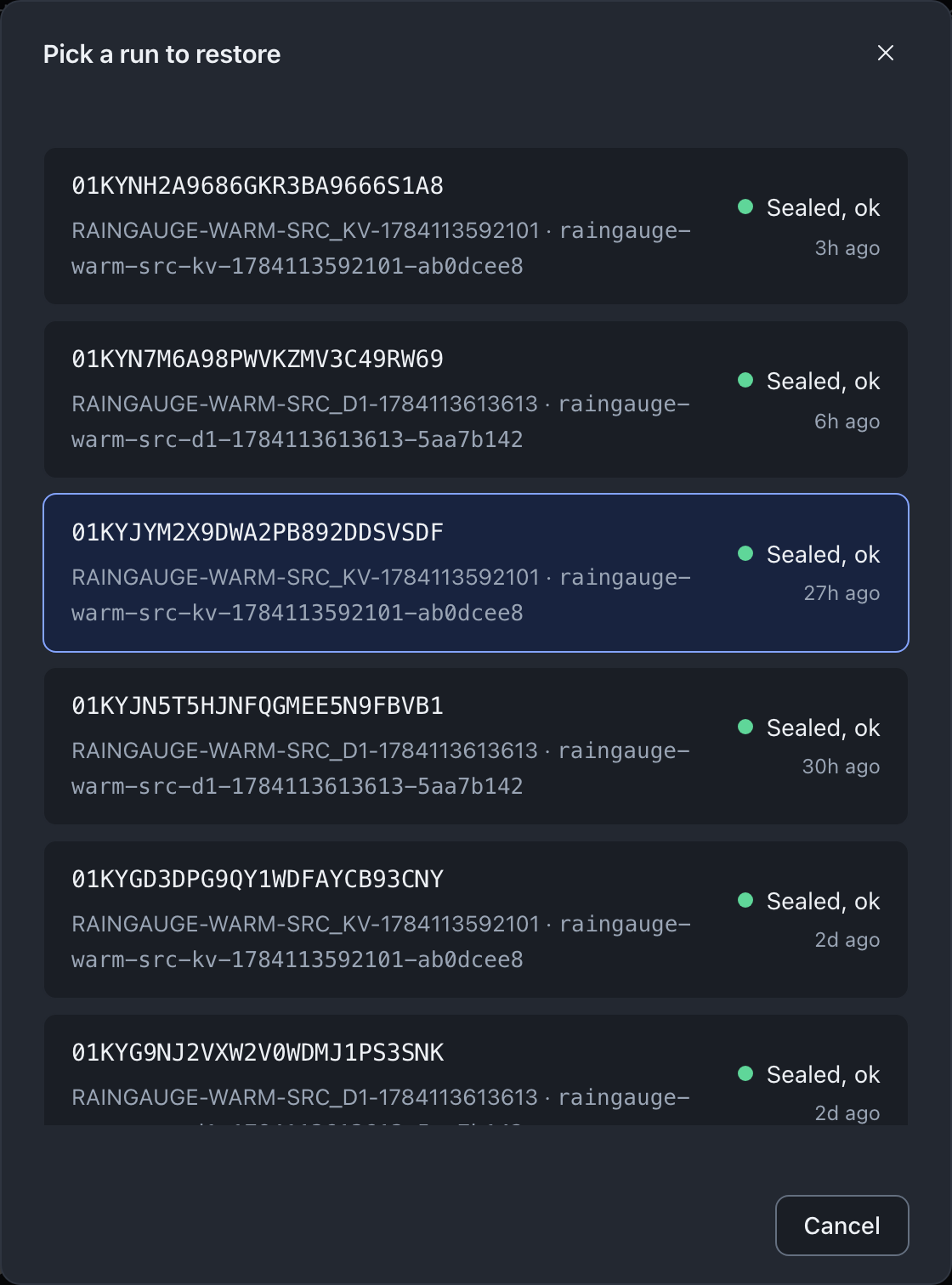
From console 0.2.7, the picker lists only your recent sealed runs. When none of the runs in the history sealed a backup, the picker tells you so. To restore an older sealed run, type its run id on the form.
A restore cannot be undone
Once an apply begins writing, there is no rollback. You cannot cancel an apply after it starts, and the engine does not undo records already written. Read the dry-run plan and the blast-radius cues carefully before you arm an apply, and prefer restoring into a fresh empty target where you can.
The journey
Read the dry-run plan
Open a run and the engine returns a
RestorePlan. Withconfirmabsent or false it writes nothing. The plan reports the records it verified read-only, the planned writes and their upper-bound byte total, a resolved-destinations sample of where each record would land (capped at fifty rows, or atmaxRecordswhen the request sets it), and any records it skipped, each with a reason. The dry-run branch gates onrestore.dryrun, which every role holds, including Viewer, so anyone can read the full preview;confirm: trueneedsrestore.apply. A skipped record is never silently dropped: a secrets record, a Workers script, or an out-of-band Cloudflare config surface appears in the skipped list with guidance.Read the blast-radius cues
The console scales the plan’s impact into plain language. It distinguishes the latest run from an older one, shows the planned writes and bytes, and flags whether records go back to their original binding or are redirected to a different one. Every one of these figures is recomputed by the engine at request time from the run and the selectors; none is trusted from the client. A direct API caller that tries to seed a misleadingly benign figure is ignored and the divergence is logged. So what an approver sees is the engine’s own view of the run, not whatever the requester claimed.
Raise a dual-control request (only if you require one)
These two steps apply when your estate requires a second approver, which is optional and off by default. If it does not, go straight to the apply below.
To move from preview to a real apply you raise a request bound to the exact plan, with a reason for the change. The reason is mandatory and is recorded for the trail. The request carries no authority to write on its own; it simply puts the plan in front of an approver. The bare shared admin token cannot raise a request, because it has no stable subject and dual control needs an attributable identity. The plan the approval keys on is a hash the engine recomputes server-side, so the binding is the engine’s, never a value the client chose.
A distinct approver approves
A second authorised person approves that exact plan. The approver must differ from the requester on a stable identity, and the engine refuses a self-approval at approve time. This is the dual-control mechanic; its full detail, including the maker-is-not-checker rule, the plan-hash binding and the single-use, twenty-four-hour window counted from the first dry run of the plan, lives on dual control. Approving from a passkey or recovery-code cookie session also requires a fresh passkey step-up re-authentication, meaning a sign-in within the last five minutes or a fresh single-use step-up assertion; the console runs the assertion and retries automatically. A bare break-glass token session is exempt. A Cloudflare Access session is held to the same five minutes, judged on its sign-in time, and the console tells you to sign in to Access again when it is older. You do not need to re-derive it here: the practical effect is that the Apply button stays locked until a distinct approver has signed this plan, and the console polls so it unlocks shortly after they do.
Arm and apply
With an approval in place, or straight from the preview on an estate that does not require one, arm the apply. The engine then gates it server-side in a fixed order, and each gate has a reason for sitting where it does.
First the apply capability: an unauthorised apply is refused with a 403 before the rate limiter runs, so a blocked production write is never masked by a 429 and is always audited. Then a fresh passkey step-up, on the same terms as the approve, so a session left open cannot write your data back; it is asked for before the rate limiter and before any approval is touched, and the read-only dry-run in the same request is deliberately not gated, so the prompt appears on the confirmed apply only. Then a usable approval bound to the exact plan hash with a distinct approver; with none, the apply is a 403 “restore not approved” that the console renders as an awaiting-approval state, not a mystery failure. Then, if Require Change Number is on, a valid change reference, enforced after the approval gate so that only an otherwise-authorised apply raises a change record. Then the engine’s two-phase integrity verify, described next. Only after all of them pass does any byte get written.
Trust the integrity safety net
The apply never writes an unverified byte. In phase one the engine verifies every in-scope record’s plaintext hash, read-only, with nothing written; a single failure aborts the whole apply with zero records restored, so a tampered archive can never half-overwrite a live resource. In phase two the engine re-verifies each record immediately before it writes that record, one value at a time. A re-verify failure mid-apply could only mean the archive changed underneath the restore, which the engine never does. For a buffered value, it stops the apply as an integrity failure. For a large R2 object streamed into one write, it fails that record only, and the apply continues.
Read the receipt
On completion the receipt records the result. A clean apply states how many of the verified records were written and how many bytes. The receipt screen names both identities: the applier (or, on the shared-token fallback, an explicit “no attributable identity” statement rather than an omission) and the distinct approver who signed the plan. Those names come from your session and the approval record: the signed receipt itself carries no identity. The audit log’s
restore-applyentry records both the applier and the approver. A partial apply is never reported as a success: it states how many records were written and how many could not be, lists the per-record reasons, and offers to retry just the failed subset. Where an approval armed the apply, the retry needs a fresh approval. That holds for Cloudflare config surfaces as well as for records. A surface your edit token is too narrow for is refused item by item rather than aborting the whole apply, and the surface is then raised as a failure of its own carrying the count per refusal class and the remedy, so the receipt records it withverified: falseand the result is not reported as complete. The apply’s per-surface outcomes still carry the finer, item-level detail. The page on the restore receipt sets out what the receipt does and does not carry.
Proportional friction
The confirm step is calibrated to the blast radius rather than fixed, so a routine restore is not buried under ceremony while a dangerous one demands attention. A small restore that writes records back to their original binding from the latest run uses a single confirm. A restore that redirects records to a different binding, or restores an older run over current data, escalates to type-to-confirm. There you type the run id (or the target binding name on a redirect) to proceed.
| Restore shape | Confirm friction |
|---|---|
| Same binding, latest run, small | A single confirm modal |
| Redirected to a different binding | Type-to-confirm |
| An older, non-latest run | Type-to-confirm, with an explicit “restores older data over current data” note |
| A Cloudflare-config or media leg targeting an account the archive does not prove it came from | Type-to-confirm on the target Cloudflare account id, which takes precedence over the run id and the binding name |
The in-account restore this flow drives is bounded to 200 records, so there is no separate large-restore tier reached by sheer write count; a run larger than that is recovered offline rather than in the console, as the maxRecords cap explains.
Whatever the friction, the confirm dialog says that you cannot cancel an apply after it starts. The dialog also says that the engine does not roll back written records. The threshold and the escalation are presentation; the security gates above (role, approval, integrity) are the engine and are absolute regardless of which confirm path you see.
The approval is single-use
The approval that unlocked your apply is consumed only after a successful apply, in one atomic step. A failed apply leaves it usable, so you can retry the same plan without a fresh round of dual control. A second apply against a consumed approval is refused. An approval lives for twenty-four hours, counted from the first dry run of the plan it was raised against rather than from the moment it was raised, so the time you spend between previewing and asking, and the time your approver spends deciding, both come out of that day. Preview, request and apply in one sitting and you will never notice the difference; leave a plan open in a tab overnight and you will find the window has closed, in which case run the dry run again and raise the request from the plan it returns. The mechanics of consumption and expiry are detailed on dual control.
What the apply writes back
KV, R2 and D1 records are written back in account after the verify. Some classes are handled out of band by design: Secrets Store values are never restored in account, Workers scripts are reprovisioned with guidance rather than blind-redeployed, and only a few idempotent Cloudflare config surfaces re-apply in console. Those out-of-band items are reported as skipped with guidance and do not, on their own, make a restore fail. The full breakdown is on what restore can and cannot write back.
Live keys and objects an apply replaces
From engine 0.3.6 and console 0.2.7, the dry-run plan says which planned KV keys and R2 objects already exist in the target.
An apply writes each planned KV key and R2 object under its archived name. When the target already holds a key or object of that name, the apply replaces it with the archived value. This is the in-account restore by design, because you recover an overwritten value by writing over it. The restore writes only the keys in the plan, and it never deletes a key.
The dry run asks the target about every KV key and R2 object in the plan. For a KV key it opens a read and cancels the value stream without reading it. For an R2 object it reads the object’s metadata only. It never reads or returns a live value.
The plan counts the planned names that exist in the target now, and lists up to 20 of them. It counts the absent names separately, because the apply creates them. The plan counts a name whose check failed, for example because the binding refused the read, as not checked.
The restore screen shows these counts before you approve. Each row of the resolved-destinations sample also says what is in the target now, for example “Exists, replaced” or “New”. The check costs one read for each KV key or R2 object, inside the in-account limit of 200 records. Workers KV reads are eventually consistent, so a key written or deleted in the last 60 seconds can still show its earlier state.
Keep live keys that already exist
To keep the live keys, tick Keep live keys that already exist before you build the plan. Through the API, send onExisting: "skip". The apply then checks each KV key and R2 object again just before it writes. It leaves a name that exists as it is and reports it as skipped, so the receipt counts it.
If that check fails, the apply does not write the name and reports a failure that you can re-run. The receipt lists a kept name as kept, not as outstanding. Without the field, or with onExisting: "overwrite", the apply replaces the live value.
onExisting: "skip" is bound into the plan hash, so an apply that keeps live keys needs its own approval. It applies to KV and R2 only, because a D1 restore already refuses a database that is not empty. Workers KV has no conditional write, so the apply still replaces a key that another writer creates between the check and the write. The offline reader keeps its own rule: it refuses to overwrite an existing destination key.
An apply that keeps live keys checks each name before its write, so each record costs one more call. Its in-account limit is 160 records, not 200. The dry run of that request uses the same limit. Keep live keys needs engine 0.3.6 or later. When the engine does not confirm the choice on the plan, the restore screen refuses the plan and offers no approval request and no apply.
Why role alone is never enough to apply, on an estate that requires a second approver
The apply route checks the apply capability first, but holding the role is never sufficient on its own even before dual control enters it: a fresh passkey step-up and the engine’s own integrity verify sit in the way regardless of policy. Where the estate has required a second approver, which is optional and off by default, the role gate and the dual-control gate are independent and both mandatory: after the role gate the router asks the scheduler Durable Object, read-only, whether a usable approval exists for this exact plan hash before touching live data. A usable approval is one whose effective status is approved, with a recorded approver subject that differs from the requester subject. With none, the apply is refused with an explicit “restore not approved” outcome that carries the plan hash, so a restore-operator or approver acting alone, with no second identity’s approval, cannot write. Where the estate has not required a second approver, this gate asks the same question and finds none required, and the apply proceeds on the role gate, the step-up and the integrity verify alone. The receipt then records the applier as the actor and, where dual control applied, the approver carried from the consumed approval, on both the stable-subject axis and the display-email axis. Any cryptographic verification of a receipt is done out of band; the console does not verify receipts in the browser. The audit event for the apply carries operator identity by design, including emails and source IPs.
Restoring several downpipes at once (batch restore)
When you need to bring several downpipes back in one sitting, the batch restore queue runs them together. You reach it from the Downpipes list: select the rows you want, then choose “Restore…” in the bulk bar. Each selected downpipe becomes a row that restores its own latest run.
The important property is that batch mode batches the console only. It is a queue over the same per-run dry-run, request, approve and apply path this page describes, with no bulk restore route behind it. Every row keeps its own dry-run plan, its own dual-control request and its own approval by a distinct approver, and its own apply. Approving one row never arms another, two rows never share a plan hash, and the maker-is-not-checker rule holds on every row exactly as it does for a single run. A single reason field fills each request, and “Request approval for all planned rows” is a convenience that fires one independent request per planned row, not one approval spanning many.
The scope is deliberately narrow. Each row restores that downpipe’s latest run to its original bindings only. A redirect, a single record, a record cap, Cloudflare-config, media, or a D1 table-subset stay on the single-run flow, reached per row through “Restore this one individually, with advanced options”. There is deliberately no “apply all” button either: every apply is its own click, gated on that row’s own usable approval, with its own confirm friction if the run is not the latest. A row shows as blocked, with the reason stated, when the downpipe has no completed run yet, when it was deleted between selection and arriving here, or when its dry run could not build a plan.
Where this fits
- Dual control covers the approval mechanic this flow depends on.
- What restore can and cannot write back sets expectations for the in-band and out-of-band data classes.
- Proving recoverability covers the read-only verbs you can run before ever committing to an apply.
- Roles and capabilities defines the request, approve and apply capabilities and which role holds each.
- The restore and recovery API documents the underlying engine routes.
Last updated .