
The credential lifecycle registry
The credential lifecycle registry is your account’s own list of the credentials, keys, licences, certificates and short-lived tokens that keep a backup or recovery working. The registry tracks them so an expiring or spent one surfaces before it lapses and quietly breaks something. This page is for a self-hoster who wants to track credential expiry without the engine holding a secret.
The registry is a watch list, not a vault. It stores a description, a date and a few classifications, so it can tell you a certificate is ninety days out or that a one-shot token still needs deleting. It never stores the credential itself. The vendor reads nothing from it. Most of what it tracks you enter by hand, with a small set of dates the engine can read off artefacts it already legitimately holds.
For the wider access model this sits inside, read identity and access.
What the registry is
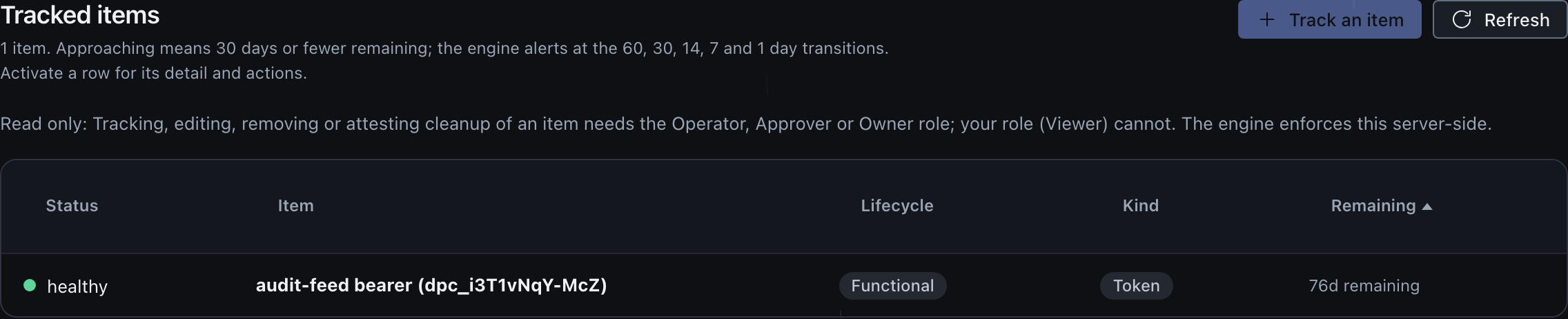
Each item in the registry is a dated row of redaction-safe metadata. It carries a label you choose, a kind, a lifecycle class, an expiry date that a certificate or a licence must have, a source, an optional purpose, an optional permission summary, and a link to what the credential powers. From the expiry date the engine computes a whole-day count remaining and a coarse state, so a row can read as ok, approaching, expired or no-expiry.
| Field | What it holds |
|---|---|
| Label | Your own redaction-safe description, for example “S3 destination access key” |
| Kind | One of credential, key, licence, certificate or token |
| Lifecycle class | Ephemeral (delete after use) or functional (a standing credential) |
| Expiry | An RFC-3339 date. A certificate or a licence must carry one; any other kind can be recorded as no-expiry instead |
| Days remaining and state | Computed from the expiry; ok, approaching, expired or no-expiry |
| Source | Manual (you entered it) or observed (the engine read it from an artefact) |
| Purpose | An optional note on what the credential is for |
| Permission summary | Optional descriptive permission text, never a secret |
| Usage link | A stable entity id for what it powers, such as a destination or an IdP connection |
The kind groups an item and selects how early its first alert fires. The expiry drives both the at-a-glance state and the alert ladder. The usage link is always a stable entity id that is already non-secret elsewhere, such as a destination id or an IdP connection id, so the console can show what a credential powers and deep-link to it; it is never a credential value, and the registry can never act on it.
An item with no expiry date has its own state, no-expiry, not a healthy green one. Some functional credentials simply do not expire, and a token can be created with no expiry. The registry shows that as no-expiry, rendered neutral, rather than implying the credential is in good standing for a year. An expired item never reads green either. A certificate and a licence are the exception: both always have a date, so the engine requires one for those two kinds and refuses a no-expiry item there.
No custody, by construction
The defining property of the registry is that an item has nowhere to put a secret. The item type has no field for a credential value, a key, a password, or even a fingerprint, hash or prefix of one. It stores an item id and the fields in the table above, except the computed days and state. The shape adds the note, the public token id, two timestamps and a cleanup state. That is all the shape allows.
That is not a convention you could accidentally break by typing a secret into the wrong box. The schema itself carries no secret-bearing field. The engine boundary bounds-checks every free-text field and control-character screens all of them, the label included from engine 0.3.6. The console renders every server-supplied string as plain text rather than markup. The closest thing to an identifier the registry holds for a Cloudflare token is its public token id descriptor. That descriptor is the account-owned public id, never the token value, and the registry cannot use it to act on Cloudflare.
The console’s add-or-edit form has one field that behaves in a way worth calling out, the optional Note. You can write a Note when you record or edit an item, but the registry never reads it back. The list the console renders (GET /admin/expiry) returns the computed status without the note, so editing an item starts with a blank Note box and a saved Note is never shown again; leaving the box blank on an edit keeps whatever was stored rather than clearing it. Because the Note is write-and-forget from the registry’s point of view, do not put anything there you will need to read back later, such as a renewal runbook link; keep that in your own runbook. What you want to see on the item itself belongs in the Purpose field. The registry does return and show the Purpose field on the row and its detail.
The vendor never holds the credential
The registry tracks dates and descriptions so you can manage credential hygiene. It does not hold, read or transmit the credentials themselves. This is the same no-custody posture the rest of the product follows, applied to the one surface where it would be tempting to cut a corner.
Tiered proactive alerts
The registry nudges you before a credential lapses, on a ladder that depends on the kind. Long-lead items, meaning certificates and licences, get an earlier first rung so a coordinated rollover has a full extra month of warning. Short-lived items, meaning credentials, keys and tokens, start their warnings closer in.
| Kind group | Alert rungs, in days remaining |
|---|---|
| Certificate, licence | 60, then 30, 14, 7 and 1 |
| Credential, key, token | 30, then 14, 7 and 1 |
An alert fires once per newly crossed rung, not on every check. The engine records the lowest rung an item has reached, so descending to a lower rung re-alerts and sitting at the same rung stays quiet. If a credential’s expiry is later pushed out above the first rung of its ladder, the engine clears the recorded rung. A future descent then alerts again from the top of the ladder.
Two things stay decoupled on purpose. The earlier 60-day rung for certificates and licences is only a notification rung; it does not make the item read “approaching” at a glance, and it does not fail the posture credential-expiry check. The coarse approaching boundary stays at 30 days for every kind, so an early courtesy alert never inflates the at-a-glance band or the posture score for a credential that is still comfortably in date.
Alerts are observability, never a control
The expiry alert is fail-open. It is computed from the stored items and routed through the same notification path as the rest of the alert stream, so a tracker hiccup or a delivery failure degrades to “no expiry notice on this check”, never a blocked or crashed backup. An expiry alert can never stop a backup from running. Treat it as a reminder, and keep the underlying dates current yourself.
What auto-observes, and what you enter by hand
Most items are entered by hand. A small set the engine can fill in for you, by reading the expiry off an artefact it already legitimately holds. Examples include a certificate’s own validity or a token’s reported window. An observed item is the only kind the engine writes itself; everything else is yours to track.
The items the engine auto-observes are the assurance licence, a SAML signing certificate, a minted bearer credential, the discovery token and a confidential client secret with a declared expiry. The assurance licence row is observed from the licence token’s own validity when you activate or clear a licence. The row is dropped when the licence falls back to community. A SAML signing certificate row is observed from the connection’s pinned public certificates when you create a SAML connection or roll over its certificates. The row tracks the latest validity across rollover certificates, so it reflects how long sign-in keeps working.
A minted bearer credential, such as the audit-feed or diagnostics ingest bearer, is observed from the grant’s own expiry at the moment it is minted. An IdP client secret row is observed when you create a confidential OIDC or OAuth2 connection, meaning not a PKCE-public one, and you declare the secret’s own expiry on that connection: the engine holds the secret value write-only and cannot read an expiry off it, so it copies the date you declared into the observed row the moment the connection is created, keyed to the connection so the console shows what sign-in it powers.
The discovery token row is observed when you set the read-only discovery token. The engine refuses a discovery token with no expiry. The row carries the token’s public id and its expiry, never the value.
The engine also adds a planned-rotation row for each of seven engine secrets while it is in service, such as ADMIN_TOKEN. The due date is the documented cadence after the last recorded rotation, or after the engine first saw the secret.
The spent Cloudflare attach token is a related but distinct case. When you attach a source, the one-shot Cloudflare token you supplied is recorded as a pending-cleanup row, so you are reminded to delete it in Cloudflare once the attach is confirmed. The engine records only the token’s public id, its reported expiry, a permission summary and the names of the sources attached. It never receives or stores the token value.
Everything else you enter by hand. That includes your R2 or S3 destination access keys and any confidential client secret for which you did not declare an expiry when creating the connection. For an IdP client secret, the console hint states each vendor’s default and asks for the date you actually chose, rather than fabricating one.
| Item | How its date is recorded |
|---|---|
| Assurance licence | Auto-observed from the licence token’s validity |
| SAML signing certificate | Auto-observed from the connection’s pinned certificates |
| Minted bearer (audit-feed, diagnostics) | Auto-observed from the grant’s expiry at mint |
| IdP client secret (confidential OIDC or OAuth2, expiry declared) | Auto-observed from the expiry you declared at connection create |
| Spent Cloudflare attach token | Recorded as a pending-cleanup row on a source attach |
| R2 or S3 destination keys | Entered by hand |
| Discovery token | Auto-observed from the token’s own expiry when you set it |
| A confidential secret with no declared expiry | Entered by hand |
From engine 0.3.6 and console 0.2.7, you can change only the purpose and the note of an observed item. The engine writes the label, the kind, the expiry and the lifecycle class again each time it observes the item. On an observed item, the console edit form therefore shows these fields as read-only, with the reason, and this includes the “No expiry / rotate on policy” box. The engine refuses a request that changes the kind, the expiry or the lifecycle class of an observed item. An edit keeps the item observed, and a spent attach token that is pending cleanup stays pending.
The deploy and attach token itself is covered in Cloudflare API token scopes. That page covers the evidence that at runtime the engine holds no Cloudflare API token that can write to or deploy your account.
The spent-ephemeral cleanup is an attestation
An ephemeral token is one meant to be deleted after use, the prime example being the one-shot Cloudflare token you used to attach a source. The registry records it as pending cleanup so you do not forget it.
When you confirm in the console that you deleted the spent token in Cloudflare, the registry flips the row to attested-deleted. That is your attestation, your word that you did it. It is not a Cloudflare-side check. The engine does not keep the attach token, and it makes no Cloudflare call to confirm the token is gone. There is no in-portal revoke. The two states are pending and attested-deleted; the console never shows “verified deleted”.
Attested-deleted is your word, not a verified result
Marking a spent token as cleaned up records that you deleted it. The engine cannot and does not check Cloudflare to confirm it, and it offers no button to revoke the token for you. Do the deletion in Cloudflare, then attest it here so the reminder clears.
A spent ephemeral token that is still pending is treated as a hygiene reminder, not a backup-breaking expiry. It surfaces in the console’s needs-attention tier and is exempt from the high-severity posture credential-expiry check. That check still fails for an expiring functional credential, certificate or licence.
Two limits worth knowing
Two limits shape how much the registry can tell you, and both follow from where its dates come from.
What the attach-token row can name depends on what Cloudflare will say about your token. The engine reads the token’s public id and its expiry from the account’s own token-verify response, on the same call that checks token usability. The engine never makes a second request. That response carries a usable id and expiry for an account-owned token; a user-owned token returns neither, so the row is still created and still reminds you, but it cannot name which token to delete, and it carries no expiry date. If the verify call does not complete, the attach proceeds on capability checks that follow, and the row is recorded without those facts rather than with guessed ones.
Writing the row is also deliberately fail-open: an attach redeploys the engine, which momentarily resets the Durable Object the registry lives in, so the write retries and then gives up quietly rather than turning a successful attach into a failure. A missing cleanup row therefore means the reminder was dropped, never that the attach did not land, so check the row appeared and track the token by hand if it did not.
An observed date can also go stale by design. The engine reads a date once, from the artefact it holds at that moment. If your identity provider rolls a SAML signing certificate and you do not update the connection, the observed row keeps its old expiry. The engine does not re-read the certificate from your identity provider. A proactive certificate alert is therefore a useful prompt, not an authoritative statement of the current server-side validity. When you roll a certificate, use Roll over certificate on the connection so the registry re-observes the new date.
Where this fits
The registry is one face of the broader access and governance model in identity and access. The deploy and attach token it reminds you to clean up is covered in Cloudflare API token scopes. That page covers why the engine carries no Cloudflare API token that can write at runtime. The expiring-credential signal also feeds the security centre’s credential-expiry check, described under the posture score. The reminders are delivered through the same channels as the rest of your alerts, set up under notifications.
Last updated .