
Recovering downpipes itself
There are two different things people mean by “losing downpipes”, and they recover in different ways. Your backed-up data is ciphertext in your own destination bucket, and it comes back with your offline break-glass key and the open reader. Neither the engine nor the vendor is in the loop. This page is about the other thing: the downpipes environment, meaning the downpipe definitions, schedules, destinations, operator roles and policy that drive the backups. That state lives in one Durable Object inside your Cloudflare account, and if it is lost the backups stop even though the data survives.
downpipes writes a signed export of its own control plane into your destination bucket, so the configuration is recoverable, but the recovery is in-account, and some state is re-established rather than restored. What follows is what is backed up, then the two recovery cases, then what to keep offline so either case is possible.
What is backed up, and where
On a change, the engine writes a signed export of its control plane to every destination, under the reserved prefix _RECOVERY/CONTROL-PLANE/. The export is a timestamped object with a detached signature beside it. The archive reader never parses this namespace; it is a separate artefact from your backups.
The engine normally seals the export: it encrypts the body to your break-glass key and to a dedicated config-recipient key. Your backups never use the config-recipient key, and it is never the operational key. A destination-bucket reader sees only a small cleartext header: the export time, the configuration version, the engine account id, the recipient fingerprints and a SHA-384 hash of the body. The reader never sees the operator roster or the topology. The hash lets a reader confirm a guess of the whole body, byte for byte, and nothing more. A sealed generation has a .sealed.json suffix.
From engine 0.3.6, either key alone seals the export (loadControlPlaneExportRecipients, engine/src/keys-env.ts). An engine that holds neither public key writes signed cleartext, and the environment-self-backup check then says so. Up to engine 0.3.5, the engine seals the export only when it holds your break-glass key and CONTROL_PLANE_EXPORT_SEALING_DISABLED is not set.
Each export is a new object rather than an overwrite, so older configuration versions stay beside the newest. From engine 0.3.6, a re-export at the same configuration version first writes the new generation. After that write, the engine deletes the earlier generations at that version that it signed itself. A generation from another signer or another account stays, and so does one with no signature.
The automatic recovery refuses a version that holds two generations as ambiguous, so such a sibling stays visible as a warning. When the deletes finish, the automatic recovery finds one artefact at the latest version. An object lock that refuses the delete leaves the earlier generations in place. The automatic recovery then refuses that version until a configuration change writes a higher one.
From engine 0.3.6, a destination that missed an export gets it on the next scheduled tick. The cause can be a failed write or the tick’s subrequest budget. Until then, the environment-self-backup check fails for that destination.
The export is no-custody by construction. It carries your configuration and non-secret metadata, and it never carries a plaintext secret: an account credential rides only as an envelope encrypted to a key that survives the wipe, or as a marker that the secret must be re-entered. A stored export that carried any plaintext secret is refused on the way in.
What returns, and what you re-establish
The distinction matters when you plan a recovery.
| Returns from the signed export | Re-established by hand after the rebuild |
|---|---|
| Downpipe definitions, schedules and retention | Identity-provider connections (OIDC and SAML) |
| Destination configuration (the S3 secret as a wrapped envelope, or a re-enter marker) | Notification channels and routing |
| The operator role table and custom roles | Operator sessions and passkeys (everyone re-authenticates) |
| Owner-governed policy flags (dual control, change numbers) | The audit-log body (only a head pointer bridges the old chain to the new) |
| The account-discovery selection (its read-only token re-entered) | The assurance licence (re-activated; fail-open, so nothing blocks meanwhile) |
Nothing in the export is a decryption key for your data, and the session signing key, the recovery-code hashes and passkeys are deliberately never exported, so a recovered environment always re-authenticates its operators.
Case 1: the scheduler was wiped, the account survived
This is a lost Durable Object with the Worker and its secrets intact, for example after a storage fault. The engine detects it (the configuration is empty but the bucket holds runs), latches a recovery-required state so the first caller is never silently promoted to owner, and raises a standing banner in the console. Its scheduled health pass unseals the latest signed export with the engine’s own config-recipient key, re-signs the recovered plaintext, stages it and resumes the backups automatically; only restoring operator access still needs a human.
Up to engine 0.3.5, the engine writes a new export generation on each scheduled tick, even when nothing has changed. All of them carry the same configuration version. The health pass refuses two generations at the latest version as ambiguous, so on those engines the automatic recovery stops there and you use the manual paths below. From engine 0.3.6, the engine writes a new generation only when the configuration, a destination credential or the recipient set changes. A destination that missed the last generation gets one too.
After the upgrade, the engine deletes the old generations over several scheduled ticks. Until it finishes, the automatic recovery still stops at ambiguous. On a bucket with an object lock, the old generations stay. On such a bucket, make a configuration change: the export then writes a higher version, and the automatic recovery reads that one.
To complete the recovery, an owner opens the recovery banner. In the common case, where the health pass has already staged a recovery, the banner offers one action, Confirm and restore access, that asks only for the break-glass ADMIN_TOKEN: the engine re-verifies the staged export’s signature against its own pinned signer before restoring the role table, so nothing else needs to be pasted by hand. The break-glass ADMIN_TOKEN it asks for is the bearer you set as the engine’s own Worker secret at deploy time; a scheduler wipe leaves the Worker and its secrets intact, so it is still configured, and it authorises the restore because the wiped role table can promote no one to owner in the meantime.
If the health pass could not stage anything, the banner falls back to a manual form asking for the export JSON and its detached signature alongside the token. The submitted JSON, signature and token are verified the same way as the confirm action.
One combination needs its own path: the engine’s own config-recipient key is missing. The health pass then refuses with a standing sealed-no-op-key reason, because it cannot open the sealed artefact in your bucket. The manual form still recovers it:
- Paste the sealed export (
.sealed.json) and its detached signature into the form. A break-glass key panel and a Recovery kit signer.pub field open. - Paste your
signer.pub. Load youridentity.key, or reassemble a split key. The browser verifies and unseals the export, and the key never leaves the browser. - Submit with the break-glass token. The engine checks the sealed wrapper and its signature with its own signer key, and needs no config-recipient key (
runSealedReconcile,console/src/components/recovery-banner.ts;POST /admin/control-plane/restore-sealed,engine/src/admin/router-identity.ts).
Outside that form, you can add the config-recipient key (from engine 0.3.6 the Keys screen’s Add configuration keys card does this without a re-key), or recover offline with the downpipe reader’s unseal-export command. Include the config-recipient key in your recovery drill (see prove recoverability). Without it, the hands-off path above needs your break-glass key. Adding the key now helps only exports sealed after you add it.
One dependency is worth knowing in advance. The automatic resume needs a destination it can find, which means a destination declared at deploy time, not one that existed only in the console. A console-only destination lived in the state that was wiped, so there is nothing to read the export from until you re-enter it. If you want the hands-off resume, declare at least one destination in your deploy configuration.
The configuration came back but the banner is still up
There is a third outcome, and it is the one an established account is most likely to meet. The recovery-required latch is set, but by the time you get to the banner the control plane is no longer empty: a downpipe or a destination is back, either because an operator rebuilt one by hand during the incident or because the break-glass token was used to put one back. The engine’s own latch is unchanged by that, because nothing clears it except a deliberate act, so the banner keeps asserting that scheduled backups have stopped after they have in fact resumed.
Neither of the two actions above can clear the banner in that state, and this is by design rather than a fault. The manual form rebuilds a wiped plane from an export, so it refuses when there is live configuration or a live operator role table to overwrite. The confirm action restores the operator roles from the staged export, so it refuses when there is a live operator role table. An account that still has its owner has a non-empty role table by definition, so on an established account both refuse every time.
The action that fits is Acknowledge recovery, which the banner offers in exactly that state: the latch is set and the configuration is not empty. It clears the latch and writes an audit entry, and it does nothing else. It imports nothing, it restores no roles, it never re-opens the first-owner bootstrap, and it needs no export, no signature and no break-glass token. It asks only that you are signed in as a real operator holding the access-policy capability, which the owner and access-admin roles both carry, because clearing a warning about your own estate is a decision to record against a person rather than against a shared token. The button is offered only when the configuration is genuinely back, so acknowledging a plane that is still empty is not something the console will let you do: on a still-empty plane the latch is correct, and the next scheduled health pass would set it again within the hour.
Read the banner’s own reason line before you acknowledge. Clearing the latch clears the signal, so if the reason describes something you have not actually put back, fix that first and acknowledge afterwards. There is one state where the acknowledge is refused rather than offered: an estate whose role table is empty while its configuration is not. The engine refuses there in as many words, because clearing the latch would remove the only explanation for why every caller resolves to viewer.
The automatic resume leaves this state: it puts the configuration back and leaves a staged export for the confirm. The confirm needs only the latch, the staged export and an empty role table. From console 0.2.7, when the engine reports that the resume of the staged export has run, the banner offers Confirm and restore access. It does not say that scheduled backups have stopped.
The confirm does more than restore the operator roles. Before it restores them, it applies the staged export again. It writes each downpipe in the export over the current one, and it replaces the destination list and the discovery settings. Any change to them after the automatic resume is lost.
The export holds no discovery API token and no STS external ID. After the confirm, enter the discovery API token again. Also enter the external ID of each STS destination, and each destination secret that the export did not hold. Until you enter the token, runs of API sources fail.
Break-glass activity during a recovery can leave this state with the configuration rebuilt by hand. The engine then holds no staged export, or a staged export whose resume has not run. In both cases the banner offers no confirm, because the confirm would write the export over the rebuilt configuration. Grant an owner role through the break-glass token first, then acknowledge.
Case 2: the whole Cloudflare account is gone
This is the worst case, and most of the time goes on the Cloudflare account, not on downpipes. Your data is recoverable throughout, because it never depended on the account: with the offline kit you can verify and restore from the surviving bucket at any point, independent of everything below.
Recovering the environment means rebuilding the engine in a fresh account and re-entering the configuration. That rebuild begins with the one deliberate command-line step downpipes has, so it is a developer task, not a console task, and its prerequisites are the slow part:
- A fresh Cloudflare account on the Workers paid plan, with R2 and Durable Objects enabled. Account and plan activation is not instant.
- A custom domain for the console, with DNS you provision and let propagate. The console is not served on a shared hostname.
- A trusted machine with Node.js and wrangler authenticated, and the engine and console source already checked out on it, to run the deploy. Both are published at
github.com/downpipes-io, but hold your own copy in advance rather than depending on GitHub being reachable during the incident. - The offline reader, built from source you already hold, only if you also need to restore the archived data itself on that machine rather than through the rebuilt console. Recovering the configuration below, plaintext or sealed, stays in the console; the reader is not needed for it.
The sealed generation matters in fewer cases than it may seem. The sealed export is opened by a dedicated config-recipient key that opens that export and nothing else, and your engine normally holds it in either posture, so an engine that lost its Durable Object storage but kept its own secrets auto-recovers its configuration on its own, as Case 1 above describes. That is true whether or not you hold an operational key. The exception is the engine that lost, or never had, that specific config-recipient secret, covered in Case 1’s own fallback rather than repeated here. What matters below is the case where the secrets are gone too: recovering into a fresh account, where the new engine’s keys were never recipients of the old export and your offline break-glass identity is the way in.
That way in needs your break-glass key to be a recipient of the export. From engine 0.3.6, an engine that holds only the config-recipient key seals the export to that key alone. CONFIG_RECIPIENT_PRIVATE is a secret of the lost engine, so nothing you hold opens that export after a full loss. Install your break-glass key before a loss, so each export is sealed to it too.
With the engine rebuilt and the first Owner signed in, open Settings, Backup configuration, “Recover an estate from a signed export”. Paste the signed export you pulled from _RECOVERY/CONTROL-PLANE/ in your surviving bucket, its detached signature, and the signer.pub from your recovery kit.
All three are required, whichever shape the export is. signer.pub is not a plaintext-only field: on a plaintext export the console sends it to the engine to verify, and on a sealed export this browser verifies the detached signature against it before it decrypts anything at all. The engine refuses a sealed import that arrives without it, in as many words, and the form will not submit without it either. Sealed is the default shape, so the common recovery is the one that needs the file most.
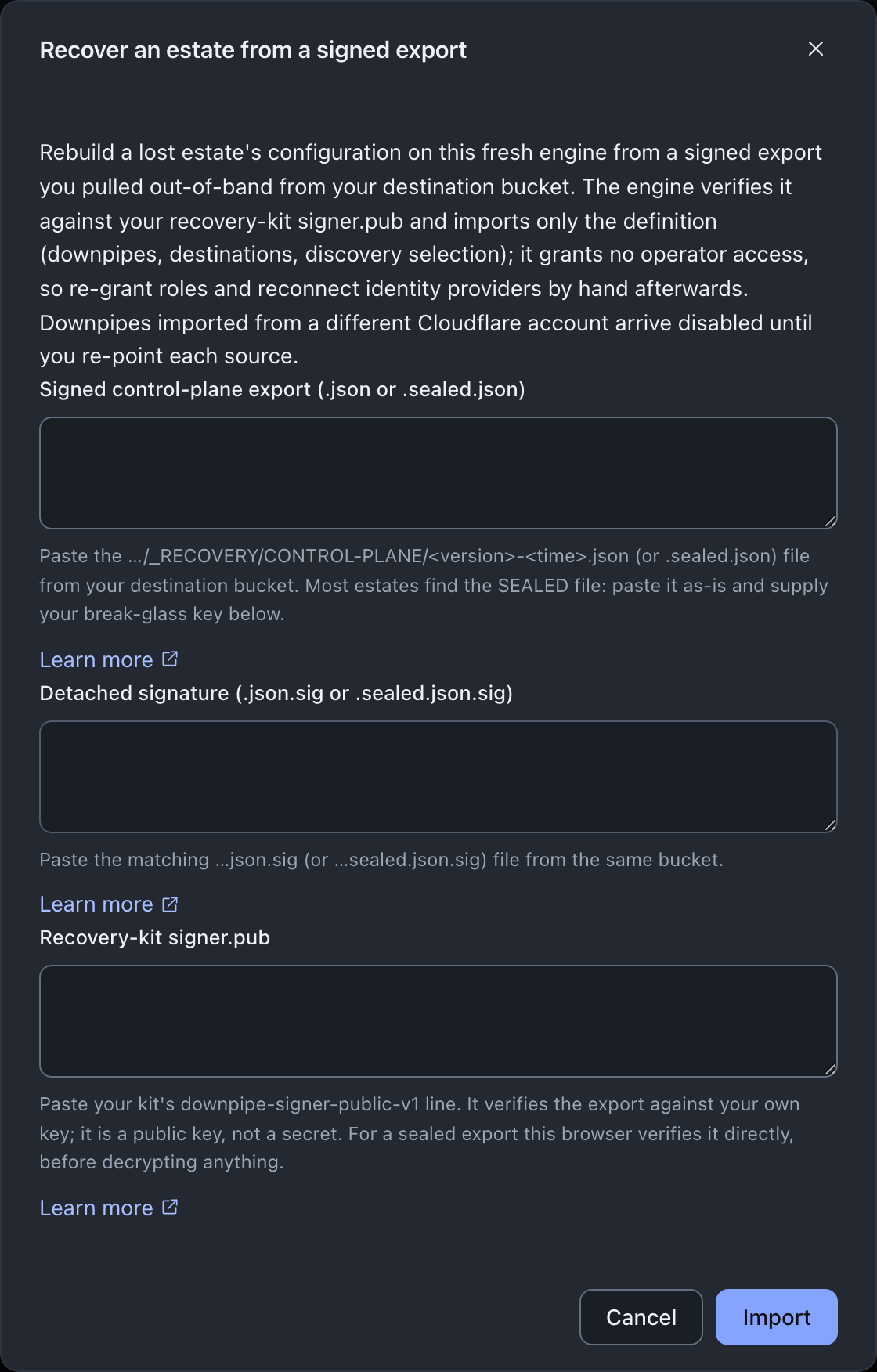
If it is sealed (the default, a .sealed.json file), paste it as-is: the console recognises the sealed shape from the pasted text alone and reveals a “Your break-glass key” panel.
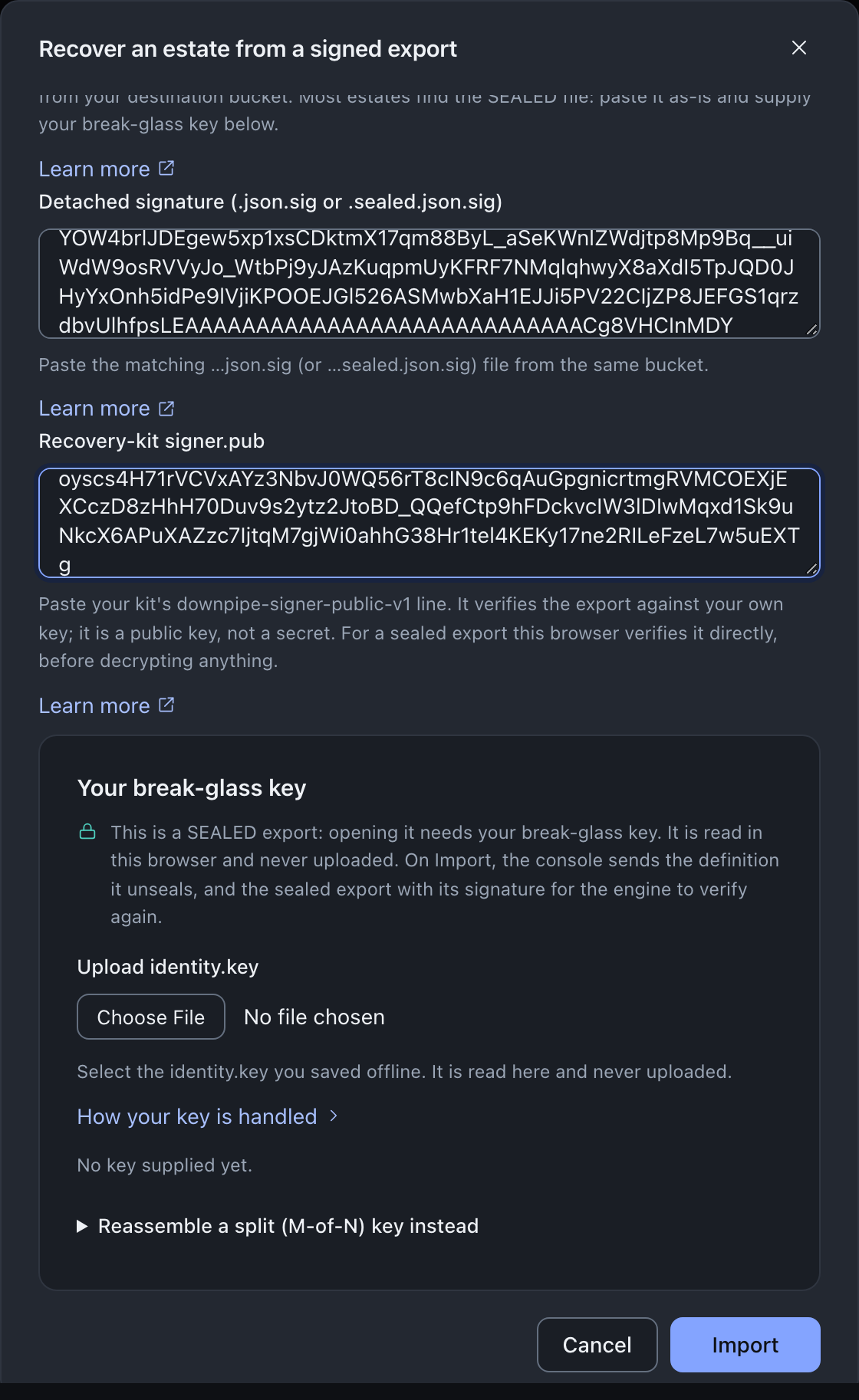
Upload your identity.key, or reassemble an M-of-N quorum of it, entered into the same form: the console reads the key in this browser and never uploads it, and a “Key read in this browser” badge confirms it. Import refuses a sealed export until the panel holds a key.
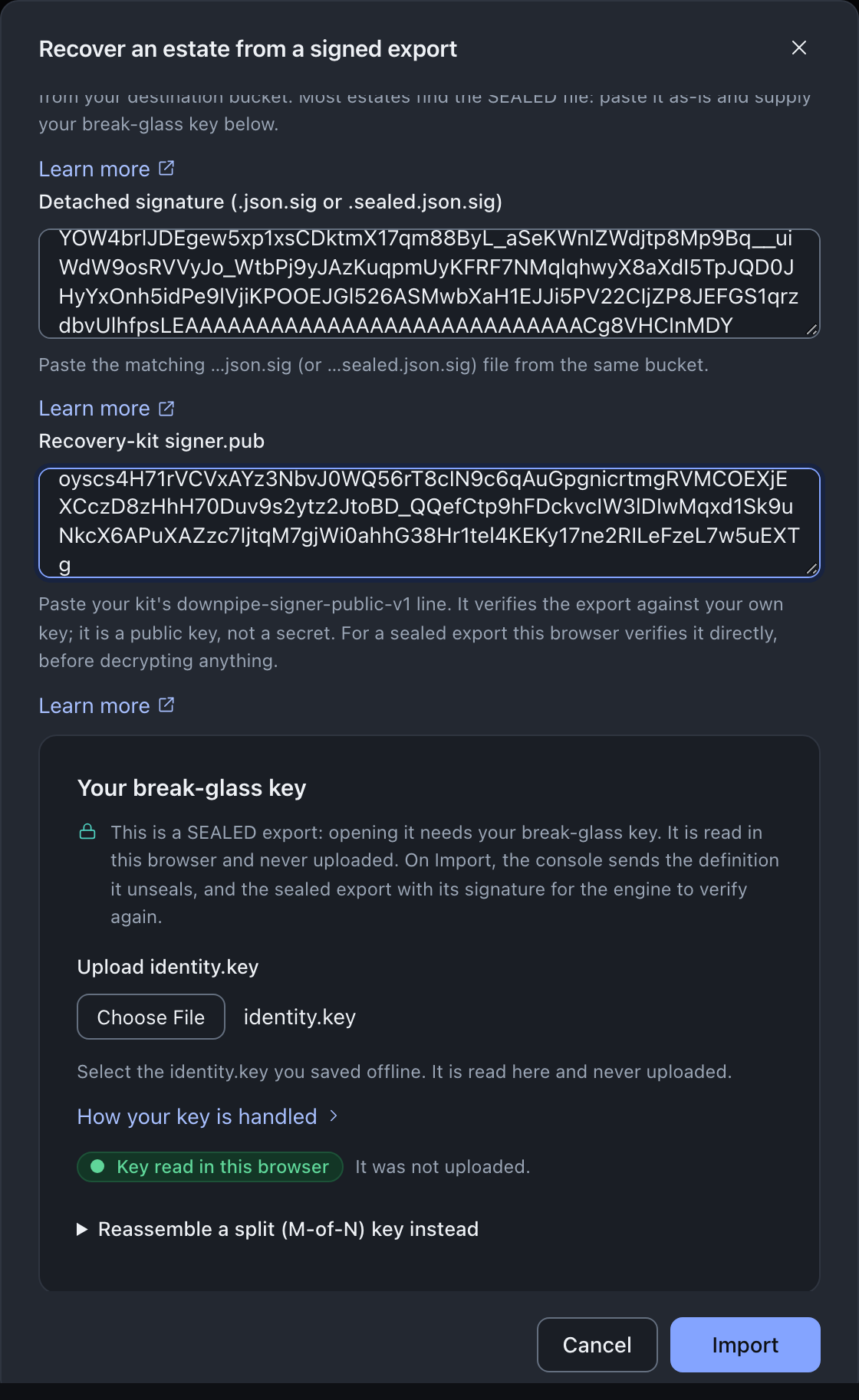
Either way your break-glass key never leaves the browser. The console sends the recovered definition to the engine, with the sealed export and its signature, and the engine verifies that signature again. The engine trusts the export against your own signer key, so a fresh engine accepts it without the old account, and imports the definition: your downpipes, destinations and discovery selection. It imports no operator access. Because the export came from a different Cloudflare account, the imported downpipes arrive disabled, since every native resource identifier in the export belongs to the old account and must be re-pointed first.
If you hold the break-glass key as M-of-N shares, the same console form reassembles a quorum of them in your browser rather than asking you to write a complete key to disk first. See split custody.
Then re-establish what the import deliberately leaves to you, using the export’s re-establishment list as the checklist: re-grant operator roles by hand, reconnect identity providers, re-enter the credentials the export marked for re-establishment, re-enrol passkeys, re-point and re-enable each source, and re-activate the licence. The import rebuilds the shape of the estate; you restore its authority and its secrets deliberately, so a stale or hostile export can never hand back access or a credential on its own.
Do the re-establishment in the right order
Most of that list is step-up gated. Granting a role, connecting an identity provider and setting a destination each ask for a fresh passkey assertion, and so does making a destination the default. The order you work the list in therefore decides whether you can work it at all.
The gate exempts one caller, the shared bootstrap token. A caller arriving through Cloudflare Access passes only while its Access sign-in is less than five minutes old; after that the engine asks it to sign in to Access again (requireStepUp, engine/src/admin/router-core.ts). There are two workable paths through a fresh-account recovery: the bootstrap token, and a passkey session.
If you are working on the bootstrap token, none of the list is gated and you can complete it in any order. Enrol your Owner passkey as part of that pass, and retire the token afterwards, not before, since retiring it is itself gated and you will want a passkey session to do it from.
If you are working on a passkey session, enrol the passkey first and keep the authenticator to hand for the rest of the list. A passkey sign-in satisfies the gate for five minutes. After that, every role grant, identity-provider connection and destination write needs its own assertion (stepUpCheck, engine/src/sched/scheduler-do-stepup.ts). This is a sitting at your desk with the key in the machine, not a task to start and walk away from. Attempting the roles or destinations work before you hold a passkey leaves you with nothing to satisfy the gate with, and the whole list blocks.
Expect the recovery to take hours, not minutes. The time is dominated by standing up the fresh Cloudflare account and its DNS rather than by downpipes. Plan the drill and the expectation around that.
What to keep offline so either case is possible
Keep the recovery kit from the key ceremony offline and intact: the break-glass identity.key, the signer.pub that verifies your archives and your exports, and the recovery sheet. That kit is what recovers your data with no account at all, and it is the material a rebuilt engine needs to trust old artefacts. Treat it as the crown jewels, because after a full loss it is the only thing that was never in the account.
It is also worth keeping a recent copy of the control-plane export itself, so your configuration inventory travels with the kit rather than depending on later access to the bucket. A drill from the console is how you confirm, on a calm day, that the kit and the export are both current and both work.
Account compromise
When the account is not just lost but hostile: the eviction order, evidence capture, and re-stand-up.
Prove recoverability
Run the drill and the offline verify, so a recovery is a rehearsed step rather than a first attempt.
Leaving downpipes
The deliberate exit: what to export as evidence, and why there is no one-click teardown.
Key ceremony and recovery kit
What each key is, where it lives, and why the break-glass key never enters the account.
Last updated .