
Signed reports for auditors: the report kinds and how to verify them
This page is for an auditor who needs a generated, signed artefact of the backup system’s behaviour, and who wants to verify that artefact themselves rather than take the console’s word for it. It describes the report kinds, the JSON and PDF each produces, the signature scheme, and the downpipe verify-report step you run out of band.
A report is generated in your own Cloudflare account, over your own observable state, by the engine. The vendor reads nothing. When a signer is configured the report is signed with the engine’s own signer, so the artefact you take away is tamper-evident and you can confirm it came from your engine.
The report kinds
The report kinds are a closed set, defined as the ReportKind union in reports.ts. There are six, each generated from a different slice of the account’s own observable state. Each is viewable as JSON and downloadable as a PDF. The first four are described below; the fifth is the framework-organised compliance evidence pack, covered on compliance and evidence, which re-projects the posture report through a compliance framework’s control mapping and is signed the same way; the sixth is change records, an owner-opt-in kind covered after the table. A typo in the kind cannot reach the engine: an unknown kind is a 404.
| Kind | What it attests | Period |
|---|---|---|
restore-tests | The drill evidence recorded over the period (each scheduled restore test, each drill that passed from the console, and each recorded offline rehearsal) plus the last restore test per downpipe, scheduled or attended, with its result | A time window, defaulting to the last 90 days |
sla-compliance | Per downpipe over the period, the expected versus successful run counts, whether the last successful run is fresh, and a strikes count | A time window, defaulting to the last 90 days |
immutability | An attestation of the recoverability properties in force: the configured destination’s real WORM property and the break-glass versus operational posture | Point in time |
posture | The posture report as a signed artefact: the score and the severity-ranked control checks at the moment of generation | Point in time |
evidence-pack | The live posture re-projected through one compliance framework’s control mapping (or every framework, for the all pack): per control, the obligation, how downpipes supports it, and the live posture-check status that evidences it. It supports the obligation; it does not certify you. | Point in time |
change-requests | Every change-controlled action over the period (a destination repoint or removal, an identity-provider change, a restore apply, clearing either push destination, and the other owner actions that need a change number), with its change number, who made it, and whether it was an Emergency Change to validate retrospectively. Config mutations are not in it, because the Require Change Number policy does not cover them. Shown in the console as “Change records” | A time window, defaulting to the last 90 days |
The change-requests kind is owner-opt-in: the console only offers its card, labelled “Change records”, when the “Require Change Number” policy is switched on, so a tenant that never enabled change management is not shown an always-empty report. The engine still serves it by direct URL regardless. The three time-bounded kinds (restore-tests, sla-compliance, change-requests) take their window from ?from= and ?to= as epoch seconds, defaulting to the last 90 days otherwise. A non-numeric or negative from or to falls back to that default rather than failing the read; a numeric but inverted range, where from is after to, is swapped rather than reset to the default. The three point-in-time kinds (immutability, posture, evidence-pack) carry a null period and ignore the window. The immutability report is itself an attestation rather than a blanket claim; what it attests is set out on immutability and attestation.
Reading and downloading a report
In the console, each report is a card on the Reports screen. The card loads its metadata on first paint, so you see when it was generated, the period it covers and its signature state without a click, and it offers View JSON and Download PDF. Under the hood the JSON comes from GET /admin/reports/:kind and the PDF from the same path with ?format=pdf. Both reads are available to any authenticated role. The evidence-pack kind additionally takes ?framework= (a framework id, or all for every framework, which is the default); an unknown framework id is a 404, just like an unknown kind.
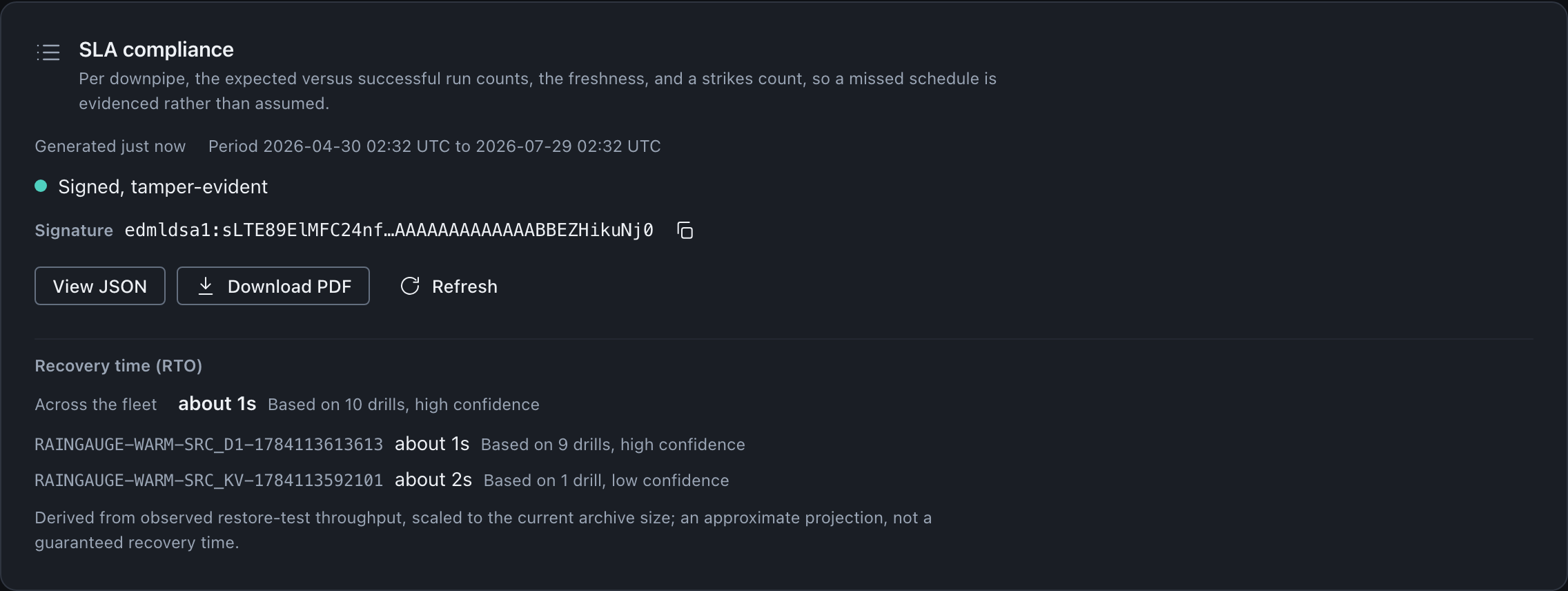
This is a time-bounded kind, so the card resolves the default window to real dates rather than showing an unbounded report: the period reads as the ninety days ending at generation. The point-in-time kinds carry a null period and say so instead, as the posture card further down this page does.
Successful runs exceeding expected runs is a pass, not an arithmetic fault
expectedRuns is the elapsed period divided by the downpipe’s nominal cadence, so it is a contractual minimum: the count the configured cadence owes over the window. Actual runs sit above it, because the scheduler’s cadence path jitters backwards and the real gap between two runs falls in a band ending at the cadence rather than sitting on it (see the cadence is a ceiling). Over thirty days a daily downpipe performs about 31.6 runs against a nominal 30, and up to a ninth more in the worst case.
Read successfulRuns > expectedRuns as over-delivery against the minimum, which is what compliance looks like here. It is not evidence of a double dispatch and it is not a divisor to correct: dividing by the reduced figure instead would demand roughly 33 runs for a nominal 30 and report every compliant downpipe as a breach.
The recovery-time block below it is part of the SLA report body rather than console decoration: each per-downpipe row carries a derived estimate and the number of drills it was derived from. It is a projection from observed restore-test throughput, scaled to the current archive size. The card says so in place, rather than leaving the number to be read as a commitment. A downpipe with no restore-test history carries no estimate at all, so an absent figure means the drills to support it have not run.
A downpipe created partway through the period reports its own window, not the report's
expectedRuns is computed over the window the downpipe could actually have run in, not blindly over the report’s own period. A downpipe created three hours ago at hourly cadence has not been owed ninety days of runs; counting the whole default period against it would read as roughly four successful runs against 2,160 expected, a compliance figure under half of one per cent on the first day of every install, which is exactly backwards for a downpipe that has not missed a single scheduled run.
Each row instead carries windowFromSeconds and windowToSeconds, the window expectedRuns was actually computed over, plus windowStartBasis. windowStartBasis reads period when the downpipe existed for the whole report period (no clamp applied), createdAt when the window was clamped forward to the downpipe’s own recorded creation time, or earliest-run for a downpipe record that carries no creation time, where the earliest run its history still holds stands in instead: a later, more conservative start than the true creation time, never an earlier one. A downpipe three and a half hours old with three successful hourly runs since reads expectedRuns: 3 over its stated window, not 2160.
What a report can and cannot carry
The no-custody rule holds inside a report as it holds everywhere else. Every report body is a redaction-safe projection built from data the input types already carry, so there is no field a secret could live in. The table below shows the classes of field. The restore-tests and change-requests kinds also carry the email of the person who acted, and any change number, reason or note that person entered.
| A report carries | A report never carries |
|---|---|
| Downpipe names and ids (your own configuration) | A key or any key material |
| Counts, expected and successful run totals, strikes | A value or a record’s contents |
| Recency and event timestamps | A private fingerprint |
| Coarse states (fresh, configured, pass or fail) | A destination endpoint, bucket or credential |
| The destination kind, as an enumeration | A selector or a binding’s secret |
| A single public signature string | The signer’s private material |
| A derived recovery-time estimate and the drill count behind it, on the SLA kind, and only where one can be derived | A guaranteed recovery time, since that estimate is a projection |
The signature is the only cryptographic field, and it is a public detached value. It carries no private key material, which is why a signed report is safe to hand to an auditor or attach to a board pack.
The signature scheme
When a signer is configured, the report is signed with the engine’s post-quantum hybrid signer. The scheme is Ed25519 together with ML-DSA-87, the same hybrid the rest of the platform uses. The signature is computed over the canonical JSON of the signed-over view, which is exactly the object {kind, generatedAt, period, data} and nothing else, so the signer and any verifier serialise the same field set in the same canonical, key-sorted form.
The value is a detached string with the scheme prefix edmldsa1:, followed by the base64url of the raw detached signature bytes. The prefix tells a verifier the scheme before it decodes anything. Because canonical JSON sorts keys, the field order in the report does not matter to the signature, but the field set must match exactly, which is why the signed view is computed in one place in the code.
Signing is fail-open, and an unsigned report is informational only
If no signer is configured, or if signing throws for any reason, the engine returns the report unsigned rather than failing the read. The data is still valuable, but an unsigned report is not tamper-evident: treat its figures as informational, never as assured. A missing signer must never turn a read into an error, so the engine returns the report unsigned and marks it as unsigned. downpipe verify-report exits 2 on an unsigned report and says to treat its figures as informational only.
What the console does, and what it does not
This is the boundary that matters most for an auditor. The console reads the signature off a report and checks that it is present and well-formed, with the expected edmldsa1: prefix. When that holds, it shows the report as signed and tamper-evident, and it surfaces the signature value for you to copy.
The console does not verify the signature. The verifying public key is not shipped to the browser, so there is no key in the page to check against. The browser therefore verifies none of a report’s figures. You verify the signature out of band with downpipe verify-report, as the next section describes. The console shows one of three signature states.
| State | What the console asserts | What it does not assert |
|---|---|---|
| Signed, tamper-evident | The signature is present and carries the expected post-quantum hybrid prefix | That the signature has been cryptographically verified |
| Signed, unrecognised scheme | A signature is present but not with the expected prefix; verify before relying on it | Anything about the scheme’s validity |
| Not signed | No signature is present, so the figures are informational only | Any tamper-evidence at all |
Verifying a report out of band
Verification is a step you run yourself, away from the console, against your own engine signer. The signer fingerprint to check against is the one your key ceremony produced and printed on your recovery sheet: the edmldsa1: fingerprint is the SHA-384 of the signer’s public key, generated in your browser during the ceremony and never held by the vendor. The ceremony also lets you save the signer public key file (downpipe-signer-public-v1), which your recovery kit holds as signer.pub.
From reader 0.3.4, the offline downpipe reader checks a report signature with its verify-report command. The command reads the report JSON and signer.pub from local files. It needs no archive and no break-glass identity, and it makes no network call. Reader 0.3.3 and earlier have no verify-report command and exit 6 with unknown command.
downpipe verify-report --signer ./keys/signer.pub --report ./posture-report.jsonTake the report as JSON, not the PDF
Open the report card, use View JSON, and save the copied JSON to a file. You can also fetch
GET /admin/reports/:kinddirectly. The console offers the compliance evidence pack as a PDF only, so fetch its JSON fromGET /admin/reports/evidence-pack?framework=<id>. The signature covers the JSON, and the PDF carries no signature the tool can check. Each request generates a new report, so a JSON you fetch after a PDF is a different report from the one the PDF shows.Run verify-report against your signer
Pass the report file as
--reportand your signer public key file as--signer, as in the command above.--report -reads the JSON from standard input. To pin the signer, add--signer-fingerprintwith theedmldsa1:value from your recovery sheet. The command then refuses asigner.pubwith a different fingerprint.Read the result
Exit
0means both signature halves verified. The command prints the report’s kind, itsgeneratedAtand its period, then the signer fingerprint. Compare that fingerprint with the one on your recovery sheet, unless you passed it as--signer-fingerprint. Any other exit code means the report did not verify, and the stderr message gives the reason.
What the command checks
verify-report rebuilds the signed-over view {kind, generatedAt, period, data} from the report’s own values and writes it in the engine’s canonical, key-sorted form. Anything outside those four keys is not part of what the engine signs. The command strips the edmldsa1: prefix and base64url-decodes the rest to 4,691 bytes: the 64-byte Ed25519 signature followed by the 4,627-byte ML-DSA-87 signature. Both halves must verify against signer.pub. The fingerprint it prints is the SHA-384 of that public key, in the same edmldsa1: form as your recovery sheet.
The command also refuses a file that holds content the engine never writes, and exits 2:
- a top-level member other than
kind,generatedAt,period,dataandsignature - a member name repeated in one object
- an unpaired UTF-16 surrogate, or bytes that are not UTF-8
- a number with a fraction or an exponent,
-0, or an integer beyond 2^53 - 1
None of these comes from the engine. A repeated name or an unusual number spelling can also make two JSON readers disagree about a value.
What each exit code proves
| Exit | Outcome | What it proves |
|---|---|---|
0 | Verified | Both halves verified over {kind, generatedAt, period, data} under this signer.pub. The holder of the matching signer private key signed these four members, and none of them changed after signing |
2 | Not verified | The report is unsigned, changed after signing, signed by a different signer, carries a damaged signature, or holds content the engine does not write. Do not rely on its figures |
6 | Wrong input | The file is not a report JSON (for example the PDF, a UTF-16 file with a byte order mark or a file that is not JSON), or a flag or key file is wrong. Nothing about the report is established |
When one half verifies and the other does not, the message names the failing half. The fault is in that part of the report’s signature member, or in that half of the signer.pub file. Take the report JSON again from the engine first. A new fetch is a new report: if it verifies, rely on its figures, not on the figures in the report that failed. If it still fails, take another copy of signer.pub from your recovery kit. Exit codes and verification outcomes lists every case behind each code.
A pass does not check the figures against your account again: it shows who signed them and that they did not change. The engine signs a report with the signer it holds when it generates the report. After a signer rotation, a report JSON you saved earlier verifies against the earlier signer.pub.
Because the fingerprint you check against is the one you captured at ceremony time and keep yourself, verification never depends on the vendor. That is deliberate: a no-custody design cannot ask you to trust a vendor-held key, so the assurance is anchored to a value you published from your own ceremony. A verifier of your own can make the same checks with a general-purpose Ed25519 and ML-DSA-87 library.
The PDF: deterministic and dependency-free
The PDF is a small, branded document the engine writes itself, with no PDF library, no headless browser and no embedded font. It uses only the standard base fonts that every reader has, plus vector graphics and the report’s own already-redaction-safe fields. The Report is its sole input, and that input carries no secret, so the PDF cannot leak one.
It is deterministic by construction. There is no Date.now and there are no random ids in the output; the only time it shows is the report’s own generatedAt. Given the same report JSON, the PDF bytes are identical, so a stored PDF compares exactly against one rendered from that JSON. When signed, the signature line on the document reads as present, tamper-evident and signed, with the scheme prefix. When unsigned, it says that the signer is not configured.
Where this fits
To understand what the immutability report’s attestation actually proves, read immutability and attestation. The posture report is a signed snapshot of the live posture computation, which is documented in full on the posture score. The same live posture, re-projected control by control through a compliance framework, is the evidence-pack kind, covered on compliance and evidence. The restore-tests and SLA reports draw on drill evidence and run history, so prove recoverability explains how that evidence is produced. For the report read and download calls in full, see the admin endpoints reference.
Last updated .