
Coverage and gap detection: protected, unprotected, and backed up but never proven
A backup posture exists to answer one question: which of your resources are protected, and which are not. The coverage view answers that question across a three-state ladder set out below. Without an inventory it reads “unknown” rather than implying that everything is covered.
Coverage works from a small reference inventory of your account’s resources, cross-referenced against your configured downpipes and what each one has actually achieved. The inventory is descriptive metadata only, a resource id and an optional label per resource. It is neither a key nor a binding, and it is never read on any path that seals a backup or restores your data. Its only job is to let the view say “this resource exists” for something no downpipe covers.
One thing is worth knowing before the rest of this page. Recording the inventory is an access-policy-level action: an access-admin or owner records it from the security centre using the Populate inventory affordance (a paste-one-per-line form per resource type), and any other role sees the read-only view. Until an inventory is recorded, the coverage view reads unknown, as described below.
The coverage ladder
Every inventoried resource lands in exactly one of three states. The ladder is deliberately conservative: there is no false pass, so a resource is only ever called protected when its recoverability has actually been proven.
| State | What it means | What it requires |
|---|---|---|
| Protected | Backed up with succeeding runs, and proven recoverable | A configured downpipe covers the resource AND that downpipe has at least one successful run AND it has a restore-proven record |
| Untested | Has a downpipe, but its recoverability has never been proven | A configured downpipe covers the resource, but it has no successful run yet, or its recoverability has never been proven |
| Unprotected | It exists and nothing is backing it up | No configured downpipe covers the resource at all |
The line between protected and untested is the load-bearing one. In the engine, statusForCovered returns protected only when a covering downpipe has both a successful run and a proven restore; anything less is untested. A backup that exists but whose recoverability is unproven is the distinct untested state, and it must never be presented as safe. The console labels the untested case “has a downpipe, but its recoverability has not been proven”. It ranks unprotected and untested findings above the protected ones so the gaps are what you see first.
What counts as a proven restore
A restore is proven when the engine holds a restore-proven record for the covering downpipe. That record is set by any of three paths, and a record from any one of them is enough.
The first is a passed blind restore test, the keyed drill that decrypts and verifies every in-scope record to a discard sink. The second is a keyless attestation, the integrity attestation that checks the signature, completeness and anti-rollback of an archive without any decryption key. The third is an attended verification, where you supply your break-glass key through the browser and the engine verifies a run; it stamps the record only when the run passed, the sample covered 100 per cent of the records, and the session proved live possession of the key, so a partial attended sample never sets it. That third path is the one the console routes you to: an unproven resource in the coverage list carries a Prove recoverability action that opens the attended verification runner.
Because a keyless attestation alone sets the record, a resource can be marked protected without a full keyed blind restore having run. Proven restore means a restore-proven record exists; it does not always mean a full keyed blind restore was performed.
What protected means
Protected means the resource is backed up by succeeding runs whose recoverability has been proven. It does not mean “safe” in the abstract. The console renders the protected case as that statement and never as an unqualified assurance.
How a resource moves up the ladder
A single resource walks the ladder as your posture matures, and the verdict only ever reflects what has actually happened.
The resource exists, nothing covers it
You record an R2 bucket in the inventory but no downpipe is configured for it. The view finds no same-type downpipe whose identity matches the bucket, so the verdict is unprotected. The console labels it “exists but is NOT backed up”, and offers a “Back this up” action that opens the create flow preselected on the resource type.
A downpipe covers it, but nothing has run yet
You create a downpipe for that bucket. It now has a cover, but no successful run has landed and recoverability has never been proven, so the verdict is untested. The console reads this as “has a downpipe, not yet proven”, in a warning tone, never as a pass.
Runs succeed but recoverability is still unproven
The downpipe runs and seals cleanly. There is now a successful run, but there is still no restore-proven record, so the verdict stays untested. A backup that has never been restore-proven is unproven, not safe.
A restore is proven
A blind restore test, a keyless attestation or a full attended verification passes and stamps the restore-proven record. With both a successful run and a proven restore, the verdict becomes protected. Protected is the only verdict the console shows in an ok tone.
What the view returns
Every call to the view returns the same shape, so a reader parses one type whether or not an inventory exists. Alongside hasInventory and the per-resource rows, it carries a headline rollup: the total inventoried count and the count in each of the three states, where the total always equals protected plus untested plus unprotected because every resource lands in exactly one bucket.
The console renders that rollup as four tiles: the inventoried total and one tile per state. Any unprotected resource pushes the “not backed up” tile to a danger tone, any untested resource pushes the “not yet proven” tile to a warning tone, and the “protected” tile reads ok only when every inventoried resource is protected. The view also notes that it counts only the resources in your reference inventory, so a resource the inventory does not list is not counted as covered or as a gap; it simply is not there.
The unknown state
The view has a single discriminator, hasInventory, that says whether its numbers mean anything. When no inventory is recorded, the engine returns hasInventory: false with an empty resources list and a rollup zeroed across the board, and it makes no coverage claim at all.
The absence of an inventory means “we do not know what exists”. It never means “everything is covered”. The console reads this state as unknown, never as fully covered.
Unknown is never green
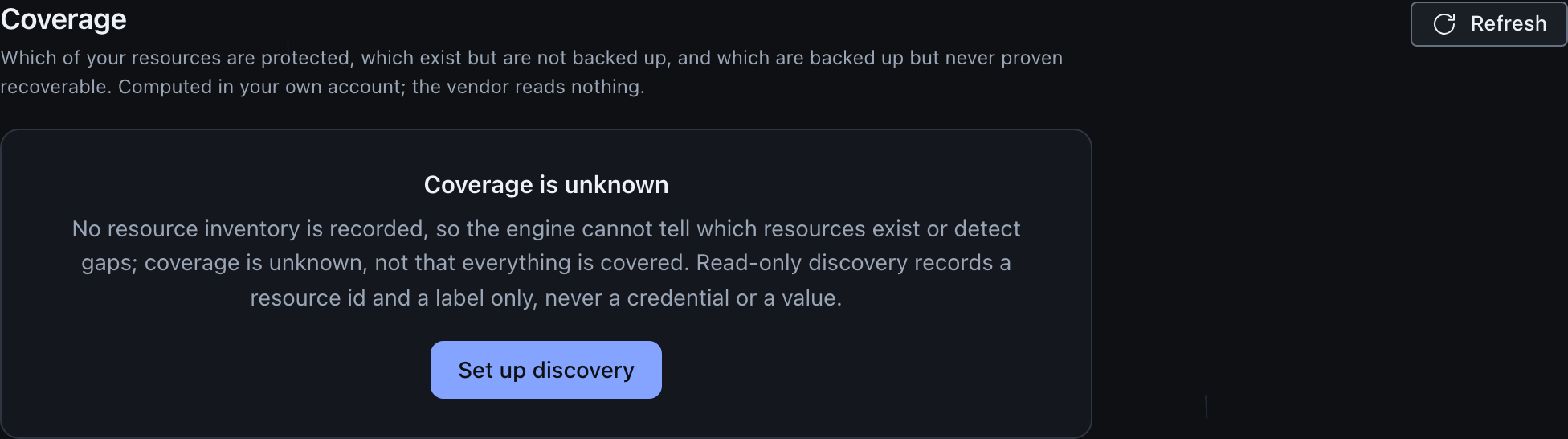
The coverage view never shows a reassuring green for an unknown state. In the console, an unprotected resource reads as a danger tone, an untested resource reads as a warning tone, and only a protected resource reads as an ok tone. With no inventory recorded the console shows a plain “coverage is unknown” panel, not a pass.
A recorded inventory that lists no resources is a different state: hasInventory is true. There is simply nothing yet to compare against your downpipes. The console shows that as an empty inventory rather than as either a pass or an unknown.
Recording the inventory from the console
The engine accepts the inventory at POST /admin/coverage/inventory, which takes a { kv, r2, secrets, d1 } body, validates and bounds it, and stores it under a single dedicated key. The route is gated on the access.policy capability, and the Durable Object re-checks the caller’s authority from its own tables before storing anything, so a router bug alone cannot let an unauthorised caller plant a misleading inventory.
The security centre exposes this to an access-admin or owner as a Populate inventory affordance. It opens a form with one box per resource type where the operator pastes the resources that exist in their account, one per line as <id> or <id>, <label>; the console parses that client-side into the inventory shape and posts it, then reloads the gap view so the new rows appear. A role without the access.policy capability sees the read-only coverage view with no populate control. The form sends only ids and optional labels, never a value or a key. The engine remains the authority on validation and on the access.policy gate (a malformed or oversized inventory comes back as an HTTP 400 the form surfaces verbatim).
Saving replaces the whole inventory, it does not merge
The populate form opens with empty boxes and does not pre-load your current inventory, and it submits every resource type at once, so saving stores exactly what is in the form. An empty box is recorded as no resources of that type, so re-recording only one type, say your KV namespaces, drops the resources of every other type you had recorded before. Paste your complete inventory across all the types each time you record it, not just what you are adding, so nothing you already had is silently dropped.
Two things about saving are worth knowing before you paste a long list.
Recording the inventory is a change-controlled mutation. If you have turned on the config-approval gate, the engine answers the save with “queued for approval” and stores nothing until the change is approved, and the form tells you so instead of confirming counts. The coverage view stays in whatever state it was in until then, so a queued inventory is not a recorded one.
A pasted line the form cannot read an id from is dropped rather than refused. The first comma splits the id from an optional label, so a line that is only a comma, or only a label, has no id and does not become a resource. The confirmation reports the counts the engine actually stored, so compare them against what you pasted: a count lower than your line count means a line was dropped, not that the engine trimmed anything.
A read-only discovery token is a separate mechanism: it lets the engine browse your Cloudflare accounts to generate binding stanzas for attaching sources, and it lives on the Sources screen. Recording the coverage inventory and setting a discovery token are distinct steps.
What this means in practice
Until an access-admin or owner records the inventory, the coverage view reports unknown, never green. Once the inventory is populated from the security centre, the view computes the protected, untested and unprotected verdicts against your configured downpipes. Unknown is the state when no inventory exists, not a permanent condition.
The safety property
The inventory is reference data and nothing more, a checklist rather than a key. This is what lets the coverage view exist without widening any attack surface.
The inventory is stored under a single distinct Durable Object key, kept structurally separate from every binding and secret the engine holds. It is never consulted on any seal or restore path. A downpipe still reaches a resource only through its own configured, reserved-binding-checked source, and that path never reads the inventory. The data direction is one way: downpipes are matched against the inventory to produce a verdict, and the inventory never feeds back into what a downpipe can reach.
The consequence is that the inventory cannot grant data access. A fabricated or tampered inventory can only change what a resource’s status reads as. It cannot make any downpipe touch a resource it was not already configured to touch, and it cannot decrypt or expose anything.
When an inventory is recorded, it is folded into the versioned configuration snapshot by reference, so a change to it produces a coherent history entry and a plain-English diff alongside your other governance changes. Only the ids and labels are captured there, because that is all the inventory holds; there is no value to capture.
What the inventory can and cannot carry
Each inventoried resource carries an id and an optional human label, and the type has no field that could hold a value, a key or a credential. The id is the native resource identifier, your own account metadata rather than a secret, for example a KV namespace id or an R2 bucket name. The validator bounds the id to a safe single-line pattern, bounds the label length, dedupes within each group, and rejects rather than silently repairing anything it cannot accept: a control character in a label and a list exceeding the per-type cap of 5000 both come back as an error, so an operator learns their inventory did not land instead of seeing the view under-report.
How a resource is matched to a downpipe
For each inventoried resource the engine finds the first same-type downpipe whose configured identity matches the resource id, using exactly the identity resolution a real run would use. A KV source matches on its native namespace id or its binding, an R2 source on its native bucket name or its binding, a D1 source on its native database id or its binding, and a secrets source on each configured secret name. The match is pure string comparison; the inventory id is read only to compare it, never to reach anything. A KV inventory entry can only ever match a KV source, so a bucket and a namespace that happen to share a name can never be cross-matched.
The routes, the gating and what an auditor can rely on
The view is two routes on the in-account engine, reached only by the console over your authenticated session. The read, GET /admin/coverage, is gated on the posture.read capability, so any authenticated role may see your own coverage view, exactly like the wider posture read. The write, POST /admin/coverage/inventory, is gated on the access.policy capability, the same level as the role table and the group mapping, because recording the inventory shapes what the posture view claims. The write also re-resolves the caller’s authority inside the Durable Object from its own tables, a defence-in-depth check, so an unauthorised caller cannot plant a misleading inventory even through a router fault. The verdict computation itself is a pure function that reads only redaction-safe fields, so the same inputs always yield the same view. In the console, the read is available to any authenticated role and the write (Populate inventory) is offered only to an access-admin or owner, mirroring the server-side access.policy gate as UX while the engine remains the authority.
What the inventory covers
The inventory reconciles four id-keyed resource types: KV namespaces, R2 buckets, Secrets Store secrets and D1 databases. Coverage spans only those four.
The five API-discovery source types, cf-config, Workers, Stream, Images and Artifacts, are deliberately not id-joined here. A cf-config downpipe backs up configuration surfaces, a Workers downpipe backs up Worker scripts, and a Stream, Images or Artifacts downpipe backs up its respective media or artefact store; none of the five is one of the four data resources this view enumerates, so none takes part in the coverage gap analysis. They are surfaced through the sources list instead. Within that scope, the view answers whether your namespaces, buckets, databases and secrets are backed up; it does not cover your Cloudflare configuration, your Workers, or your media and artefact sources.
Related reading
To understand what “runs succeed” means before a resource can be protected, read verify at seal. That page covers the integrity chain the engine builds when it finalises a run.
To understand the proven-restore half of the ladder, read prove recoverability for the blind restore test, and the canary for the continuous read-back probe. For why a keyless attestation can stand in for a full keyed restore, read immutability and attestation.
Last updated .