
The topology map: sources, destinations, and copy coverage
The topology map is the console’s visual answer to one question: what is being protected, where does it land, and is each flow fresh. It draws every downpipe as an edge from its Cloudflare source to your archive destination, colours each edge by its freshness state, and lets you open any flow for its detail. This page is for operators who want to read the estate at a glance and know what the picture shows and what it does not.
The map lives at the Topology map screen in the console. It is close to a read-only view: it shows names, statuses, freshness, and how much each flow moves, all from your own in-account engine. It carries no consequential flow action, running, drilling and restoring all live behind a link. The only writes it offers are two narrow, gated clean-up actions in the drawer, covered below. The sections that follow cover what it renders, how it reports freshness and coverage, and how it reflects residency.
What the map renders
The map binds to the engine’s own data and draws three things: your sources, your destination, and the links between them. Each source node is a Cloudflare store you back up, named from its binding, namespace, or bucket; the destination node is the archive your runs write to; and each edge is one downpipe carrying one source to one destination (mapScreen and mapDownpipesToFlows, console/src/screens/map.ts). It is a live picture in the sense that it refreshes in place on the same cadence as the Overview. The map pauses while the tab is hidden, so a backgrounded console makes no requests.
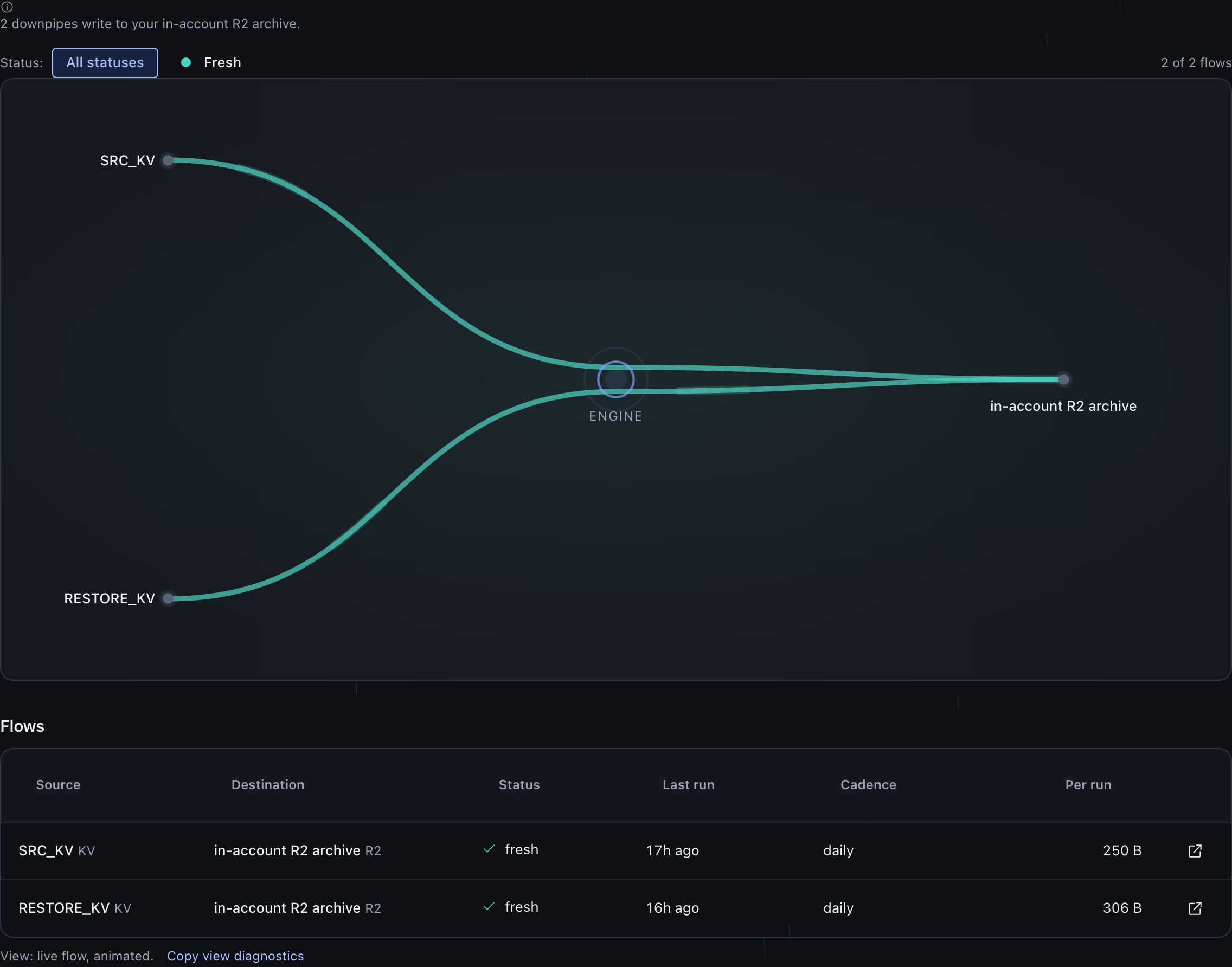
The console supports more than one archive destination account-wide, and a downpipe can pin to a single destination or fan out across several (buildTargets, console/src/screens/map/data.ts); many sources converging on one destination is the common default, not the only shape the map can draw. The map says so in a destination note that names the real spread rather than assuming a single sink (destinationNote, console/src/screens/map/panels.ts). When a downpipe is fanned across more than one destination, the map draws one edge per destination it writes to, so a one-to-many flow reads as several edges to several nodes.
The map keeps working under partial failure. The downpipe list is the core read: if it fails on first load you get an inline error with a Retry, with your filters preserved. The history and status reads are enrichments, so when they degrade the map shows individual flows as “unknown” rather than blanking, and it never paints a stale colour over a flow it could not actually read (MapView.load, console/src/screens/map/controller.ts; the partial note, unknownNote, console/src/screens/map/view-chrome.ts, surfaced in console/src/screens/map/render.ts).
The engine can return a downpipe record that has no configuration or no source. From console 0.2.7, such a record does not stop the map from loading. A record that has an id shows as an unknown flow.
The drawer of that flow states what the console could not read and tells you to send a support pack, and it offers Delete downpipe. The map counts these flows in their own note, apart from flows that have no run yet (unreadableNote, console/src/screens/map/view-chrome.ts). The map cannot show a record that has no id, and this includes a record whose source is readable. It states how many there are and tells you to send a support pack (unplacedNote, console/src/screens/map/view-chrome.ts).
Opening a flow opens a mostly read-oriented detail drawer: the source, the destination, the schedule, the last run, the per-run size, and a recent-runs strip. Its main action is “Open in Downpipes”, which links to the surface where the consequential actions (run now, drill, restore) live, so a Viewer is never shown one of those write controls on the map that would be refused. The drawer does carry two narrow clean-up writes, each gated: “Delete downpipe” removes a single downpipe (Operator and up, the same danger-tier confirm as the Downpipes screen, with the blast radius named and the archives kept), which also removes one orphaned roster entry, one whose stored key no longer matches its id so it can never run. Separately, when there are orphans, an Owner can clean up every orphaned entry at once (drawer.ts, drawer-sync.ts). Neither touches your backed-up data.
Freshness
The colour on each edge is a freshness verdict. The map shares the exact rule the Overview uses, so the two surfaces cannot disagree about the same downpipe (classifyFreshness, console/src/screens/map.ts). The vocabulary is small and each state means something specific.
| State | What it means |
|---|---|
| Fresh | The newest good run is current against the downpipe’s cadence |
| Stale | A good run exists but is older than the cadence tolerance allows |
| Failed | The latest run failed, or the run succeeded and one destination lane did not. The drawer says which, and sends you to the right place for each |
| Disabled | The downpipe is paused, which is a deliberate state, not a failure |
| Unknown | History could not be read, or the downpipe has never run, so the map makes no green claim |
Read the Failed row carefully, because it covers two different faults with different remedies. A capture failure sends you to the flow’s recent runs. A lane-only failure means the backup run itself completed and one destination copy did not land, and the drawer says so in as many words and points you at Copies instead, because Recent runs will show you nothing but successes (console/src/screens/map/panels.ts).
Two further states appear only on a fan-out edge, and the difference between them decides whether waiting is the right move.
| Fan-out state | What it means, and what to do |
|---|---|
| Partial (amber) | That destination is reachable but behind the latest good run. The data is safe on another destination while this copy catches up, so waiting is reasonable |
| No copy (amber) | Backups have completed since this destination was added and it has never reported holding one. Waiting will not fix it. The other destinations still hold the backup |
No copy is not a milder Partial. It ranks second worst of the seven states, behind only Failed, and it is earned before it is said: the lane is anchor-gated, so a destination added minutes ago to a running downpipe reads Partial and never reaches these words. Both are per-lane readings from proven per-destination replication state, described in the copy-coverage section below, rather than whole-downpipe freshness verdicts. Both are also selectable in the status filter and reachable as a ?status= value.
Two parts of that rule are worth calling out. Staleness is measured from the last successful run, and a run currently in progress does not reset it, so a silently stuck backup that keeps restarting still reads stale rather than being masked by the in-flight run. And a downpipe with no readable run reads “unknown”, never green: the map distinguishes “no run yet” from “the status could not be read” in the drawer, so an unknown is explained by its actual cause rather than guessed at (deriveStatus, console/src/screens/map/data.ts; freshnessLine, console/src/screens/map/panels.ts). When some flows read unknown, the map says why in a note above the picture, so the neutral edges are explained rather than read as a fault.
Copy coverage for fan-out downpipes
For a downpipe that fans a source out to more than one destination, the map shows a copies-of count, so you can see at a glance whether every intended copy is actually present. The drawer for a fan-out flow carries a “Copies” row that reads as “N of M copies”, derived from proven per-destination replication state rather than from intent (copiesRow, console/src/screens/map/drawer.ts; summariseReplication, console/src/components/replication.ts).
A fan-out with no successful run yet reads as its intended destination count with a “no run yet” qualifier rather than claiming copies it has not made. When fewer copies are present than intended, the row says which of three things is happening: how many destinations are down, how many have never reported at all, and whether the flow is simply catching up. Never reported is the one to act on rather than wait out.
In the SVG view, a down destination is badged on the destination node, with the reason beside it, from proven reachability rather than assumed (downDestinationIds and the per-lane status, console/src/components/replication.ts; the node badge in console/src/components/topology-svg-nodes.ts). The live Canvas2D view draws no node badge. There, the edge to a down destination reads Failed. The Copies row counts it as down, and names the reason when the engine reports a specific one. A single-destination downpipe has no redundancy concept, so it shows no copies row at all; its capture state speaks for its only copy.
The map’s copy coverage and freshness are read from the engine’s recorded run outcomes. The console does not verify your coverage end to end against Cloudflare from the browser, so the map reports what the engine recorded, not an independent confirmation. The map performs no Cloudflare-side verification and asserts none.
The detailed redundancy model lives with the backing-up subject rather than here. The model covers what three copies, two media, and one off-site mean for a fan-out downpipe and how the engine cascades a write across destinations. See the redundancy map and 3-2-1 redundancy for that detail; this page is the read-at-a-glance view, and it references the redundancy model rather than restating it.
How residency is reflected
The default destination node is labelled from the same destKind the engine reports, so the map reflects residency rather than inventing it. An in-account R2 destination draws as an in-account R2 archive. An S3-compatible one draws as an S3 archive, a Google Cloud one as a Google Cloud Storage archive, and an Azure Blob one as an Azure Blob Storage archive. For all three, when every flow writes to that default, the destination note says the archive is out of your Cloudflare account. A configured-but-unnamed kind draws as a configured archive, and an unset destination reads “destination not selected” rather than a fabricated bucket (destinationFor, console/src/screens/map/data.ts; destinationNote, console/src/screens/map/panels.ts).
When the engine can state the real bucket name, the node and the note name it. A destination that a downpipe pins or fans out to is different. Its node takes the destination’s label or bucket name. When every flow writes to one such destination, the note names it too (destinationNote). The node draws with the R2 glyph only for an R2 endpoint or the deploy-time R2 destination. Every other store draws with the S3 glyph (buildDestinationIndex, console/src/screens/map/data.ts).
The node glyph is a narrower thing than the name. Google Cloud and Azure both draw with the S3 glyph, because the glyph vocabulary is shared with the source side of the map, where its members are Cloudflare resource types. For those two the glyph means only “an object store outside the Cloudflare account”, and the name is what tells you whose cloud it is.
That labelling comes straight from the engine’s status report. The report returns only the destination kind and never the endpoint, region, or any access key (buildStatus, engine/src/admin/status.ts). So the map can show you whether your bytes land in-account or out-of-account without the map itself carrying where. For the full account of where ciphertext and metadata sit and why residency is a choice you make, see data residency.
The scope
The map is observability with a narrow clean-up exception. It renders names, counts, statuses, and freshness, all from the in-account engine; it transmits nothing and shows no key material (console/src/screens/map.ts). The consequential actions you might want to take on a flow are running it, drilling it, restoring from it. These actions all live behind the “Open in Downpipes” link, not on the map. The only writes on the map itself are the two gated drawer clean-ups described above, deleting a downpipe and clearing an orphaned roster entry. Neither reaches your backed-up data.
The map draws as a live Canvas2D view, degrades to an SVG topology where canvas rendering is unavailable, and always carries an accessible data table in every branch. The map states in one line which renderer is actually live so a still-looking map is diagnosable from a screenshot (buildMapBody, console/src/screens/map/render.ts; viewStatusLine, console/src/screens/map/view-chrome.ts). The accessible table, shown below, is the form to rely on for keyboard and assistive-technology use.

Where this fits
The map is the picture; the surfaces it points at are where you read more or act.
The runs behind a flow
A flow’s freshness and its recent runs come from run history. To dig into what ran, when, and with what result across the whole fleet, see the runs and history view, which is the source the map’s freshness vocabulary mirrors.
The redundancy model behind the copies count
The “N of M copies” read is the at-a-glance form of the 3-2-1 redundancy model. For the full model and the failover behaviour, see the redundancy map and failover and replication.
The operator's reading of the topology
A complementary operator-side account of the topology, framed for running and scaling the estate, lives in topology. This page is the Day-2 read of the console map screen specifically.
To read the estate’s activity in full, go to the runs and history view. To understand the destination labels the map shows, read data residency. For the operator-side topology, see topology.
Last updated .