
Retention and pruning: keeping and deleting backup history safely
By default, downpipes keeps every run forever. Retention is the optional, per-downpipe policy that bounds how much history you keep. Pruning is the engine deleting the runs that fall outside that policy. This page is for the operator setting a retention policy. It explains the two knobs, the safety gate that keeps deletion off until you ask for it, and what “delete” actually does to a run.
This is the only path that removes a committed backup. Everything else writes and verifies. The seal path also deletes, but only its own leftovers: scratch manifests after a merge, and the objects of a run that never committed to the RUNLOG. So the behaviour is deliberately cautious, and the most important thing to understand is that setting a retention policy does not, on its own, delete anything.
The three knobs
A retention policy has three settings. Two bound the history, and the third is the gate that decides whether the engine actually deletes.
| Knob | Type | What it does |
|---|---|---|
keepRuns | integer, 1 to 10000 | Retain the N most recent runs, counted by their position in the destination’s RUNLOG. |
keepDays | integer, 1 to 36500 | Retain runs whose RUNLOG entry time is within N days of now. |
enforce | boolean, off by default | The deletion gate. Off (or absent) means dry run: compute and log the plan, delete nothing. Only true makes the engine delete. |
At least one of keepRuns or keepDays must be set for a policy to exist. With no retention policy at all, the engine keeps everything and never prunes a run. In the console editor, the two limit fields live under a “Retention: prune old runs (off by default)” disclosure, and leaving both blank means no policy is sent.
keepRuns cannot be zero. The minimum is 1, because retaining zero runs is refused: there is no shape of this policy that empties your history.
Union semantics: setting both bounds keeps more
When you set both keepRuns and keepDays, a run is retained if it satisfies either bound. It is superseded only if it falls outside both. This is a union, so adding the second bound keeps more history, never less.
Two more rules can keep a run that falls outside both bounds. The engine keeps a run that a replica still needs, until that replica has caught up. The engine also keeps a run holding more records than any run the bounds kept, so a source that shrank or went empty never displaces your last full backup. If a run outside both bounds is still there, one of these is the likely reason.
Take a downpipe with keepRuns: 10 and keepDays: 30. A run is kept if it is among the ten most recent runs, or if its RUNLOG time is within the last thirty days. A run is only superseded if it is both older than the tenth-most-recent run and older than thirty days. If you run daily, the day bound dominates and you keep about thirty runs. If you run hourly, the run-count bound dominates and you keep the last ten regardless of how recent they are. The engine takes whichever bound is more generous for each run.
keepDays uses the RUNLOG entry time, not the age of the stored files. A run whose recorded timestamp cannot be parsed is treated as outside the day window, so it can still be kept by keepRuns but is never silently kept by a parse failure. A single bad timestamp can only narrow retention, never widen it.
Dry run by default
Setting keepRuns or keepDays on its own deletes nothing. The engine, on its scheduled pass, computes a prune plan for every downpipe that has a retention policy, and logs what it would do, but it does not write or delete unless the enforce gate is on.
The gate is a plain checkbox in the editor, labelled “Enforce deletion (off = report only)”, off by default, with a loud warning attached: when it is on, the engine deletes superseded runs and their unreferenced segments on the schedule; when it is off, it logs the prune plan in the engine log and deletes nothing. Turning it on is a deliberate act, to be done only once you are sure the limits above are right. The warning also names the one posture in which an enforced pass still deletes nothing, covered under when pruning cannot run at all below, so that ticking the box and reading only the first sentence cannot leave you waiting for deletions that will not come.
Enforcement is the only thing that deletes
Enabling a retention policy does not delete old backups. By default, retention is a dry run that reports a plan and removes nothing. Deletion happens only when enforce is set to the literal value true. Until then your history accumulates exactly as if you had set no policy at all.
Retention is also not classification-driven. The only knobs are keepRuns and keepDays. There are no data-sensitivity tiers that prune for you, and nothing about the contents of a run changes how long it is kept.
Review before you enforce
Because the dry-run plan is written to the engine’s structured log, you can read what an enforced prune would do before turning the gate on. The plan reports how many runs it would supersede, how many run-tree objects and orphaned segments it would delete. It reports how many runs it would retain. It does not report a byte total: computing one precisely would mean reading the full body of every deletable segment first, and the plan deliberately avoids that cost. Read the counts, confirm they match your intent, and only then enable enforcement.
Only an enforced prune that changes the archive writes a first-class retention-prune audit event. From engine 0.3.6 the scheduled pass and the console follow one rule. Each apply that superseded a run, or removed or hid an object, writes one event. Its outcome is success when the apply finished its plan, and failed when it stopped after a change.
The event records the downpipe it acted on (id and name) and who acted: the engine for a scheduled pass, or the person for a console apply. It never records run contents. The counts ride the pass record, and the scheduled pass also writes them to the structured engine log. The dry-run path writes nothing to the audit log; it is reported in the engine log alone. An enforced prune that changes nothing writes no event, so re-running it is a quiet no-op. A remainder the store keeps refusing does not write an event on every pass.
Supersede is not delete
When a run falls outside the retention window and the gate is on, the engine does not remove its RUNLOG entry. It keeps the entry in place and marks it superseded. This matters for the chain: a missing RUNLOG entry would look like a rollback and be rejected by the reader, whereas a superseded entry is a recognised, retained state. So pruning never shortens the RUNLOG.
What deletion actually removes is narrower than the run. For each superseded run, the engine deletes that run’s tree objects (its root manifest, the signature, and the shard manifests) and the segments that are now referenced by no retained run. A segment shared with a run you are keeping is never touched.
The segment deletion is manifest-driven, not age-driven. The engine reads the decrypted manifests of every retained and every superseded run, and builds the set of segment object keys each group references. It deletes only the segments that appear in a superseded run and in no retained run. Content addressing means a value unchanged across runs is the same object key in both, so it is seen in both sets and kept. There is no time-to-live and no age comparison: an unreferenced segment is unreferenced by construction.
The apply order is the crash-safety invariant. The engine marks the RUNLOG entries superseded and re-signs the log first, and only then deletes. From engine 0.3.6 it deletes a run’s orphan segments before that run’s tree, which is what names them. If the process stops partway, the RUNLOG is already consistent, and a later prune plans what is left and finishes it. Deleting an already-absent object is a no-op.
From engine 0.3.6 a delete the store refuses does not stop the apply. The engine counts the refusal and moves on, and a run whose segment was refused keeps its tree for a later pass.
The abstain invariant: a transient read failure never deletes
The safest part of the design is what happens when the engine cannot read a run it intends to keep. The protected set of segments (the ones referenced by retained runs) must be complete, because the orphan set is computed by subtracting it from the superseded references. If a retained run could not be read, that set would be incomplete, a shared segment could fall into the orphan set, and a kept run would break.
So the planner abstains. If any retained run fails to open on a pass, the whole prune defers: it supersedes nothing and deletes nothing on that pass, logs why, and retries on a later tick when the run is readable again. The complementary case is just as safe: a superseded run that cannot be read this pass is simply not superseded this pass, so its objects are left untouched. Either way, a transient read failure can never cause a wrongful delete.
When pruning cannot run at all
Two configurations hold back the deletion, by design. In both, backups keep working. The prune still marks over-cap runs superseded in the RUNLOG, because that step commits before any delete, but it removes no archive bytes.
| Condition | What happens | Why |
|---|---|---|
| The destination has Object-Lock / WORM enabled | On S3 each delete adds a delete marker and the bytes stay, because an Object Lock bucket is always versioned. From engine 0.3.6 the prune counts those objects as hidden, not reclaimed. | The bytes stay until the bucket’s noncurrent-version lifecycle rule or the lock releases them. Add that rule if you want retention to reclaim storage. |
| The deployment is in a break-glass-only posture | The engine’s own SCHEDULED prune does not run. You run this downpipe’s prune from the console instead, on demand, supplying your break-glass key in the browser. | A break-glass-only engine holds no in-account read-back key, so its unattended cron pass cannot decrypt the manifests to work out which segments a superseded run still needs. Rather than guess, it defers. The archive format keeps superseded entries, so nothing is at risk of deletion; the cost is storage, not safety. |
In the break-glass-only case the engine logs that the scheduled pass is deferred and how many downpipes with retention are waiting, so the deferral is visible rather than silent.
Pruning from the console with your key
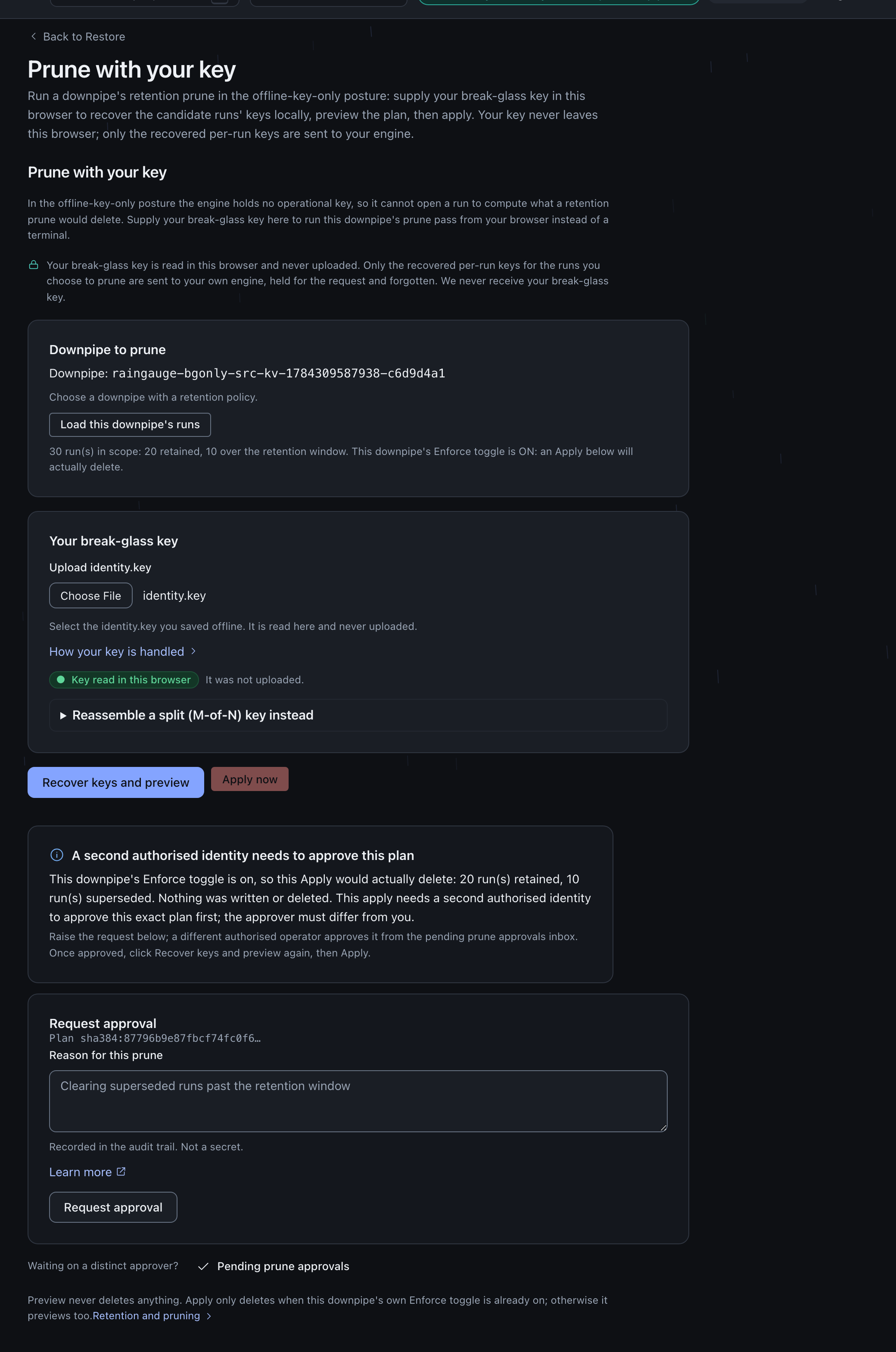
A break-glass-only estate still prunes without a terminal. Open the downpipe’s editor, expand Retention: prune old runs, and follow Prune with your key through to /restore/break-glass-prune. The panel needs the same restore.apply authority the standard restore flow’s apply step needs, because deleting archived runs is at least as consequential as overwriting live data with one.
The flow is one screen, four steps:
- Choose the downpipe. Only downpipes carrying a retention policy are listed. Selecting one and choosing Load this downpipe’s runs fetches the current retained/superseded split from the engine, and reports whether this downpipe’s own Enforce toggle is on (an Apply below deletes once a second authorised identity approves the plan) or off (Apply will only ever preview).
- Supply your break-glass key. Select
identity.key, or reassemble an M-of-N quorum in the same browser tab. It is read locally and never uploaded; only the per-run keys it recovers, for the runs you choose to prune, are sent to your own engine, and only for the one request that uses them. - Recover keys and preview. The browser opens each candidate run’s capsule locally and hands the recovered per-run keys to the engine, which plans the prune exactly as the scheduled pass would with a held key. Nothing is written or deleted at this step; the outcome reports how many runs would be retained, how many superseded, and how many objects would go.
- Apply. With Enforce off, Apply previews again rather than deleting. With Enforce on, a first Apply raises a dual-control request instead of deleting: give a reason, and a second authorised identity approves it from Pending prune approvals (
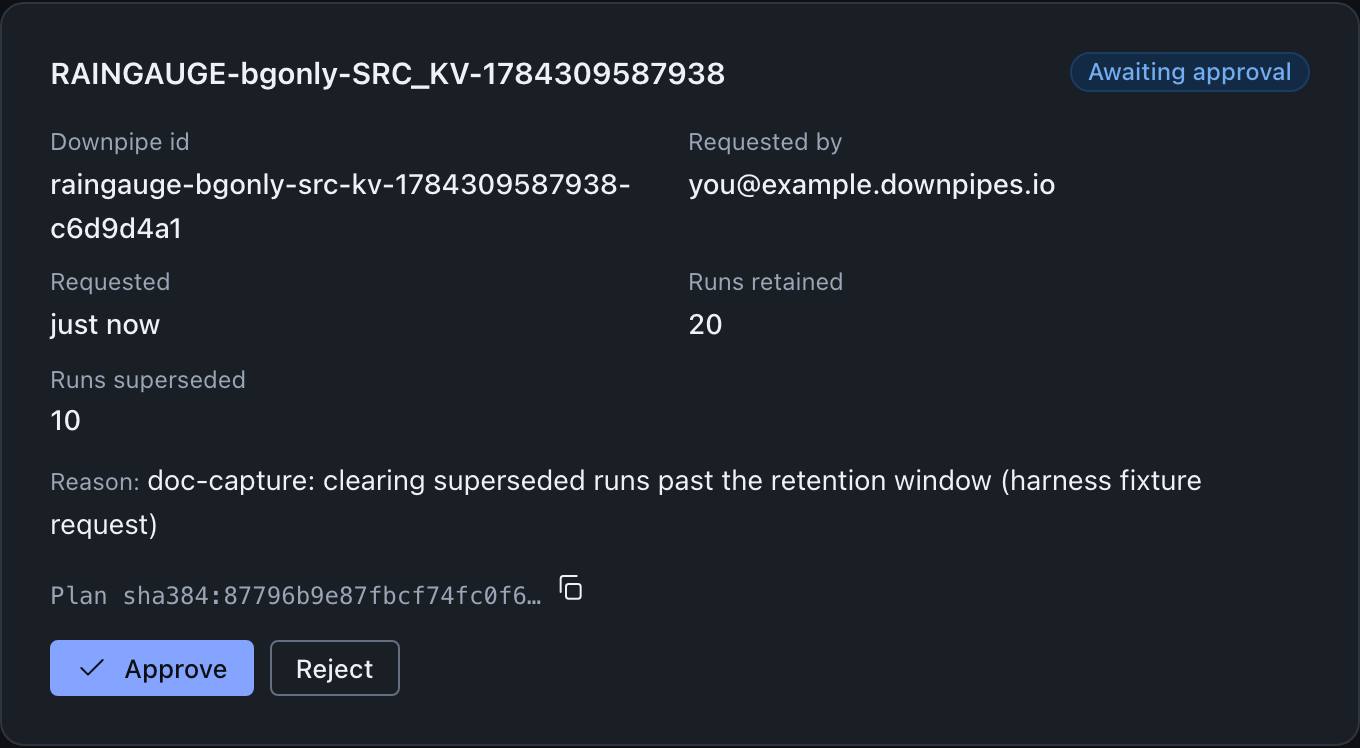
/restore/prune-approvals), distinct from the person who requested it. Once approved, recover keys and preview again, then Apply completes the delete.
Both the apply and the approve are step-up gated, so each opens a browser credential sheet. On this panel in particular, read that sheet carefully: it is asking for the passkey you sign in with, not for the identity.key you have just loaded into the page. The two are unrelated, and your break-glass key is never sent anywhere. Raising the request and rejecting one are not gated, matching the convention that only the dangerous direction carries the friction.

With Enforce on and no approval yet for this exact plan, Apply is refused rather than deleting, and the panel walks straight into the request:
The distinct approver reviews it from Pending prune approvals, one card per pending request:
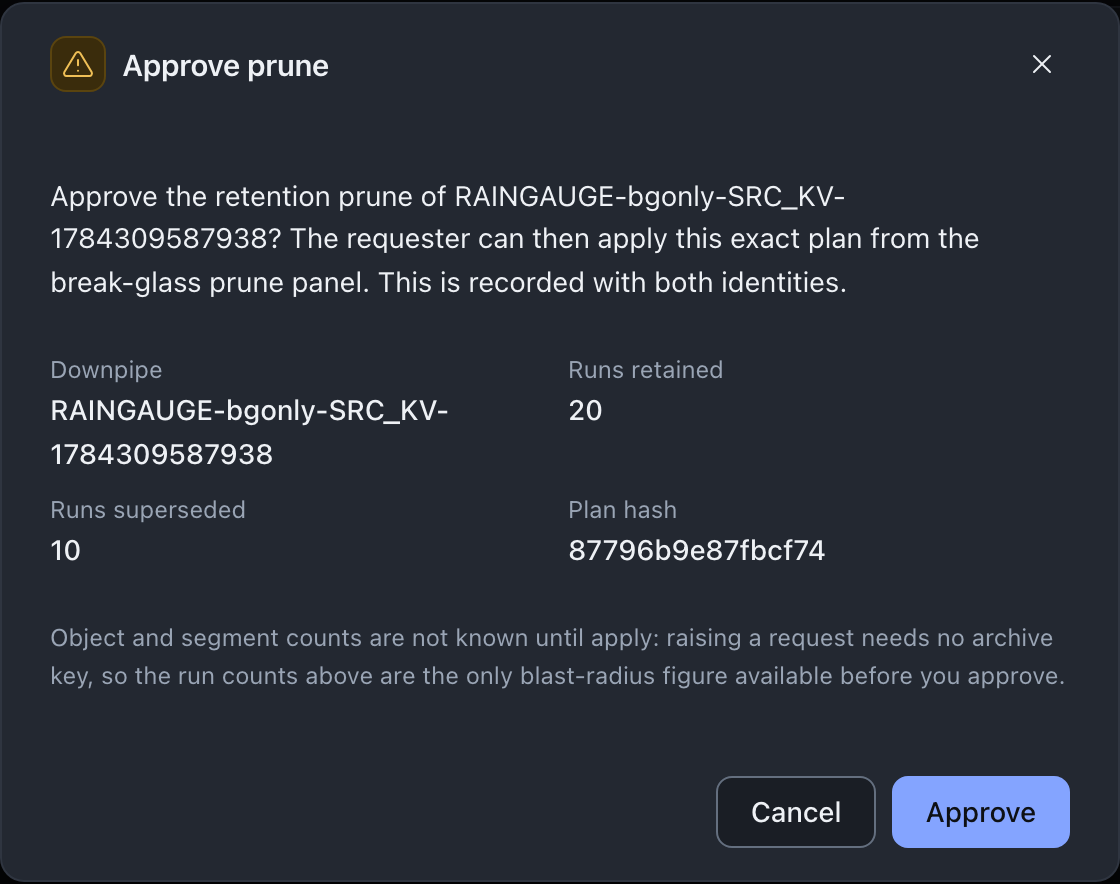
Approve opens a confirmation naming exactly what is about to be authorised, since approval lets anyone with permission to apply a restore run this exact plan:
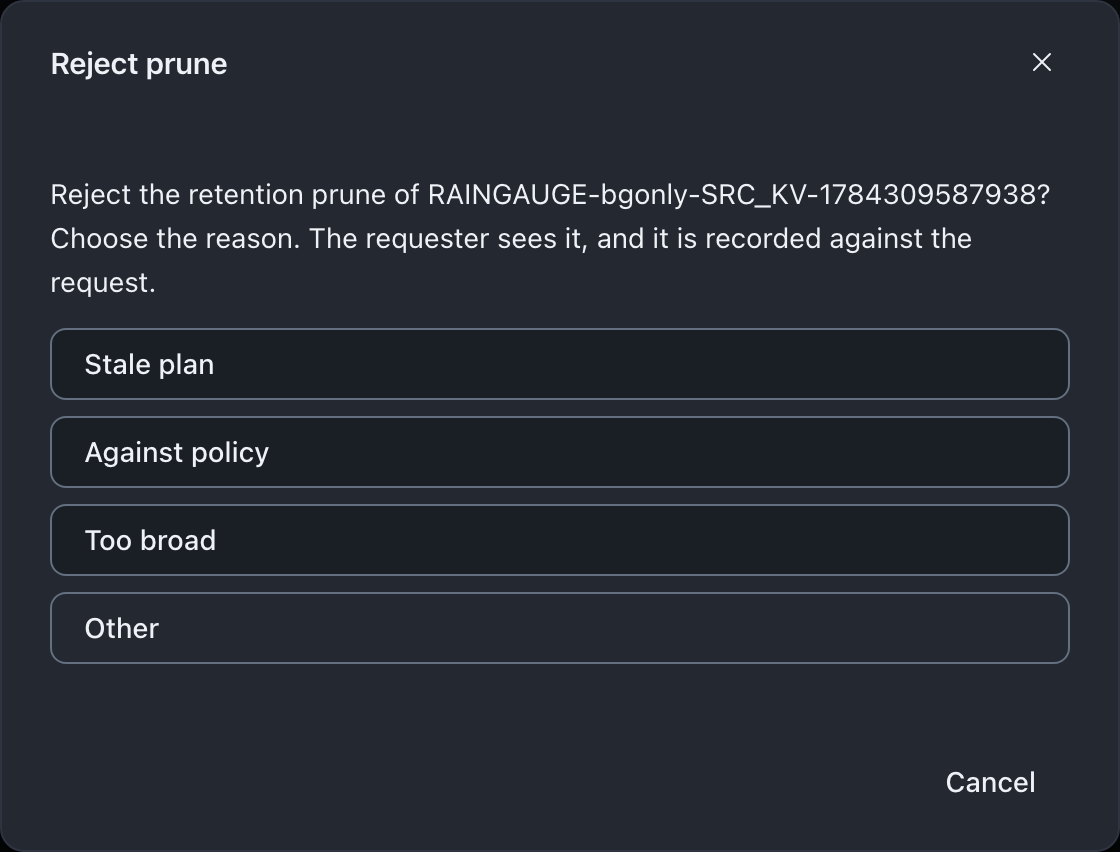
Reject instead asks for a reason from a closed, non-sensitive list, recorded against the request and visible to the requester:
If a run this downpipe still needs to keep cannot be opened with your key, the whole pass abstains rather than guess which segments are still needed. This is the same abstain invariant the scheduled pass follows. Recover that run’s key, or confirm you supplied the right quorum for this estate, and try again.
Pruning offline, without the console
If the console or the engine is unavailable, the same prune runs entirely offline with the open-source downpipe reader and your break-glass key. Neither the vendor nor Cloudflare is in the loop. This is the same deliberate offline channel break-glass recovery covers for restoring data; pruning follows the identical shape.
downpipe prune \
  --archive <dir> \
  --identity identity.key \
  --signer signer.pub \
  --keep 30
That is a dry run. It reads your RUNLOG, works out which runs your policy has superseded, and reports what it would delete without touching anything:
prune DRY RUN (nothing was deleted; pass --apply to delete)
  runs kept:              30
  runs deletable:         4
  orphan segments:        118
  would delete segments:  118
  would delete run-tree objects: 12
  would delete objects in total: 130
Read the last line before you arm --apply. orphan segments: 0 does not mean the prune is a no-op: a superseded run’s manifest tree is removed even when every segment it referenced is still shared with a run you are keeping, so the total is the number that tells you the size of the operation.
Add --apply when the plan looks right. It prints the same shape with what was actually removed. If the two disagree, it says so on a NOT deleted (planned but kept by the destination) line rather than exiting quietly. From reader 0.3.4 an --apply that leaves any planned object behind also exits 14.
--keep is per downpipe, counted by the RUNLOG’s own index rather than by timestamps, so one busy downpipe never pushes another downpipe’s runs out and editing a clock cannot steer the result.
Keep a record of what was pruned
Whichever path did the deleting, there is a record of it. An enforced prune that changed the archive, scheduled or applied from the console, writes a first-class retention-prune audit event, covered above. A prune run with the offline reader instead can write its own local record: add --receipt <path> and the command writes a JSON record of the pass. Use it whenever you arm --apply offline, because that record is the only account of why your stored corpus shrank outside the audit log.
downpipe prune \
  --archive <dir> \
  --identity identity.key \
  --signer signer.pub \
  --keep 30 \
  --apply --receipt prune-2026-07-28.json
The record is written BEFORE the first delete and rewritten when the pass finishes, which is what makes it useful rather than decorative. A prune that is interrupted, by a closed laptop or a dropped connection, never returns a summary at all, so a record written only at the end would be missing for exactly the pass you need to reason about. A receipt left at "status": "started" tells you a pass did not finish, and it names the runs it was working through.
It carries what the summary prints, plus the destination, the times, and the count of objects the destination refused or failed to delete. A refusal can be a lock or a missing delete permission; the receipt names a lock only when the store’s answer does. The counts are the difference between retention that took effect and retention that only appeared to.
If the path cannot be written the command stops and deletes nothing. You asked for a record, and deleting without one is not a lesser version of that.
A dry run writes a receipt too, so you can keep the plan you are about to arm.
If the break-glass key was split M-of-N, there is no identity.key to pass. Reassembling one onto disk to prune offline would undo the point of splitting it. Supply the custody artefacts instead. The key is combined in memory for that one command, the same way the console’s own reassembly step does it in the browser:
downpipe prune \
  --archive <dir> \
  --envelope identity.envelope \
  --share share-1.txt --share share-2.txt \
  --signer signer.pub \
  --keep 30
--share is repeatable and takes either the labelled download or a file holding the bare emailed share body. --wrapping-key replaces the shares when a single wrapping key was kept instead. --threshold is needed only when every share you supply is the bare emailed form, which carries no threshold of its own. Below the quorum the command fails before it reads the archive, so a threshold that has not been met cannot be worked around by trying.
Two behaviours are worth knowing before you rely on either path. If any run you are KEEPING cannot be fully read, the prune abstains and deletes nothing at all, because it cannot then tell that run’s live segments apart from deletable ones; repair that run with downpipe verify first. And if your destination refuses or fails a delete, those objects are counted and reported rather than swallowed. From reader 0.3.4 the command then exits 14, so a clean exit never means “retention applied” when the bucket still holds everything.
Retention is not the recovery window
Two different “how far back can I go” notions are easy to confuse, so they are kept distinct.
Archive retention, the subject of this page, governs how many runs and how many days of runs are kept in your destination’s archive. The recent-runs timeline that a recovery picks from is a separate, bounded run-history ring inside the scheduler. It is capped at the 50 most recent runs per downpipe (RING_CAP, engine/src/sched/scheduler-do-limits.ts). They are different mechanisms with different caps. Restoring as of a chosen run, and the treatment of point-in-time recovery, belong to the Recovery section, not here. There is no by-timestamp picker for retention; retention is purely about how long history is kept.
Segment garbage collection and the costs screen
The costs screen’s accumulate curve models retention enforcement being off, which is the default: nothing is pruned, so storage grows with the run count. The retained curve is what enabling enforcement on a policy would bound it to. Both are projections of a setting you control, not of a capability that is missing. The manifest-driven segment collection described above runs, and deletes unreferenced segments, once enforcement is on.
Where this fits
How a run is captured
The end-to-end shape of a run and where retention sits in the scheduled passes.
Runs and history
The run history view, including the recent-runs window a recovery picks from.
Recovering data
Restoring a run, and how recovery point is expressed as the newest good run rather than an arbitrary time.
Cost prediction
What runs and retention cost to store, and how the costs screen models them.
The data-safety model
The trust argument: why manifest-driven pruning and the abstain-on-unreadable invariant mean a retained run can never lose its bytes.
Last updated .