
Notifications: channels, routing rules, and delivery history
Notifications are how a stalled or failing backup becomes visible without anyone having the console open. You add a channel that points at your own sink, you write rules that decide which events reach it, and the engine delivers a short, redaction-safe line when something it watches changes. This page is for the self-hoster who runs the engine in their own Cloudflare account and wants on-call alerting wired correctly.
Two properties shape everything below. First, this is your own configuration in your own account. A channel holds your URL, your key, or your addresses. The vendor never sends on your behalf, and the payload is built only from your own operational facts. Second, delivery is fail-open: a notification problem can never block, delay, or fail a backup, so a row that says “not delivered” never means a backup failed.
The Notifications screen has three tabs behind one tablist: Channels (where alerts go), Rules (which events reach which channels), and History (the recent delivery outcomes). The sections below follow that order.
Channels: where an alert is delivered
A channel is one delivery destination. The engine supports seven kinds, and each kind stores only the transport fields it needs. That rule is enforced when you save a channel (validateChannel, engine/src/notify-routing.ts): an email channel carries addresses and nothing else, a PagerDuty channel carries a routing key and nothing else, and a foreign field is dropped rather than stored.
| Kind | What it stores | Notes |
|---|---|---|
toAddresses | One or more validated addresses. Live sending needs the engine’s email binding and its sender address (EMAIL_FROM) configured. | |
| Webhook (generic HTTPS) | url | A plain HTTPS POST of the event body to your own endpoint. |
| Slack | url | An incoming-webhook URL from your Slack workspace. |
| Microsoft Teams | url (connector) or toAddresses | A connector webhook URL is preferred; an email-to-channel address is the fallback. Exactly one path is stored. |
| PagerDuty | routingKey | The Events API v2 integration (routing) key for your service. |
| Jira Service Management / Opsgenie | url plus a sealed apiKey | The Alert API endpoint and a GenieKey token; the token is write-only. One alias-keyed client covers both JSM and Opsgenie. |
| ServiceNow | url plus a username and a sealed apiKey | The Event Management (em_event) endpoint with HTTP Basic auth; the username is not a secret, the password is sealed. |
The URL kinds (webhook, Slack, Teams connector) are validated at the boundary by isAllowedWebhookUrl. A channel URL must be https, must carry no embedded credentials in the authority, and must not be a workers.dev host. By default it also must not point at a private, loopback, or link-local address, including the cloud-metadata IP. This restriction closes a request-forgery foot-gun where the engine could be turned into a confused deputy. The rare on-premises case where your sink sits on a private network is an explicit, per-channel opt-in, so the decision is deliberate and auditable. This screening runs both when you save the channel and again at send time, so a stored channel can never reach an internal target on a path that skipped the first check.
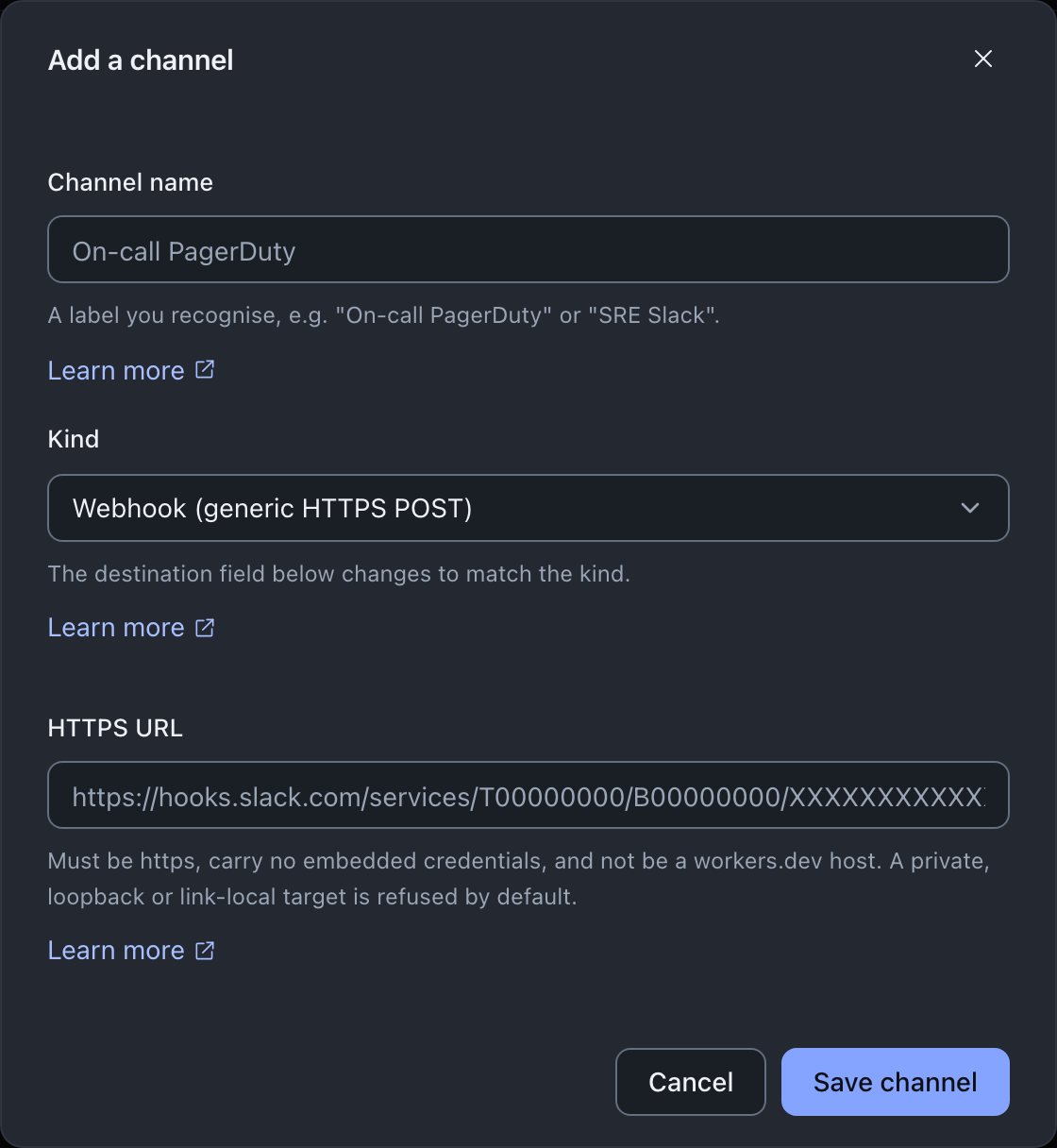
A channel holds your credential, not the vendor’s
A Slack or Teams webhook URL and a PagerDuty routing key are bearer credentials to your own sink. The engine stores them as your configuration and sends them only to the destination they belong to, and it never logs them. The console reinforces this in the table: a URL is shown middle-truncated so the host stays legible without reproducing the whole path, and a routing key is shortened the same way (channelTargetDisplay, console/src/screens/notifications/shared.ts). Email addresses are not bearer values, so they render in full.
What a channel never carries is also the point. There is no path here that reaches your backup data, a destination credential, a key, or a plaintext value. The body the engine builds is assembled only from the event and severity, the downpipe id and name, RFC-3339 times, and a one-line detail that is the downpipe name and its state.
Redaction-safe here means no customer backup data, no keys, and no secrets. It does not mean the payload is free of all identifying information: it does name your downpipes and their state, because an on-call responder needs to know which pipe is in what condition. That is your own operational data going to your own sink.
Rules: which events reach which channels
A channel on its own delivers nothing. A rule connects an event to one or more channels. The fields a rule carries are validated by validateRule in engine/src/notify-routing.ts, and the routing decision is the pure function resolveDelivery.
| Field | Meaning |
|---|---|
scope | global (every downpipe) or a single named downpipe. |
minSeverity | Deliver an event only when its severity is at or above this. Critical only delivers critical; info delivers everything selected. |
events | Either all, or an explicit list of selected events. |
channelIds | The channels this rule delivers to. A rule must name at least one. |
digest | Optional. off by default; daily or weekly batches the success-class stream instead of sending each occurrence. From engine 0.3.6, a success-class event raised to warning, such as a restore that fell short, is sent immediately. |
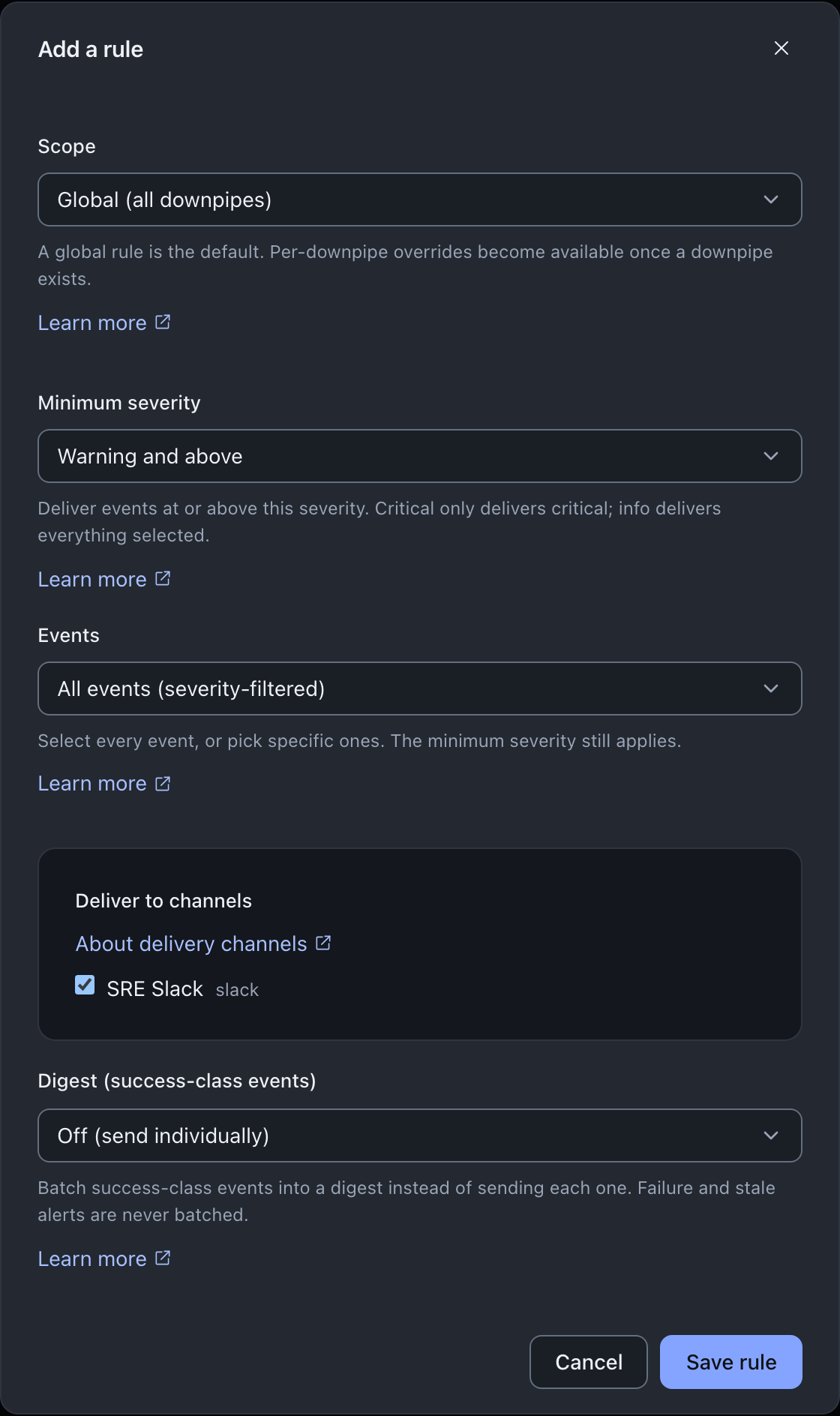
The per-downpipe override is the rule behaviour worth understanding. When any downpipe-scoped rule selects an event for a given downpipe, the global rules do not also apply for that event on that downpipe: the per-downpipe configuration wins. This lets you redirect or silence one downpipe’s stream without the global default doubling it up. With no per-downpipe rule for the event, the global rules apply as the default. Channels are then deduplicated by id across the winning rules, so a channel named by two matching rules is delivered to once.
What is on by default
You do not have to write a rule to get the alerts that matter most. When you add your first channel and no rule exists yet, the engine auto-creates a default global rule selecting backup-failure (critical) and backup-stale (warning). So failure and stale alerts are on as soon as there is somewhere to send them. Success events are off by default; to receive them you add a rule that selects them, and setting that rule’s digest to daily or weekly batches the stream so it does not become noise.
A rule whose minimum severity sits above the highest severity of every event it selects saves without error but can never deliver anything. The console warns you about that combination inline at edit time, because the engine accepts the rule rather than rejecting it.
The test send
A test confirms a channel is reachable before you depend on it. From the Channels tab, the Test action on a channel sends a fixed, info-severity line that names only that it is a test, then reports the delivery outcome (POST /notify/test, engine/src/admin/router-ops.ts). A successful send tells you the channel accepted the message; a failure tells you to check the channel configuration.
A test send is also recorded in delivery history, flagged as a test and badged “Test send” so it is never confused with a real event. You can filter the History tab down to test sends alone. Routing and digests never consult these rows, a test send only ever reaches the one channel you tested.
Delivery history
The History tab shows the recent delivery outcomes, newest first, read from a redaction-safe ring that is capped at 1000 entries, so old rows roll off (NOTIFY_HISTORY_CAP, engine/src/notify.ts). Each row records the event, its severity, the channel kind, the redaction-safe detail line, the time, and whether the send was accepted.
A “not delivered” row means the alert did not reach the channel. The channel refused it or was unreachable, or the engine’s own send-time screening or configuration stopped it. It never means a backup was blocked or failed. That separation is the whole point of the fail-open design described next. The History view says so, so that a failed delivery is not read as a failed backup.
Why delivery is fail-open
Notifications are observability, never a control. Every part of the delivery path is built so a problem degrades to “not delivered this tick” rather than escaping into a backup.
The send itself never throws. A url-based channel POST and the email send each swallow a network error, an abort, or a non-2xx response into a returned outcome (deliverPayload, engine/src/notify/types.ts, and sendEmail, engine/src/email.ts). The POST is also bounded by a five second timeout so a hanging sink cannot wedge anything.
The dispatch over multiple channels guards each one, so a single channel’s failure never aborts the rest (deliverEmission, engine/src/notify-routing.ts). Above that, the cron runs notifications after the run loop, inside an outer try and catch, so even an unexpected throw on the notification path cannot delay or crash a backup (engine/src/sched/scheduler-do.ts and the cron driver). The result is that a notification fault costs you a missing alert, at worst, and the condition persists in the engine so the next eligible tick re-attempts.
Who can change notifications
Any authenticated role can read rules and history. Reading the channel list needs notify.config, because a channel holds a bearer credential. Writing needs it too. From console 0.2.7, a role without notify.config still sees the Rules panel: each rule names its channels by id, because the channel names are in the list that role cannot read.
Every write, which is adding, editing, or deleting a channel or rule, and the test send, gates on the notify.config capability. The engine is always the enforcement point; the console mirrors the gate so a control you cannot use is shown disabled with the reason rather than hidden and then refused. Operators, Approvers, and Owners hold notify.config by default.
A channel or rule write also needs a fresh passkey
Adding, replacing or deleting a channel, and adding, replacing or deleting a rule, are all step-up gated. A cookie-borne session must give a fresh passkey assertion before the write lands, unless its passkey sign-in is less than five minutes old. Both directions are gated on purpose, and the reason is the availability of evidence rather than confidentiality. A notify emission is redaction-safe, so repointing a channel steals nothing, but silencing an account is the move made before an attack rather than after it, and suppression needs no delete at all: a channel repointed at a sink nobody reads, or a rule narrowed until it matches nothing, goes quiet with every record still in place.
The console runs the assertion and retries with the token it gets back. A bare break-glass token session is exempt. A Cloudflare Access session passes only while its Access sign-in is less than five minutes old; after that, the engine asks it to sign in to Access again.
Under dual control, a write waits for a second approver
If your account runs the optional dual-control gate, a channel or rule write does not take effect immediately. It returns a pending change and waits for a second notify.config holder to approve it, so the maker and the checker are different people. The console shows the pending state rather than a plain success toast, and the change applies once a second approver acts (upsertNotifyChannel and upsertNotifyRule, console/src/lib/api/client-notifications.ts, surfaced via channels.ts and rule-form.ts). So a notification write is not always instant; with dual control on, it is deliberately a two-person action.
Each applied write goes on the audit chain
From engine 0.3.6, the engine records each channel or rule write that it applies on the audit chain. The actions are notify-channel-change and notify-rule-change, and the audit log shows them as “Notification channel changed” and “Notification rule changed”. The engine also records a write that it refuses because the caller does not hold notify.config. An applied row names the kind of change and the stored channel or rule id, and never the channel URL, routing key or credential. A delete of a channel or rule that does not exist changes nothing and writes no row. Under dual control, the proposal and the approval write their own config-change rows instead.
Deleting a channel leaves the rules that used it
Deleting a channel removes the channel. It does not update the rules that referenced it. A rule keeps the deleted channel’s id in its list, and at delivery time an id with no channel behind it is skipped, so the rule still runs, still matches, and delivers to whatever other channels it names.
The confirmation warns you that a rule delivering only to this channel will stop delivering. It cannot tell you whether any of your rules actually do, so treat it as a prompt to check rather than as a report.
The case to watch for is a rule that named only the channel you deleted. It stays enabled and keeps matching its events, and it delivers to nothing.
The rules table names this state. A rule that is on but can reach no channel reads delivers nowhere in its Enabled column instead of on, and the Channels column shows which ids are the problem: a deleted channel appears as “unknown channel” and a switched-off one as “(disabled)”. So after deleting a channel, open Rules and look for that state. A rule left pointing at nothing is an alert you have stopped receiving, covering exactly the events you set it up for.
Deleting a rule has no such consequence: nothing references a rule, so removing one only stops that rule matching.
Where this fits
For the catalogue of the events that fire and their severities, and for the closed set of twenty-three names the rule form and the engine share, read what downpipes alerts you about. To see the run outcomes that drive failure and restore-test alerts, read the Runs activity view. Securing notification webhooks, in the day-2 section, covers the URL screening a webhook, Slack or Teams channel is held to. That screening includes the deliberate private-sink override and the DNS-rebinding limitation the screening does not catch. There is no header hardening to read about for a webhook channel, because you set no header on one: the POST carries content-type and nothing else, and the only kinds that authenticate through a header are Jira Service Management and ServiceNow, whose sealed credential rides in Authorization as the table above describes (deliverPayload, engine/src/notify/types.ts). For the capabilities that notify.config belongs to, see roles and capabilities; for the two-person gate, see dual control.
Last updated .