
Offboarding a member and the IdP boundary
Offboarding a member in downpipes is three jobs. Two of them happen in the console, and one does not. The console removes the departing person’s in-app role immediately. Removing the ways they can still sign in to the engine is a separate, deliberate action on the same tab. Ending their identity-provider access and their Cloudflare Access session at the edge lives outside the console entirely and is yours to do. The console records that you did it.
This page is for the self-hoster who is removing someone from the team. It walks the member-removal ceremony on the Access and security screen, sets out the three sign-in stores a role removal does not touch, explains the confirmation that records your IdP cleanup as an audit intent, and sets out the hard boundary so you do not mistake a removed in-app role for a closed door.
The member-removal ceremony
There is one removal flow, reached by the Remove action on the member’s row on the Roles and access tab. Every other entry point links here, so the same confirmation is always offered and the same record is always written (offboardingLinkCard points at the single ceremony, console/src/screens/access-security/fallback.ts).
When you confirm, the console removes the person’s in-app role through deleteRole (openOffboardModal, console/src/screens/access-security/roles-members.ts; deleteRole, console/src/api.ts). With config approval off, the default, the removal is immediate and audited. With requireConfigApproval on, the engine queues the removal for a second approver and changes nothing yet: the person keeps their role and their sessions until an approver applies it, and the console says the removal is pending and leaves the row in place. The engine is the authority for this: it removes the grant, refuses to remove the last Owner, and records the removal in the tamper-evident audit log. The flow is safe to repeat against someone who has already gone, and repeating it is not inert: an offboard of an address the role table cannot see still ends that address’s live sessions and still writes an audit entry, for the reason the next section sets out.
Role removal also bumps the engine’s own session epoch for that person, so their next request from any engine session fails closed rather than running on for the rest of the session lifetime. This is an engine-side revocation on the axes the engine controls. It does not reach the edge, which is the boundary the next section is about.
Removing the in-app role is the part the console can do, and with config approval off it does it at once. It strips the person’s privilege on the engine and bumps the engine session epoch so their engine sessions stop working on the next request. It does not, and cannot, end a Cloudflare Access session at the edge.
Authority that arrives through a group is not removed by Remove
A member’s effective role is the stronger of two sources: the role row held against their email address, and the highest role mapped to any group their identity provider asserts in their sign-in claim (resolveRole, engine/src/sched/scheduler-do-rbac.ts). A group-mapped grant needs no row of any kind. So a member whose authority comes only from a group claim has no row in the members roster at all, and Remove is not offered against them, because the roster has nothing to show.
Offboard that address anyway, from your directory tooling or by hand, and the engine reports that nothing was deleted, because no grant existed to delete. What it does do is end their live sessions: it bumps that address’s session epoch and records a session termination in the audit log, so the cookie they are holding stops working on its next request rather than running to its natural expiry.
Ending the session is not the same as removing the authority, and this is the part to plan for. The next time they sign in they resolve to the same role, because the group mapping still confers it. What removes the authority is removing the person from that group in your own directory. Until you do, the engine keeps granting them the role every time they authenticate, and it is right to: the claim it is handed still says they hold the group.
Revoking sign-in factors does not close it either. A member who signs in through a group claim usually holds no passkey credential, no banked recovery codes and no unredeemed invite, so the revoke finds nothing to remove and deliberately does not terminate a session on the strength of a revocation that closed no way in (revokeSignInFactors, engine/src/sched/scheduler-do-signin-factors.ts).
A group-claim member is offboarded in your directory, not here
For a member whose role comes from a group, the console-side offboard ends the session they are holding and nothing more. Removing them from the group in your identity provider is the step that removes the authority. Treat it as part of the same ceremony as the IdP cleanup below, not as a follow-up you can leave for later, because in the meantime a fresh sign-in restores their full role.
Why the offboard does not delete the group mapping
A group-to-role mapping is estate policy about a directory of people, not one person’s grant. Deleting it during an offboard would demote everybody who holds that group rather than the person leaving. So the mapping is deliberately left untouched, and narrowing who holds it is a change you make in your directory or on the mapping itself, never a side effect of removing one member.
A recovery import re-grants the roles the export carried
Rebuilding a wiped control plane from a signed export re-applies every role grant in that export, bound grants by their stable subject and pending ones by email, without checking them against anything else. That is deliberate: the disaster this path exists for is one where the audit chain is gone, so there is nothing left to check the export against, and refusing would leave the estate with no Owner and no way back in.
It cannot resurrect authority on a live estate. Both recovery paths refuse outright unless the role table is empty, and there is no force overwrite. The manual rebuild also needs an empty control plane. The staged confirm needs the recovery state that the engine sets when it finds the plane empty. What it does mean is that a member offboarded after that export was taken is granted their role again by the recovery, so re-run the offboard against the recovered estate before you hand it back to the team.
The separate estate import, the one that recovers a definition into a fresh account, is the opposite case and imports no authority at all: roles, group and custom roles, identity-provider connections and the export’s org policy are never applied by it.
Removing the role does not remove the ways they sign in
This is the step to plan for, and it is the one an offboarding is most likely to stop short of. Removing the in-app role removes their authority. It does not remove their credentials, and there are three of those, not one.
The engine keeps every way one person can authenticate in three separate stores: their WebAuthn passkey credentials, their banked recovery codes, and any passkey invite issued to them that has not yet been redeemed or expired. A passkey is the hardest of the three, because it needs the physical authenticator. The other two are bearer secrets. A recovery code still signs the person in, with whatever role the engine resolves for the address; with no role row that is the viewer floor. After deleteRole removes the role row, the engine does not let either secret enrol a fresh passkey: recovery sign-in answers enrolPasskey: false, the passkey self-add route refuses an address that is off the roster, and the engine refuses an unredeemed invite for an off-roster address the same way (rosterRefusesEnrolment, engine/src/admin/signin-factors.ts). The roster check fails open: if the engine cannot read a populated role table, it does not refuse.
deleteRole touches none of them. So an account can read “no credentials” for a departed member while two live ways in stand in their name.
Read the person's sign-in factors before you call the offboarding done
An offboarding that removes the role and stops there leaves a departing member holding whatever recovery codes and unredeemed invites they already had. A recovery code is still enough to sign back in with viewer access, and if the role table cannot be read, either secret can still enrol a new authenticator. Removing them is a separate, deliberate action, described below; do it as part of the same ceremony rather than assuming the role removal covered it.
GET /admin/signin-factors?email=<address> reads what one person still holds: their credential count and ids, whether recovery codes are present and how many are unconsumed, and how many invites are live with the soonest expiry. It reports and never deletes, and it is redaction-safe, so it carries no code, no code hash and no invite token. You can read your own factors with no extra capability. Reading another person’s factors needs roles.write. If you omit ?email=, it reads the whole account, which also needs roles.write.
POST /admin/signin-factors/revoke with {"email": "<address>"} is the write: it removes all three stores for that address in one operation. When that closes a way in, it writes one audit entry and terminates their sessions. It is roles.write, has no self-service arm (revoking your own every factor is a self-lockout with no legitimate use), and carries the sole-Owner floor, raised to two Owners while dual control is on, so it cannot be used to strand the account with no Owner. Dual control does not queue it for a second approver.
It is also step-up gated. A cookie-borne session must give a fresh passkey assertion before it runs, unless its passkey sign-in is less than five minutes old. Plan an urgent offboarding around that: this route is the one in the engine that destroys recovery codes, which cannot be re-derived, and it needs the authenticator of the person doing the offboarding, not the person being offboarded. Its receipt counts what it removed per store. The receipt reports live and expired invites separately, so a call that swept only dead records cannot read as one that closed a way in.
Why this is not part of Remove member
An email can hold authority from a role row and from an identity-provider group claim at the same time, and the effective role is the strongest of the two. For such a member, removing the role row is a demotion to whatever their group still confers, not a departure. Folding factor destruction into that would mean demoting a colleague who remains a legitimate user also destroyed their authenticator and their recovery codes, and recovery codes cannot be re-derived. Deliberate removal should revoke; a demotion should not; deleteRole cannot tell which one it is being asked to do, so the revoke is told explicitly instead.
Where the control is in the console
Both routes are on the Roles and access tab, under Sign-in factors (who can still sign in). It is a second table rather than a column on the members roster, and the reason is what the roster cannot show: an email whose role row was deleted keeps its passkey credentials, its banked recovery codes and any unexpired invite, so it is not a row in the roster at all. Each row states a verdict, “can sign in”, “no way in” or “cannot be judged”, and an inventory of what that email holds. Revoke sign-in on a row opens a confirmation whose action is Revoke every factor.
Two refusals sit in front of the control. The console refuses a revocation of your own factors before the call, and the engine refuses it too (revokeSignInFactors, engine/src/sched/scheduler-do-signin-factors.ts), so a roles.write holder cannot strip their own factors by calling the API directly either. Revoking an Owner’s factors is disabled for anybody who is not an Owner, which mirrors the engine’s own anti-escalation guard rather than offering a control that fails server-side. If the engine does not serve the sign-in factor read, the panel says so rather than showing an empty table, because an empty table here would read as “nobody can sign in”, which is the false negative this surface exists to stop.
The hard boundary: the console cannot deprovision your IdP
The console cannot deprovision your identity provider, and it cannot end the person’s Cloudflare Access session. Both of those live at the edge and inside your own identity provider, which the console never holds a credential for. The console removes the in-app role and records that you did the IdP cleanup; it does not perform it (openOffboardModal copy, console/src/screens/access-security/roles-members.ts).
The reason is the same no-custody constraint that runs through the rest of the product. The console stores no credential, and it writes no secret you enter to browser storage or to the URL (access-security.ts responsibility rows). When you use Cloudflare Access, it enforces sign-in at the edge, in front of the console and the engine. Ending an Access session is an edge action, not a console switch.
A removed in-app role does not end a Cloudflare Access session. If the person can still pass your Access policy, they can still reach surfaces the edge lets through until you remove them in your identity provider or end their Access session. The IdP step is necessary, and on an Access-fronted account it is the one that closes the edge; it is not sufficient on its own, because the engine sign-in factors above sit behind the edge and survive both the role removal and the IdP cleanup.
The I-have-removed-this-person confirmation
The removal modal offers a checkbox: “I have removed this person in our IdP / Cloudflare Access.” It is not a control that changes anything at the edge. It is a record that you say you did.
When the checkbox is ticked, the console records an audit intent, the access-policy-change-intent marker, through the one audit write the console is allowed to make (openOffboardModal calls recordAuditIntent("access-policy-change-intent"), console/src/screens/access-security/roles-members.ts; recordAuditIntent, console/src/api.ts). From engine 0.3.6, that write needs roles.write, the capability that the removal also needs, so the Owner and the Access admin can both record it. An older engine accepts it from an Owner only. The write is best-effort: if it fails, the removal itself already succeeded and is audited, and the intent simply does not get its own entry. The console then tells you that the confirmation was not recorded. The modal also links out to the Cloudflare Access users dashboard so you can do the real step in the same flow.
The confirmation marker is best-effort audit intent, not proof. It records that you stated the IdP cleanup was done; the engine cannot witness the out-of-band step, so it never asserts the IdP actually changed. The authoritative record for an edge or IdP change lives in Cloudflare, deploy, and identity-provider logs, not in this marker.
Sign-out semantics
Signing out is a related but separate action, and its scope is easy to over-read.
Signing out clears the console’s in-memory session state. If you signed in with a passkey or single sign-on, it also asks the engine to terminate the session server-side. The engine does not merely clear the browser cookie: it bumps the identity’s session epoch and per-subject not-before instant, so the just-signed-out token and any exfiltrated copy of it fail closed on their next request. That signs the account out of all its engine sessions, not just one passkey session (logout handler, engine/src/admin/router-auth-flow.ts; passkeySessionLogout, engine/src/sched/scheduler-do-session.ts). What it does not do is end a Cloudflare Access session or the session at your identity provider, which both end outside the console. Any key files you downloaded during setup also remain on the operator’s disk; signing out is a session action, not a cleanup of local files.
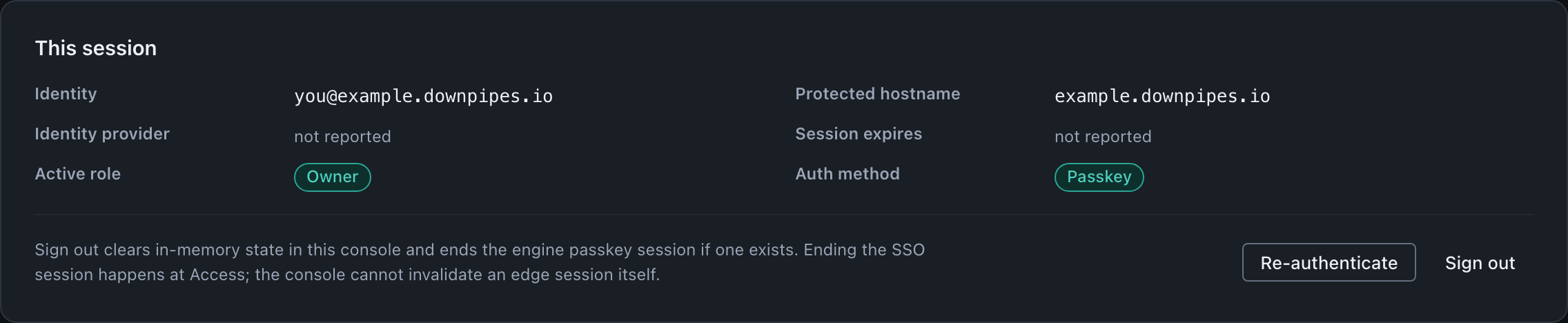
The card states that boundary in place, so the limit is read at the moment of signing out rather than only here.
| Action | What it does | What it does not do |
|---|---|---|
| Remove member (in-app role) | Removes the role row at once, audits it, bumps the engine session epoch; with config approval on, queues the removal for a second approver instead | End a Cloudflare Access session at the edge; deprovision the IdP; remove the person’s passkey credentials, banked recovery codes or unredeemed invites; remove authority a group claim confers |
| Offboard an address with no role row (group-claim member) | Ends their live engine sessions and audits the termination | Remove any authority. They resolve to the same group-mapped role on their next sign-in until you remove them from the group in your directory |
| Revoke sign-in factors (Roles and access, Sign-in factors) | Removes all three engine sign-in stores for one email in one operation; when that closes a way in, audits it and terminates their sessions | End a Cloudflare Access session at the edge; deprovision the IdP |
| Tick the IdP-cleanup checkbox | Records an access-policy-change-intent audit intent and links out to the Access users dashboard | Prove or perform the IdP change |
| Sign out | Clears in-memory console state. After a passkey or single sign-on sign-in, also terminates the engine session server-side (bumps the session epoch and per-subject not-before), signing the account out of all its engine sessions so a captured token also fails closed | End a Cloudflare Access session or the session at your identity provider; delete downloaded key files from disk |
The through-line across the table is that the console acts on what it controls, the in-app role and the engine session, and records, rather than performs, the steps that belong to the edge and your identity provider.
Where this fits
Offboarding one member is part of the larger picture of who can do what and how someone leaves entirely. For the roles you are removing and what each one can do, see roles and capabilities. For the audited intent markers and how out-of-band changes are recorded against the engine, see the audit log. When you are winding the whole product down rather than removing one person, the controlled exit sequence covers removing every role, deprovisioning identity in your own dashboard, and keeping your offline keys; that exit sequence is its own subject and is not the per-member ceremony described here.
Last updated .