
Choosing your recovery posture: strict break-glass-only or an added operational key
Every backup downpipes seals is encrypted to your break-glass key, which is generated on your side and never sent to the engine or the vendor. The break-glass private key is the universal way back into your data, and the vendor never holds it. Your engine, running inside your own Cloudflare account, never holds it either.
What your engine does or does not hold is the one remaining choice, and it is the recovery posture. The default is strict break-glass-only: the engine holds nothing that can decrypt any archive. You can instead add an operational key, whose private half lives in the engine, so the engine can read its own backups back and test that they restore without you present. This page sets out what each posture gives you, what each one costs, and why the default is the safer place to start.
The two postures at a glance
Both postures protect your data with the same break-glass key, so both are equally recoverable offline. They differ only in whether the engine also holds a key that can read your archives in place.
| Default: strict break-glass-only | Optional: add an operational key | |
|---|---|---|
| What the engine holds | The signer key, the break-glass public key and the configuration keys | The signer key, the break-glass public key, the configuration keys, and an operational key (public and private) |
| Can the engine decrypt your archives? | No: in this strict posture it holds no key that can decrypt an archive | Yes, through the operational private key |
| In-account read-back with no person present (the automated drill, scheduled restore tests, retention pruning) | Not available; the drill returns ok:false naming the absent key | Available |
| In-account read-back that needs no standing key (verification at seal, the hourly canary) | Available, at the same keyed tier as the other posture | Available |
| In-console restore | Available with you present, supplying your key in the browser | Available |
| If your own Cloudflare account is fully compromised | Nothing the engine holds can read any archive | The operational private key can read past archives |
Recovery with your offline identity.key | Recovers every archive | Recovers every archive |
| Changing your mind | You can add an operational key later from the Keys screen, with no re-key and no effect on archives already sealed | Removing it later does not protect archives already sealed while it was present, because each archive is wrapped to the keys in force when it was written |
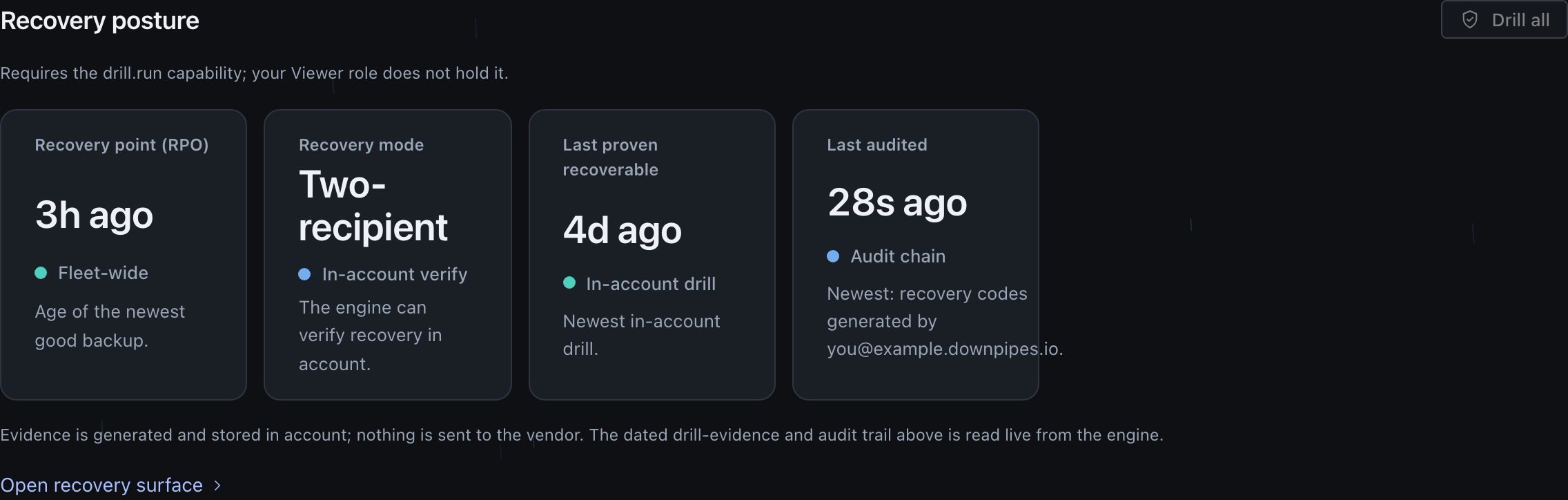
In the default strict posture, the Recovery mode tile reads Break-glass-only, marked Attended verify. Its note states that by design no key in the engine reads the archives, and that you prove recoverability with attended verification.
Strict break-glass-only
In the strict break-glass-only posture the engine holds the signer private key, the break-glass public key and the configuration keys. The configuration keys open only its own configuration export and the credentials the console stores, never an archive. It can still seal and sign new backups, because sealing wraps an archive to a public key and signing uses the signer key. It cannot read any archive back, because it holds no private key that decrypts one.
This is the posture to choose when the threat you most care about is a compromise of your own Cloudflare account. With no operational private key present, a full account compromise yields no key that opens an archive. The attacker still gets the cleartext run metadata and the ciphertext from your destination, the same as an attacker with only the bucket bytes, but they cannot read your values, names or secrets.
The cost is narrower than it sounds, and this is the posture most teams talk themselves out of.
What still runs in-account, automatically, with no key present: verification at seal and the hourly canary. The seal path holds the run’s own per-run key while it is finalising that run, so a break-glass-only engine reaches the same keyed verification tier as an operational one, and the canary runs with no skipped checks. The exception is an engine that sets SLICED_RUNS_DISABLED, which switches sliced runs off: its buffered seal does not hand the per-run key to the verify step, so each run is verified at seal without the keyed decrypt check (verify at seal). Your backups are not unverified in this posture.
What still works, with you present: the in-console restore. The engine cannot open a run on its own, so the console’s break-glass panel takes your break-glass private key in the browser and recovers the run’s key there. The browser sends only that one run’s key to the engine. Your break-glass key is never sent, and the browser wipes both keys when you leave the panel. There is no terminal step.
What you actually give up is the UNATTENDED work, the operations that need a key at a moment when nobody is there to supply one: scheduled restore tests, the automated drill, and in-account retention pruning. In this posture runDrill returns ok:false with a reason naming the absent in-account read-back key. The scheduled retention pass defers the same way rather than pruning silently; the console’s break-glass prune panel runs the SAME prune on demand instead, with you present to supply your break-glass key in the browser, or you can run it offline with downpipe prune.
Tightening is the reversible direction
Tightening to break-glass-only is performed in the console with no terminal: an owner pastes a one-shot scoped token, and the engine removes both operational secrets itself through the Cloudflare API. The route POST /admin/keys/break-glass-only calls removeOperationalSecrets, which deletes OPERATIONAL_PRIVATE and OPERATIONAL_PUBLIC. After that the engine holds no operational key.
Tightening does not lock you in. An engine that holds a signer and a break-glass key but no operational private key is offered a targeted add on the Keys screen. The add installs only a fresh operational pair over POST /admin/keys/add-operational. That route never reads or writes SIGNER_PRIVATE or BREAK_GLASS_PUBLIC, so returning to two-recipient is not a re-key: your identity.key, your break-glass key, your signer and your recovery sheet all stay the ones you already have, and every run stays signed by the same signer. The targeted add refuses when an operational key is already present, because replacing one is the full ceremony’s job rather than this route’s.
The direction that cannot be taken back is adding the key, not removing it
Removing the operational key is reversible with the targeted add above. Adding one is the direction that does not fully undo. The recipient set is baked into each archive when it is sealed and is never rewrapped afterwards, so every run written while an operational key was present carries a wrapped key for that operational recipient permanently. Deleting the key later stops the engine reading those archives, but it cannot retract the exposure of a key that was live in your account while they were written. Archives sealed before the add stay break-glass-only recoverable, forever.
Your engine still recovers its own configuration
A break-glass-only engine holds no key that opens an archive, and it still opens its own configuration. The key ceremony generates a dedicated config recipient in both postures, so the config export is sealed to a key that opens that export and nothing else.
There is deliberately no fallback to the operational key: a fallback would couple config recovery to the archive key for exactly the estates that chose to remove it.
Your break-glass key stays the first recipient, so the offline reader still unseals an export and an operator holding only their offline key still recovers their configuration.
It is data-loss-safe
Removing the operational key does not risk your data in the ordinary case: no break-glass rotation behind you, one continuous break-glass identity. Each run is wrapped to the break-glass recipient as well as the operational one, so the offline identity.key recovers everything, including archives that were sealed while the operational key was present. Deleting the operational secrets then removes the engine’s ability to self-test-restore and nothing more.
That guarantee narrows if you have since rotated your break-glass key. An archive sealed to an older break-glass vintage, while the operational key was also present, opens with either key before the switch; after the switch it opens only with the old identity.key you kept at rotation time (see rotating your keys). The engine does not let this happen silently. Before the switch it checks your run history and refuses with a 409 when removing the operational key would strand such an archive, or when it cannot rule that out. “Cannot rule that out” covers more ground than it sounds, and one branch of it is ordinary rather than exceptional: one inventory pass reads back at most the 400 most recent successful runs, so an account holding more than 400 successful runs trips the guard every time, even with every archive wrapped to your current break-glass key. An unreadable run history does the same.
Read the console’s wording carefully, because the two branches say different things. On the strand-known branch it states how many archives are affected. On the cannot-determine branch the count is zero because nothing was read, not because nothing is at stake, and the message says so in those terms. Either way the one sanctioned way forward is the same: a second, explicit confirmation that you hold the identity.key for every older vintage.
An owner starts the switch on the Keys screen
The strict break-glass-only control is owner-gated. Anyone without the owner role sees the reason rather than the control, and the change is rate-limited so it cannot be hammered.
You confirm the irreversible action
The switch is confirm-to-act: it never fires on a stray click. A confirmation states that the engine will no longer read or test-restore your archives, and that recovery is unaffected because your offline key still opens every archive. Because the route is step-up gated, a cookie-borne session is also asked for a fresh passkey assertion before the removal runs, unless it signed in with a passkey in the last 5 minutes.
The engine removes both operational secrets
Using your one-shot token, the engine deletes
OPERATIONAL_PRIVATEandOPERATIONAL_PUBLIC. The token is used once for this call and is never stored or logged. Revoke it on the Cloudflare API Tokens page afterwards.The console confirms the new posture
The console reads the engine’s status once. If the operational private key is gone, it states that the engine is now break-glass-only and holds no key that can read your archives. If not, it asks you to re-open the tab to confirm. The change is recorded in the audit log by name only.
Adding an operational key
There are two ways in, and which one the console offers you is decided by the state of your engine rather than by a menu.
At the first key ceremony, asking for an operational key generates one and installs both halves into the engine, alongside the signer private key and the break-glass public key. Setup states this before you choose and again before the install. The posture question says the operational key opens your archives and a breach could read them. Apply warns before the install that it puts a key that can decrypt your backups in your engine (console/src/screens/setup/b/q-apply.ts). That key is what makes unattended restore proof possible.
On an engine that already holds a signer and a break-glass key but no operational private key, the Keys screen offers the targeted add instead, over POST /admin/keys/add-operational. It generates and installs only the operational pair, leaves the signer and the break-glass recipient untouched, and needs no new identity.key. Archives sealed before it stay break-glass-only recoverable; only runs sealed afterwards gain the operational recipient. For runs sealed after the add, scheduled restore tests, drills and in-account retention pruning run on their own with no further action.
That self-test ability is the reason to add this key. With the operational private key present, the engine can open a run, recompute its integrity chain and restore a sample of records on its own. That is how scheduled restore tests, the in-console restore and the recovery drill work. A drill returns the records it verified, whether the run is the latest for its downpipe, and a measurement of how long the read-back took. A clean drill shows the backup restores, not only that it was written.
Presence is not validity
The Keys screen reports each key as present when its binding is set, never that the value parses or that a restore will succeed. The drill is what proves recoverability; presence only tells you the engine has a key by that name.
The residual you are accepting
The cost of adding an operational key is a real residual, and it is your own account, not the vendor. The operational private key is decryption-capable and it sits in the live engine. An attacker who fully compromises your Cloudflare account seizes that key, and with your destination bytes they can read past archives through the operational path. The break-glass private key stays out of their reach because it is offline, so they still cannot recover through break-glass, but the operational path is open to them.
This is the residual the threat model names for adversary two, a full Cloudflare account compromise. The console discloses it at the decision point in setup, on the Keys screen, and here, so that adding the key is an informed choice and never an accident.
How to decide
Pick the posture that matches the threat you are most worried about, and accept the cost that comes with it.
Stay break-glass-only
The default, and the right choice when the threat you most care about is compromise of your own account. A full account compromise then yields nothing readable. You accept that the engine cannot self-test-restore, so recovery and proof are exercised with your break-glass key, in the browser or at an attended verification.
Add an operational key
Choose this when you value automated, in-account restore drills and want the engine to prove your backups recoverable on its own. You accept the disclosed residual: a full compromise of your own Cloudflare account could read past archives through the operational key.
Break-glass rotation is a separate decision
Rotating the break-glass key writes a new BREAK_GLASS_PUBLIC and changes nothing else. It is not a re-key and it is not the posture switch. Archives sealed before a rotation can only be opened by the old identity.key, so keep it. New archives are sealed to the new key from the next run.
The controls, gates and what is recorded
The strict break-glass-only switch and break-glass rotation are both owner-exclusive and rate-limited, and both run through a one-shot scoped Cloudflare token that the engine uses for that one operation and never stores or logs.
The audit entry for the switch records the action by name (operational-removed) and the operator’s own identity, with no key values. The audit log always carries operator identity, so the entry is durable evidence of who changed the posture and when. A later targeted add records its own entry by name (operational-added), so the trail carries both directions.
removeOperationalSecrets deletes the operational secrets idempotently: a secret that is already gone is treated as a success, so a repeated switch is safe. The deletion takes effect on the running engine without a redeploy. The signer private key and the break-glass public key are untouched by the switch, so the engine stays able to seal and sign new backups in either posture.
A drill in the break-glass-only posture returns ok:false rather than throwing, with a plain reason: there is no in-account read-back key. It reports the posture you chose; it is not a failure. The message then names the in-product routes first: prove recovery with an attended verification, or add an operational key to bring unattended drills back for future runs. It keeps offline recovery with the break-glass key and the reader for archives sealed before that. The offline reader remains the channel that needs neither the vendor nor Cloudflare, so it is still the one to rehearse.
Recording that you accepted the posture
Separately from choosing a posture, you can put on the record that you accepted the one you are in. The Keys screen shows the acceptance statement in force, a tick box reading “I have read the statement above and understand my choice”, and a Record this acknowledgement button that stays disabled until the box is ticked.
The posture on that screen is not a picker. It is whatever your engine reports: operational key present, or offline key only. That is deliberate, because a picker would let someone record an acceptance of a posture their engine is not actually in.
Confirming records five things in your tamper-evident audit log, under your signed-in identity: the posture, the version of the statement, a SHA-384 hash of the exact words you were shown, whether it came from the Keys screen or from guided setup, and the kind of sign-in you used. It changes nothing about your keys, and the statement text itself is never logged.
The engine refuses to record in two cases:
- If the words your console displayed do not match the text the engine holds for that statement version, the engine refuses instead of recording. The point of the record is that what was shown is what was hashed, so a mismatch has to fail rather than quietly record different words.
- If the statement version is unknown or stale, the engine refuses and asks you to reload. In practice that means your console and engine are on different versions, so the fix is to update them rather than to retry.
Both surface in the console as one message naming the version-skew cause. From console 0.2.7, any other failed record shows the engine’s reason instead, for example “rate limited (HTTP 429)”. A rate limit or a lost connection does not tell you to update.
Related reading
For why the vendor never holds your data or keys, and what each adversary can and cannot do against the platform, read the no-custody trust model. For how the keys are generated in your browser and what goes on your recovery sheet, read the key ceremony and recovery kit.
When you need to exercise recovery in the break-glass-only posture, break-glass offline recovery covers the MIT-licensed reader, your identity.key, and the steps to recover with neither the vendor nor Cloudflare in the loop.
Last updated .