
What to expect: reading your security centre
The security centre scores your recoverability and access posture and maps each finding to a named control standard. It is a read screen: the score is a pure computation over your account’s own observable state, it is recomputed live every time you open the screen, and the vendor reads nothing. This page walks you through what the score means, what a single check states, and what the coverage rollup shows, so nothing on the screen is a surprise.
Every check on the screen carries only redaction-safe metadata: an id, a title, a severity, a status, the named control it maps to, what was observed, how the determination was made, and how to fix it. No check can carry a key, a value or a fingerprint. That property is why the whole screen can be computed in your own account without anything sensitive leaving it.
What you will read, in one line
You read the posture score to see where you stand, work the checks that need attention from the top of the ranked list, then read the coverage rollup to see which of your resources are actually protected. Grading a finding is a separate Owner action; reading the posture needs no special role.
Read the posture score
The screen opens on the posture score: a single 0 to 100 number with a tone label (strong, fair or needs work), and a breakdown across four tiles.
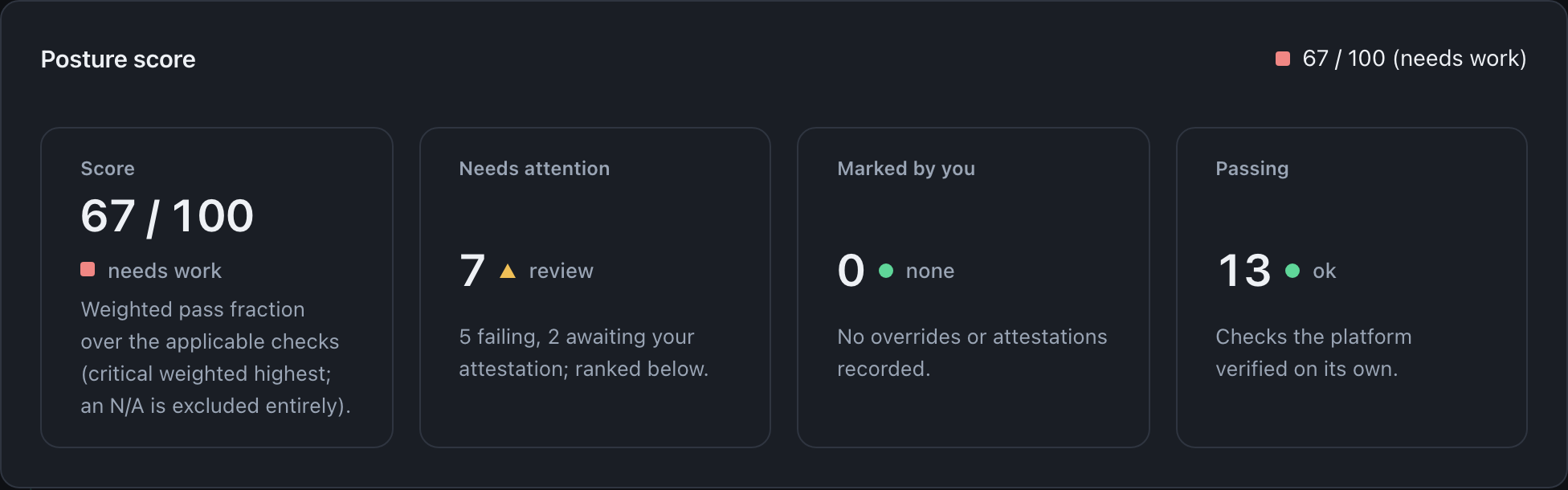
What it means. The score is a weighted pass fraction over the applicable checks: each check has a fixed severity, a critical check weighs far more than a low one, and a check you mark not applicable is excluded from the score entirely. The tone follows the number: at or above 90 it reads strong, at or above 70 it reads fair, and below 70 it reads needs work, as the example does at 67. The Needs attention tile counts the failing and awaiting-attestation checks that are ranked below; Marked by you counts the determinations you have recorded, each of which stays listed with your reason; Passing counts the checks the platform verified on its own.
What to do. Read the Needs attention count first. It is the work surface, and the checks behind it are ranked most severe first so the worst open item is always at the top.
Read a check in full
Each check is a card that states its finding without you needing to read any source. The needs-attention checks are shown first and in full.
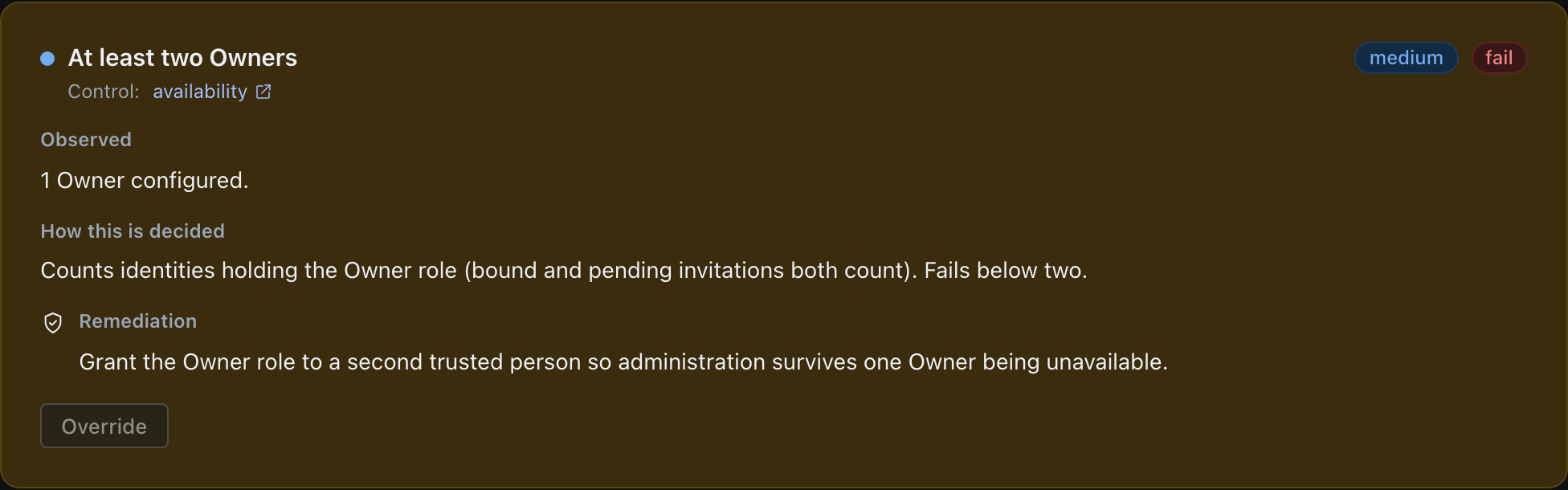
What it means. The card names the control the check maps to (here, availability), a severity that sets its weight, and a status. Observed is the plain fact the check found, “1 Owner configured” in the example. How this is decided is the one-line method, so the verdict is never a black box. Remediation is the fix. A check the platform cannot verify by itself reads “needs attestation” in amber rather than a red failure you have no way to clear, so it does not earn its weight until you grade it.
What to do. Work the ranked list from the top; each card carries its own remediation. Recording a determination (attesting a pass, describing a compensating control, marking not applicable, or accepting the risk) is an Owner action, so for any other role the Override control shows disabled, as on the card above.
Being an Owner is necessary and not sufficient. Recording a determination needs a recent strong authentication, because the route sits in the engine’s step-up set, and so does withdrawing one afterwards. A passkey session that authenticated within the last five minutes satisfies that on its own, so if you have just signed in with a passkey you will not be prompted at all. Past five minutes, or on an OIDC or SAML session, the console runs a fresh passkey assertion at the moment you record. Have your authenticator to hand before you sit down to work a long list.
A caller on the break-glass token is exempt. A Cloudflare Access caller passes only while its Access sign-in is less than five minutes old; after that, the engine asks it to sign in to Access again.
Read the coverage rollup
Below the checks, the coverage section answers a different question: which of your resources are backed up, and which are only claimed to be.
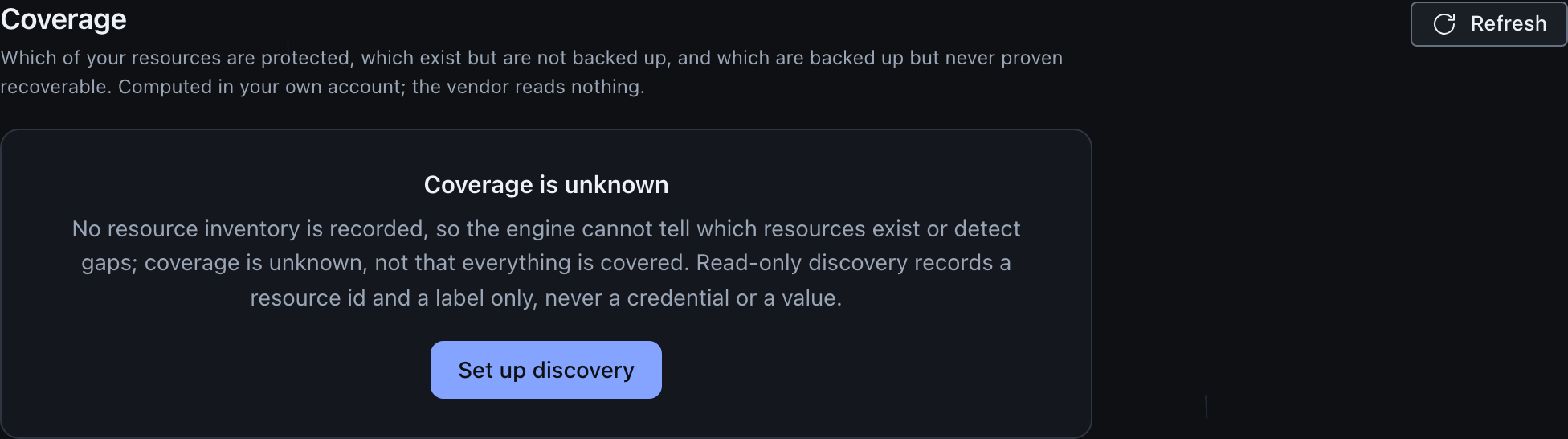
What it means. Until you record a reference inventory the section does not guess: it reads coverage is unknown, because the absence of an inventory means the engine cannot tell what exists, never that everything is covered. The inventory records only a resource id and a label, never a credential or a value. Once an inventory is in place this becomes a rollup that is deliberately conservative: a resource is only ever called protected when it is backed up, its recent-run history holds a successful run, and a restore has actually been proven; a resource that has a downpipe but lacks a successful run or a proven restore sits in not yet proven and is never shown as safe; a resource that exists with no downpipe covering it sits in not backed up.
What to do. Record the inventory, then clear the not-backed-up gaps and prove recoverability for the unproven ones. An access-admin, an owner, or a custom role that holds
access.policysees Populate inventory, which opens the form that records the inventory. Everyone else sees only Refresh, and the panel states that someone who can manage access policy records the inventory. Read-only discovery on Sources does not record an inventory. The full detail is on coverage and gaps.
Where the numbers come from
The score and the checks are one computation over your account’s own observable state: presence booleans, per-downpipe recency, expiry states and a few counts, run through a fixed function that has no input or output of its own. The coverage rollup is a second computation, over your recorded inventory and your downpipes. The console renders the result. The encryption is post-quantum hybrid, and the audit trail is tamper-evident: an alteration is detectable, not prevented. For how the score is weighted and what each of the named checks looks at, read the posture score reference.
Last updated .