
Licensing, editions, and the control-plane
This page explains how downpipes is licensed, what its tiers are, and what the vendor-side control-plane is from your point of view as an evaluator. It covers the commercial model and the one vendor-operated Worker that your engine and console can call.
The shape of it stays small on purpose, however many tiers sit on top of it. The engine runs in your own Cloudflare account; the vendor never holds a backup, a recovery key or a Cloudflare token, at any tier. The control-plane exists to mint a licence your engine verifies and to keep the operator’s own customer-of-record ledger. For Enterprise, Custom and MSP it takes no payment itself: there is no checkout for those tiers. Business self-serve is the one exception: GET /buy/:tier redirects to a Stripe-hosted checkout page, so a card number is typed into Stripe’s own page and never reaches this Worker. It cannot reach your account, and a licence never gates a backup or a recovery, whatever the tier and whatever the volume behind it.
What it costs
There are two bills, and only one of them is ours.
What you pay us. Nothing, unless you buy a paid plan. Community is free, fully featured and free forever, and it is the default: a Community customer simply carries no licence token. Business is a self-serve annual subscription. You buy and manage it through Stripe’s own hosted checkout and customer portal, at the prices on the pricing page, the one place they appear.
Enterprise and Custom are quoted, invoiced and paid by bank transfer, for an annual or a three-year term. The vendor sells MSP / MSSP by conversation and invoices it the same way. It costs US$490 per client estate per year, for 10 to 50 client estates, under the MSP / MSSP rider (msp-rider.pdf on the legal page). No online checkout, card processor or subscription exists anywhere in the product for Enterprise, Custom or MSP. The next section sets out the tiers, and what the paid ones actually buy.
What you pay Cloudflare. Everything else, and directly. The engine runs in your own Cloudflare account, so Cloudflare bills you at their own rates for the Workers requests, the Durable Objects and the archive storage the engine uses, including the operations each run performs against that storage. We add no markup and see none of it. Backing up more data, more often, and keeping it for longer all cost more. The floor is a Workers Paid plan; what sits on top of it depends entirely on your volumes, and the prerequisites set out what to work it out against.
We do not restate Cloudflare’s rates, because they are Cloudflare’s to change and only you know your volumes. Once you have sources and a schedule configured, the console’s calculator projects the storage and read side of that bill as a planning estimate. The estimate is described in predicting storage cost. It cannot answer the question before you have configured anything, which is why the answer above is prose rather than a number.
What the control-plane is, and what it structurally cannot do
The control-plane is the only vendor-operated Worker that your engine or console calls. The engine also pulls the signed update channel from a vendor-run static host, update.downpipes.io. The control-plane is a Cloudflare Worker reached on a custom domain (the workers.dev route is disabled by policy, matching the engine and console). It mints the out-of-band assurance licence that your in-account engine verifies, and it receives a content-free advisory beacon. An Enterprise, Custom or MSP prospect never reaches it directly: an enquiry goes to the vendor, and an operator mints the licence afterwards. The vendor runs the control-plane as a service and provides its source to no one.
The control-plane also keeps a customer-of-record ledger of who was issued a licence. Operators read it through the Access-gated admin portal at admin.downpipes.io. Tools read it through bearer-gated /admin/* routes, such as /admin/licences, /admin/licence/token, /admin/entitlement, /admin/deploy-ledger and /admin/cor-health. The public control.downpipes.io host refuses every /admin/* path. It does serve the read-only support-entitlement check, /support/entitlement, behind its own bearer.
Its only scheduled work is a daily renewal sweep. The sweep emails reminders ahead of an invoiced term’s expiry, and a renewal notice about 30 days before each Business renewal. An Enterprise, Custom or MSP sale happens by direct contact with the vendor, off this Worker entirely.
The limits below come from the threat model and are enforced by what the Worker holds and the paths it exposes.
| The control-plane | Position in code |
|---|---|
| Customer data | No backup or per-downpipe data. It does keep an operator-side customer-of-record ledger: for each licensed account, the organisation, named contacts, any allow-listed email domains, an invoice reference, the commercial term, operator notes, any Stripe customer and subscription ids, and the bound Cloudflare account ids, alongside the vendor-signed licence token (kept for the operator’s own re-retrieval). For support matching, the ledger also holds the purchaser’s email domains, the Cloudflare zones that consoles claimed from, and the domains an operator removed. It separately holds, only when an operator turns the beacon on, minimal beacon aggregates in a distinct BEACONS namespace. |
| Cloudflare tokens | None held. There is no binding, credential or code path by which it can reach a customer’s Cloudflare account, read a backup, or run a recovery. |
| Card data | None held, at any tier, and none received. Enterprise, Custom and MSP are invoiced and paid by bank transfer, off the platform entirely; a Business purchase goes through Stripe’s own hosted checkout page, so a card number is typed into Stripe’s page and never this product’s, and this Worker’s outbound calls to Stripe create a Checkout Session, list subscriptions, and retrieve one subscription and its schedule. |
| Secrets it does hold | The licence signing key (LICENCE_SIGNER_PRIVATE), the admin mint bearer (ADMIN_MINT_TOKEN) that gates the operator-only mint endpoint and the customer-of-record admin reads, a separate read-only entitlement bearer (ENTITLEMENT_READ_TOKEN), and the Stripe secret key and webhook signing secret (STRIPE_SECRET_KEY, STRIPE_WEBHOOK_SECRET). In production all of these live in the account Cloudflare Secrets Store, never in source. The beacon ingest key (BEACON_INGEST_KEY) is a plain Worker variable instead. |
| The break-glass key | Never reaches the vendor. Even a full compromise of the control-plane cannot decrypt a customer archive. |
| Reaching into an account | No inbound path exists that can touch a backup or a recovery. |
The licence signing key is not your encryption key and not your break-glass key. It is the vendor key that signs licences, and the only thing your engine ever does with the matching public half is check a signature. Your archive encryption keys and your offline break-glass key are described in the no-custody trust model; they live with you, never here.
The licence tiers, and one commercial model
The difference between tiers is people, paperwork and the volume a plan covers, never product capability.
Community is free, fully featured, and free forever. Every security control ships in it for everyone: external identity-provider sign-in, multi-factor authentication, Cloudflare Access, server-side role-based access control, the tamper-evident audit log, and the no-custody post-quantum hybrid cryptography. A Community customer simply carries no licence token, and Community is never minted: it is the engine’s fail-open default, not a grant anyone issues.
The paid offer is Business, Enterprise, Custom and MSP / MSSP. Business is a self-serve annual subscription bought through Stripe’s hosted checkout, at the estate-banded prices on the pricing page; Enterprise and Custom are invoice-billed and sales-assisted, a quote, a purchase order, and an invoice paid by bank transfer, for an annual or a three-year term. What a paid plan pays for is human work and, for Business, a support level and a volume band; the signed feature list a licence carries is a record of what was bought, and the engine echoes it but enforces nothing.
An operator mints the MSP band below, including for a Custom arrangement, and its band definition and the support-time check described here apply to it. Business comes in four estate-banded tiers (business-1, business-3, business-10 and business-25, covering 1, up to 3, up to 10 and up to 25 Cloudflare accounts). You buy one through Stripe Checkout at GET /buy/:tier and manage it afterwards through Stripe’s own customer portal, never a downpipes screen. Every Business subscription also includes, at no extra charge and issued automatically at purchase by the control plane, a Data Handling Statement, a Data Processing Agreement and a Security Attestation, signed and addressed to the customer, each verifiable by its own integrity hash at control.downpipes.io/documents/verify/<hash>.
| Tier | Motion | Volume band | Term |
|---|---|---|---|
| Community | Never minted | None; the full product, unbanded | No expiry |
| Business | Self-serve, Stripe Checkout | 1 / up to 3 / up to 10 / up to 25 Cloudflare accounts, each with a protected-data allowance | Annual, auto-renews until cancelled, with a renewal notice about 30 days before each renewal |
| Enterprise | Invoice-billed, sales-assisted | Up to 25 Cloudflare accounts, the same ceiling as Business’s largest band | Annual or three-year, manually re-minted |
| MSP / MSSP | Sold by conversation, invoice-billed and operator-minted under the MSP / MSSP rider | 10 to 50 client estates at US$490 per client estate per year, each estate one client Cloudflare account covering 1,000 GB protected | Annual, re-minted by an operator |
A “Custom” arrangement is not a separate value on the licence token: it mints under Enterprise, or under the MSP band, with bespoke invoice terms rather than a standard annual or three-year term, including a standing Enterprise agreement that needs to cover more than 25 Cloudflare accounts. The token’s tier field carries a value from a closed set the engine recognises, and the tiers above are the ones the control plane mints; a value outside that set grants nothing and falls open to Community (TIER_VALUES and the future-tier reason code in engine/src/admin/licence.ts).
Enterprise buys services, not a feature unlock
This is deliberate: security is not an entitlement and never appears in the licence. The signed feature list tierToFeatures names seven services for Enterprise: audit assistance, ISO 27001 documentation support, SOC 2 evidence support, security-questionnaire support (such as UpGuard), compliance advisory, priority support, and a dedicated account manager. The Enterprise offer adds signed disaster-recovery drill evidence and a periodic backup-assurance attestation, which are described in the console’s ENTERPRISE_SERVICES list (console/src/lib/billing.ts) rather than carried in the signed token. No product capability sits behind any licence, at any tier.
A licence enforces nothing on the data or recovery path, whatever it was bought for. The fail-open section below describes this in full.
Volume bands, and what “protected data” means
Each band travels on the licence token as ordinary feature strings, the same generic features list every tier carries (LicenceClaims.features: string[] in engine/src/admin/licence.ts), so a band needs no change to the token’s wire format. An MSP licence, for example, carries band:msp and its estates: and protected-gb: counts alongside whatever service entitlements the tier names, and the client-estate quantity scales those two numbers directly: ten client estates, the minimum an MSP licence carries, mint band:msp, estates:10 and protected-gb:10000.
“Protected data” is the sum, across your downpipes, of the most recent successful run’s plaintext size, never the size of the retained archive. A downpipe that has run for years and kept every generation still counts once, at its latest snapshot size, so retention depth never affects which band you need; only the estate you are actively protecting does. Within one engine, “accounts” in the estate rollup below is the count of distinct Cloudflare account ids among your bound sources. That count, not a seat count or a source count, is what actually drives support burden for an agency or a multi-account estate. The band’s own estates: count is a different, coarser thing: how many separate downpipes deployments, normally one per Cloudflare account, the band covers in total. See binding to your Cloudflare account for how that number is actually checked.
The protected-data figure is advisory only: nothing measures it against your subscription except a support ticket you choose to send, described below. The estates: count is different: it is checked mechanically the moment a Business licence is claimed, as described next.
Buying and activating a licence, with no command line
Activation never needs a terminal, whatever you end up on. Every path ends with you entering a claim code or a token in the console.
Agree the plan and settle the invoice
Enterprise and Custom are quoted and invoiced: a quote, a purchase order, and an invoice paid by bank transfer. The agreed term sets the licence validity. Business is different: choose a band on the pricing page and pay through Stripe’s own hosted checkout; there is no separate quote step and no invoice to settle by hand.
The licence is minted
Enterprise, Custom and MSP are never bought through Stripe: a vendor operator mints the token at the single authenticated mint endpoint (
POST /admin/licence), gated by an admin bearer verified fail-closed and in constant time. For Business, Stripe’s own webhook mints it the moment checkout completes (POST /stripe/webhook), triggered only by a signature-verified Stripe event naming a subscription this control plane’s own price map resolves to a checkout tier; an unsigned or unmapped event mints nothing, loudly. Both paths sign the same claims through the same issuer and email the same short claim code, so nothing about redemption differs by tier.A short claim code is emailed to you
The purchase email address receives a short claim code of the form
DWNP-XXXXX-XXXXX-XXXXX-XXXXX-XXXXX-XXXXX(theDWNPprefix then thirty Crockford base32 characters), not the raw signed token. The hybrid Ed25519 and ML-DSA-87 signature makes the token itself too long to paste comfortably from a mail client, so the email carries the code and the control plane holds the token.Enter the claim code in the console
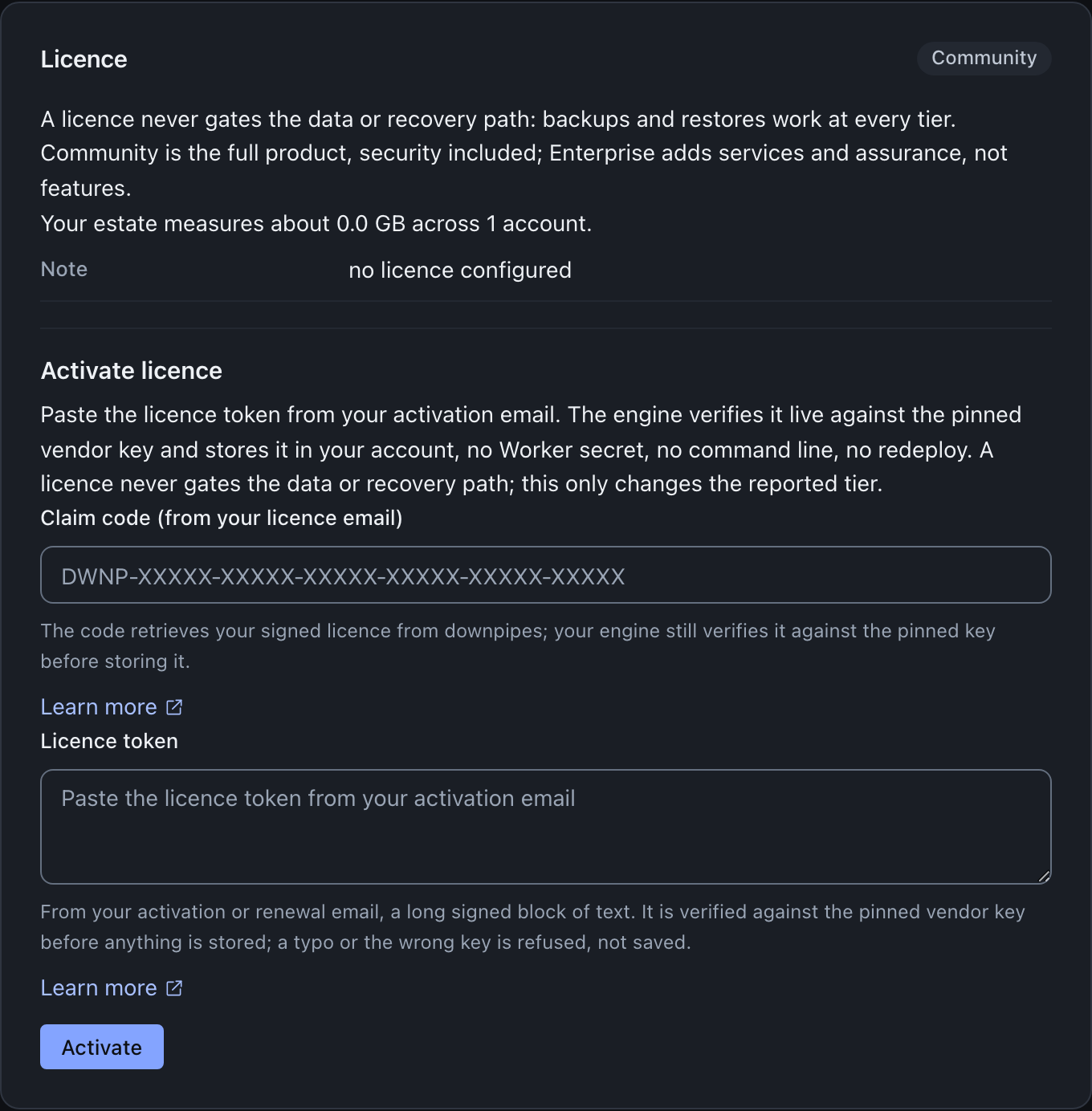
Open your console, go to Licence and updates, then Activate, and enter the claim code. The control plane exchanges the code for your account’s current licence token at
POST /licence/claim(the claim row never stores the token; it reads the account’s stored token, so a re-mint automatically serves the newest one), and the console submits that token to the engine’s verify-before-store activation. This step is identical for every tier: there is no Worker secret to set, no CLI and no redeploy (console/src/screens/licence/activation.ts). A code that is malformed, unknown or expired is refused with one uniform result, and the claim code stays usable for the licence term (older codes age out on their own) so you can re-activate after a console reset.
The console’s Activate form takes either input. The short claim code is the normal delivery, and you paste the full signed licence token when the code cannot be exchanged. No downpipes email carries the token itself; an operator can read it back from the ledger and give it to you. Whichever path a token came from, the console posts it to the engine, which verifies it live against the pinned vendor key and, only if it verifies, hands it to the scheduler to store (the engine’s POST /admin/licence, handleUpdates in engine/src/admin/router-updates.ts). A token that does not verify is refused with a plain reason, and nothing is stored. The stored token wins over any deployment-time token, the same way a console-set destination wins over its deployment-time fallback (readLicence in engine/src/admin/licence.ts).
The engine also refuses a licence that ends earlier than the active licence, and changes nothing, unless the request sets allowSupersede (handleUpdates in engine/src/admin/router-updates.ts). From console 0.2.7, this refusal opens a confirm on the Licence card, titled Use a licence that ends earlier?. The confirm shows the end date of each licence. When the two end dates are on the same day, it shows the full time of each.
Use this licence sends the same licence again with allowSupersede, and the engine stores it. Keep the active licence sends nothing, and the active licence stays in place. For a renewal, select Keep the active licence, then enter the claim code from your most recent licence email. The engine does not compare the two dates when the active licence is not valid, or when it cannot read one of the dates. In that case it stores the new licence, and the console tells you that the end date moved earlier.
Binding a self-serve licence to your Cloudflare account
A Business purchase is made through Stripe, which knows your card and your email and nothing about Cloudflare: it has no way to name the Cloudflare account the licence is for at the moment you buy it. So a self-serve licence binds to the Cloudflare account or accounts that actually claim it, rather than at the point of sale. This happens automatically, the first time you enter your claim code in each engine’s console: the console reads that engine’s own Cloudflare account id and sends it along with the code, and the control plane records it against your licence.
When the engine knows its own account. The engine works this out for itself: from the
CF_ACCOUNT_ID deploy variable when an operator has set it by hand, or otherwise the first time you
attach a source or apply an update through the console, both of which already confirm to the engine
which Cloudflare account it is running in. No command line and no extra step are needed either way.
A brand-new engine that has done neither yet does not know its account, so its Licence card says so
and the first claim does not bind anything; claiming still works, and binding completes on
the claim that follows the first attach or update. From then on, every later claim from that engine
sends the account id automatically, exactly as described above.
business-1 covers one Cloudflare account; business-3, business-10 and business-25 cover up to
three, ten and twenty-five. The first claim from a given engine’s console binds that account; a
second claim from the same account changes nothing (it is not a second estate); a claim from a
genuinely new account binds it too, up to the band’s own count. A claim beyond the band, for
example an engine in an eleventh distinct Cloudflare account claiming a business-10 licence, is refused with the error
estate_band_full and a message naming the band and the two ways to add an estate: buy a larger Business band on the pricing
page, which takes effect immediately (see plan changes below), or
contact support@downpipes.io. An MSP licence has no larger band to buy. Its refusal names the
client-estate count, and you contact support@downpipes.io to raise that count.
This is separate from the volume bands described above, and checked differently. The protected-data figure stays advisory, read only when you send a support pack; the estate count above is enforced the moment a new account tries to claim the licence, whether or not you ever contact support. If you activate the SAME token by pasting it directly rather than using a claim code, none of this runs.
The console reports whether this account is one your licence is bound to when the engine knows its
own account. The engine uses the CF_ACCOUNT_ID deploy variable for that check when the variable
is set. From engine 0.3.6, when it is not set, the engine uses the account it confirmed on the first
attach or update (engineAccountTagFor in engine/src/admin/licence.ts). Up to engine 0.3.5, the
check runs only when CF_ACCOUNT_ID is set. When the check fails, the console tells you to activate
with that account’s own claim code instead.
Enterprise licences, including a Custom arrangement minted under Enterprise, do not bind this way: an operator names the Cloudflare account directly when the licence is minted.
An MSP licence binds at claim, to its clients’ accounts. An operator’s MSP mint binds no account.
Each client console that redeems the claim code binds its own Cloudflare account, up to the
licence’s client-estate count. The control plane refuses the next distinct account with
estate_band_full, and the message tells you to contact support to raise the count. An MSP re-mint
keeps the client accounts that are already bound, up to the new count, earliest-bound first.
An operator can remove one bound account from a Business or MSP licence, for example a stray binding
from a leaked claim code. The removal frees that slot for the next distinct claim. It revokes
nothing: a token that an engine already holds keeps verifying until its notAfter.
Renewals, cancellation and plan changes: it depends on how you bought
Enterprise, Custom and MSP do not auto-renew, and no payment details are held anywhere for them: a renewal is a fresh mint with the new term once the renewing invoice is paid, and the renewal email carries a new claim code. The daily renewal sweep emails a reminder about six weeks ahead of a term’s expiry and again about two weeks ahead, so this never arrives as a surprise. You enter the new claim code in the console’s Claim code field yourself, because there is no path by which the control-plane can reach into your engine; the console’s renewal cue, an amber “Renews soon” state ahead of any paid term’s expiry (renewalNotice in console/src/lib/billing.ts), is what prompts you.
Business does auto-renew. It is a genuine annual Stripe subscription, charging the card you gave Stripe at checkout on the same date every year until you cancel. Stripe’s own webhook re-mints the licence on every successful renewal charge, one year forward each time (invoice.paid, billing reason subscription_cycle). You cancel, change your card or plan from Stripe’s own customer portal, never a downpipes screen.
About 30 days before each renewal, the control plane emails you a renewal notice. It states the plan, the band, the renewal date and, when Stripe supplies it, the amount. It links the sign-in page of Stripe’s customer portal. When you have moved to a lower band that starts at the renewal, the notice quotes the band and amount that renew. A subscription set to cancel gets no notice, because nothing renews.
Cancelling takes effect at the end of the paid year, not immediately: the subscription’s status is untouched and the licence keeps working until the term genuinely ends, so nothing about your access changes the day you cancel. Changing plan is asymmetric by design: moving to a higher band takes effect immediately and is charged pro rata for the rest of the paid year, on the same renewal date; moving to a lower band takes effect only at the next renewal, with no refund or credit for the current year, so scaling up for a support conversation and straight back down again never returns money (clauses 5.3 to 5.4 of the self-serve terms state the same terms a customer accepts at checkout).
A cancellation or non-renewal, at any tier, simply means no fresh token is minted. Because the licence is fail-open, a churned customer keeps their existing token until its notAfter lapses. At that point, the engine answers Community and nothing on the data or recovery path changes.
The fail-open invariant
A downpipes licence is fail-open by design, at every tier. A missing licence, an expired one, a forged one, one carrying a tier name this engine predates and does not yet recognise, and even a control-plane that has vanished entirely, all degrade to the free Community tier. None of those is an error, and none blocks anything. Backups keep running and offline recovery always works, because both depend solely on the archive format and your own keys, not on this Worker (engine/src/admin/licence.ts).
The engine’s verification path makes this concrete. Every abnormal outcome (no token, an unpinned vendor key, a malformed token, a signature that does not verify, an expired notAfter) returns the Community tier rather than throwing (verifyLicenceToken and the community(...) helper in engine/src/admin/licence.ts). A tier name the running engine does not recognise is not an error either: it is classified distinctly, as a future tier, and still falls open to Community, so an engine that predates a tier tolerates a licence minted for that tier safely rather than crashing on an unfamiliar string (the future-tier reason code in engine/src/admin/licence.ts). The route that reads the licence wraps the whole thing in a backstop so a licence problem can never throw out of the handler. The route answers HTTP 200 on every path, including expiry, tampering, an unrecognised tier and absence.
The licence itself is a compact, dot-joined token. The body is the canonical-JSON encoding of { account, tier, notAfter, features, boundAccounts }. The signature is a hybrid Ed25519 and ML-DSA-87 detached signature over exactly those body bytes. The engine verifies the token against the pinned vendor public key, and both halves of the hybrid signature must verify; neither can be stripped (hybridVerify, called from verifyLicenceToken).
The verifier is always the pinned vendor key, never a key the token asserts. The token carries no key id and no algorithm field by design, so a forged token cannot nominate its own signer. The engine resolves the pin from a deployment-time value or a baked-in vendor pin, and a token that does not verify under it falls open to Community (effectiveSignerPin in engine/src/admin/licence.ts).
How support recognises a customer
Support answers a ticket as a paid customer’s when the sender’s email address maps to a licence on the customer-of-record ledger. The control plane tries four matches in this order, and the first that succeeds answers:
- An exact named contact on a licence record.
- A domain on the operator’s allow-list for a record.
- The purchaser’s email domain. The control plane derives it when a licence is minted, from the contact that the mint names: the Stripe checkout address for Business, or the contacts on an operator mint.
- The Cloudflare zone that a console claimed from, the activation zone. When a console redeems a claim code, Cloudflare adds a
CF-Workerheader that names the console’s zone, and the control plane records that zone against the licence.
The two derived matches never use a free or shared mailbox provider, such as gmail.com, outlook.com or an ISP mailbox like bigpond.com. They never use a shared platform zone such as workers.dev or pages.dev either. A domain that unrelated people share would otherwise entitle all of them. A domain matches exactly: a zone example.com recognises @example.com, not @eu.example.com.
When more than one record derives the same domain, a record with a current licence answers first. Next comes a purchaser domain before an activation zone, then the record created first. An operator can remove a derived domain from a record, and the control plane never derives that domain for that record again. A match on a lapsed or churned record answers as not entitled.
An activation zone never matches on an MSP licence. Each client console claims from its client’s zone, and an MSP’s support runs through the MSP’s own named people. The MSP’s own purchaser domain still matches.
The protected-data figure is checked at support intake, never by the engine
The engine itself never checks a band. It does not measure your estate against your tier to enforce anything, and it sends no volume figure anywhere; it is the same fail-open, nothing-leaves-by-default posture the rest of this page describes. The one band check outside a support ticket is the estate count. The console sends the engine’s Cloudflare account id with a claim code, and the control plane refuses a claim beyond the band’s estate count, as binding to your Cloudflare account describes.
What the engine does instead is compute a local estate rollup entirely within your own account: total protected bytes, records and bytes per source type, the count of distinct accounts and zones behind your bound sources, your downpipe count, and the start time of the newest run it counts. That rollup appears in three places and travels no further than those three: as a local display on the console’s Licence screen, as an estate field in the GET /admin/licence response, and as a volumes section in the support pack (engine/src/admin/licence.ts, engine/src/admin/support.ts, console/src/screens/licence/view.ts). The first two never leave your account at all. The third does, but only when you choose to send a support pack, exactly like every other section of the pack.
This is not the beacon, and it is not metering
The estate rollup is unrelated to the opt-in beacon described below: the beacon is a separate, off-by-default telemetry emitter that a customer must explicitly configure before anything leaves the account, while the estate rollup is computed either way and simply sits inertly in your own console and API response until you choose to attach a support pack to a ticket. Neither one enforces usage against a limit; nothing the engine does ever blocks a backup, a restore or a console action because of volume.
Support checks the protected-data figure in exactly one place: at intake, and only on the tickets where a customer sends a pack. The check is deterministic: it compares your pack’s volumes rollup with the band on the ledger record that your ticket’s email address matches, as the section above describes. What happens next depends on why you are writing in, not on the numbers alone. A ticket about data loss, a restore, or a security concern is helped first regardless of whether the reported estate is over the licensed band, with any true-up handled afterwards; recovery is never held hostage to a subscription tier. A routine ticket from an over-band account gets a friendly note with the measured numbers and an invitation to talk about the right plan before deeper work proceeds. Either way, restores themselves are never gated by a band, the same fail-open invariant that governs the licence as a whole.
For what the volumes section contains, field by field, see the support bundle. For the support model this check sits inside, see getting support without giving us access.
The beacon: opt-in, off by default
The beacon is designed to be the least the vendor could receive, and it is never sent unless an operator turns it on. It is content-free, fail-open and advisory, and it is a completely separate system from the estate rollup above: it carries only the Cloudflare account id as its tag, the engine version and the Cloudflare deploy id, plus aggregate counts (a downpipe count, a coarse healthy/stalled split, and one account-wide maximum RUNLOG index), never anything per-downpipe and never a volume or band figure, and the receiver rejects any payload that carries a per-downpipe field (it returns 422). A store failure still returns a success status, because losing a beacon degrades only an assurance view and can never touch a backup or a recovery. When the vendor’s ingest key is set, a beacon must present the per-account key derived from it; unset, the endpoint is closed.
The emitter lives in the engine’s cron pass (runBeaconEmitPass in engine/src/cron/beacon-emit.ts, wired at engine/src/cron/drive.ts), and it runs after the backup passes so it can never delay a backup: the seal loop that writes the backup runs near the start of the tick (runSealLoop, engine/src/cron/drive.ts), and the beacon pass runs well after it in the same file, itself followed by the digest flush, the update-available alert and the tick-outcome record. It stays off unless the operator sets BEACON_URL, BEACON_INGEST_KEY and CF_ACCOUNT_ID; if any is missing, the pass returns immediately and nothing leaves the account (beaconConfigured in engine/src/cron/beacon-config.ts). The engine’s posture report reflects this live: beaconEnabled (engine/src/admin/router-posture.ts) is computed from whether all three are configured, not a hard-coded value.
What an enabled beacon is used for
Once enabled, the beacon feeds the control-plane’s per-account deploy ledger, derived from the version-identity change between two beacons. That ledger has one internal, read-only route, GET /admin/deploy-ledger, which the support-diagnosis flow calls to corroborate whether an independent vendor-side deploy actually happened in a fault window, before it will attribute a missing-binding fault to a deploy. There is no customer-facing assurance dashboard. The vendor’s admin portal shows operators the ledger and a release adoption table built from stored beacons, and never shows either to you.
The beacon is off until you configure it, its blast radius stays bounded to the counts and identities described above even once enabled, and it carries no volume or band figures at all; those belong to the estate rollup described above, which only ever leaves your account inside a support pack you chose to send.
Where this fits
The custody story this page leans on (no data, no keys, no token, and the offline break-glass key) is set out in full in the no-custody trust model. The adversary-by-adversary reasoning is in the threat model. What downpipes does not provide, including a live assurance view, is in security properties and their limits. For exactly what the support pack’s volumes section contains, see the support bundle. For how it protects itself in transit, see getting support without giving us access.
The other half of the cost answer above lives on two pages. What Cloudflare bills you for, and the account settings that are a precondition of any of it, are on the prerequisites. The calculator that projects the storage and read side of that bill once you have sources and a schedule is on predicting storage cost.
Deeper detail: the licence token, the mint endpoint and the validity window
The token format, byte for byte. A licence is <body_b64url>.<sig_b64url>. The body is base64url-no-pad over the canonical-JSON claims bytes; the signature is base64url-no-pad over the detached hybrid signature (Ed25519 then ML-DSA-87) computed over exactly those body bytes. The engine reconstructs the message as the decoded body, re-canonicalises the parsed claims, requires the re-canonicalisation to equal the signed bytes (so a non-canonical re-serialisation is rejected as malformed even if the raw signature checked), and verifies both hybrid halves against the pinned key (engine/src/admin/licence.ts). A licence also carries boundAccounts, the Cloudflare account ids described above: for a self-serve licence, the accounts its claims have bound; for an operator mint of Enterprise or a Business band, the one account named at mint; for MSP, the client accounts bound at claim, which a renewal mint carries forward up to the estate count.
The pinned public key. The vendor public key is ed25519(32) then ML-DSA-87 public(2592), totalling 2624 bytes, base64url-no-pad. A normal customer never pins it by hand; it is baked in when the engine is deployed and does not change between renewals or between tiers. A non-empty LICENCE_SIGNER_PUBLIC on the engine overrides the baked key, and a licence then verifies only against that value (effectiveSignerPin).
How a mint happens. An operator mints a licence through the operator-authenticated endpoint POST /admin/licence. It fails closed: an unset admin bearer or an unset signer returns 503, a missing or wrong bearer returns 401 (compared in constant time over SHA-384 digests), and an invalid body returns 400. On success it signs the claims with the pinned vendor signer and stores the token best-effort under account:<account>, so the operator can re-retrieve it. It optionally emails a claim code for the token, never the token itself, and returns the token. On this endpoint the tier defaults to enterprise and an unknown value is refused, so a typo can never mint a grant that does not exist; Community is never minted anywhere.
The Stripe webhook (POST /stripe/webhook) mints Business licences only. A claim that binds a new Cloudflare account re-signs the stored token, and so does an operator’s removal of a bound account.
The validity window. An operator-minted licence’s notAfter is the agreed contract end date the operator sets from the invoice term. The endpoint accepts any Date-parseable string, requires it to be valid and in the future, and renders it in the engine’s RFC-3339 UTC-millis form so the signed bytes are stable. An operator mint has no auto-renewal and no grace window: a renewal is a fresh mint with the new term. A Business licence runs 365 days from its purchase or its latest paid renewal, because the webhook re-mints it on each paid renewal invoice.
Last updated .