
What to expect: installing your first keys
Before downpipes can seal a single backup, your engine needs a set of keys. Installing them is a one-time ceremony you run once per engine. This page walks you through what each screen shows, what it means, and what to do, so nothing on the day is a surprise.
The whole ceremony runs in your browser. The recovery key you keep is generated on your side and is never sent to the engine or to us. That property is the reason the install has the shape it does, so it is worth keeping in mind as you go.
This page walks the Keys screen, which runs the ceremony outside setup. A new console runs the same ceremony inside its setup instead: the Keys step makes the keys and the Apply step installs them. First run and setup covers that route.
What you will do, in one line
You generate the keys in this browser and save the one recovery file the ceremony hands you. You record the public fingerprints, then paste a one-shot Cloudflare token so your engine writes its own secrets. There is no terminal and no command to type.
Generate your keys in the browser
The Keys screen opens on its Posture tab, which holds the ceremony card. The card states the one rule that governs everything else before you commit to anything: the private half of the break-glass key is the only recovery key you keep, and it never leaves your browser for the engine or the vendor. If you lose it, you cannot recover your backups unless your engine holds an operational key that opens them.
What it means. Leaving the posture disclosure closed keeps the default, strict break-glass-only: your engine holds no key that can read an archive at rest. Open it and untick the box to add an operational key as well. That lets your engine prove your backups restore with nobody present. Either way the break-glass key generated here is what recovers your data. You can add an operational key later from the Keys screen without re-keying.
What to do. Select Generate keys. The key pair is minted in this browser tab; nothing is sent anywhere yet.
Save your recovery key
Generating the keys immediately downloads one file,
identity.key, and swaps the card for a result view. That view shows where every file goes, in three columns.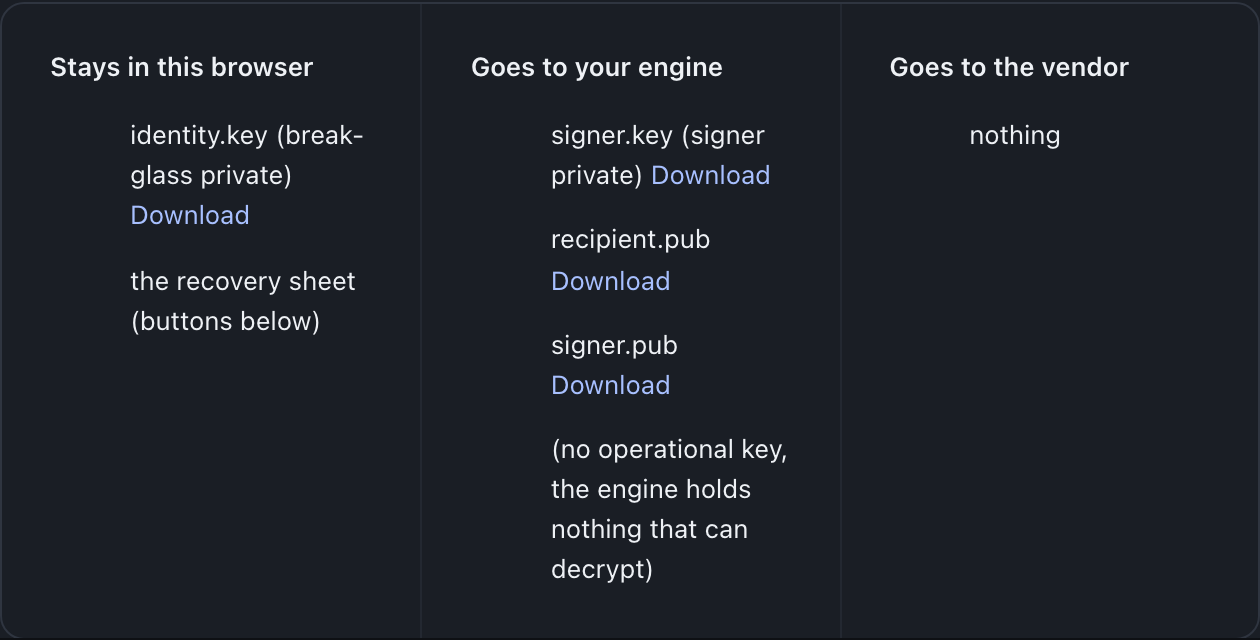
What it means. The Stays in this browser column holds
identity.key, the break-glass private key. It is the only recovery key you keep, and there is no server-side copy.The Goes to your engine column is the material your engine needs to do its day job: the signer private key, your break-glass public key, the signer public key and two configuration keys. On a strict break-glass-only estate, the column also states there is no operational key and the engine holds nothing that can decrypt an archive. Strict is what the posture disclosure starts on. Untick that box and the optional operational pair joins the column, listed as the read-back key that can decrypt archives. Keep a copy of
signer.pubin your offline kit as well. The Goes to the vendor column reads nothing, which is the whole point of the no-custody model.An offline restore refuses to run without a pinned signer. From engine 0.3.6 the bucket also holds a copy of the current signer’s key. After a re-key, that copy is the new signer’s key. The file in your kit is the copy that works for every run.
What to do. Move
identity.keyoff this machine and store it offline, and keep the printable recovery sheet with it. That standing duty is the one thing no automated step can do for you. If you want to split the key across several holders so no single loss is fatal, do it now from the same screen.Record the public fingerprints
The result view carries a Public key fingerprints section. The fingerprints identify which key is present on your engine, so you can confirm the right keys landed after the install without revealing any private material.
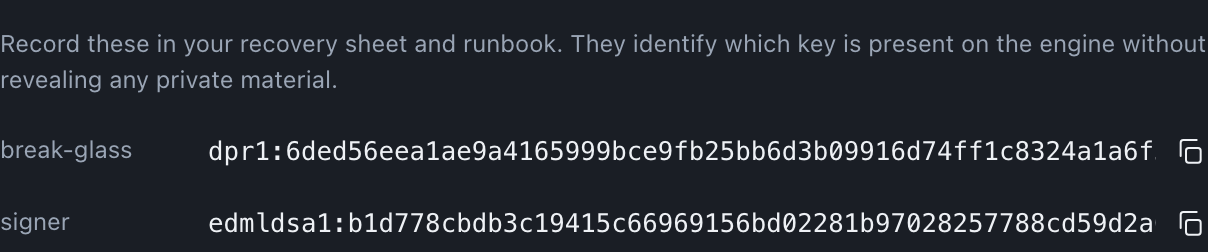
What it means. These rows show the fingerprints in plain text. They are public values, safe to record and share. The console shows every fingerprint in full, with a copy control beside it. A third row, operational, appears only if you opted in to an operational key in the posture disclosure; under the default, strict break-glass-only posture, only break-glass and signer are listed.
What to do. Copy each fingerprint onto the recovery sheet and into your runbook. You use them to verify the correct key is present on the engine once the install completes.
Install to your engine, with no terminal
The last section of the result view is the install. You paste a one-shot Cloudflare token, and your engine writes its own secrets: the signer private, the break-glass public, the two configuration keys, and the operational pair only if you asked for one. The break-glass private is never part of this step.
What it means. The token is scoped to the Edit Cloudflare Workers template on the engine’s own account and is used once, never stored. Your engine performs the privileged write itself, so the key material does not pass through the vendor. Because the token grants real access, you revoke it straight afterwards on the Cloudflare API Tokens page.
What to do. Follow How do I create the token? if needed, paste it, then select Install keys to your engine.
Confirm the install landed
The install writes engine secrets that settle over a few seconds. When it is done, the same section can re-check presence and report the signer and break-glass keys present on your engine.
What it means. You can confirm a completed install. The engine status settles to the expected shape for the chosen posture, with the signer and break-glass keys present. The audit log holds exactly one
keys-installedevent, with you, the owner, as the actor. When the engine already stored a credential, such as a read-only token or a destination key, the same install also leaves oneconfig-secrets-rewrappedevent: the engine encrypted those credentials under the new wrap key, and the event holds counts and credential classes only (rewrapAfterKeyInstall,engine/src/admin/config-rewrap.ts). That is the state a healthy first install leaves behind.What to do. Confirm the presence check reports both keys present, then match the fingerprints on screen against the ones you recorded. Once you have confirmed
identity.keyis stored offline, clear the in-memory key material from the browser tab.
After the ceremony
Your engine now holds the keys it needs, and you hold the one key it does not. Set where backups go on the Destinations screen, which is a separate no-terminal task. Keep identity.key offline and keep the recovery sheet with it; everything the platform can prove about recovery rests on that file being safe and on you being able to find it.
Last updated .