
Identity and access: Cloudflare Access, roles, and the bootstrap token
downpipes decides who can administer a self-hosted engine through three layered mechanisms: a one-time ADMIN_TOKEN bootstrap that claims the first Owner, an optional Cloudflare Access layer that makes every admin action attributable, and an opt-in hardening flag that retires the shared-token path once Access is proven. This page is the self-hoster’s view of that order of operations, from the very first sign-in to a hardened steady state.
It is an operator runbook. Each role’s powers, and the rules that decide a caller’s effective role, have their own pages in the identity and access section. This page points at that section rather than restating it. The aim here is the order of operations: what to set up first, when each path becomes safe to retire or harden, and the two distinct break-glass mechanisms you must keep apart.
The admin token is a one-time bootstrap
A fresh engine has no Owner and no role table to read. To break that circularity, the deployer sets one secret, ADMIN_TOKEN, with npx wrangler secret put ADMIN_TOKEN. Anyone holding the engine’s address and that token can administer the engine, so it is the lower-assurance path: the bearer is authorised, but the audit log records that an action happened, not who did it, because a bare token carries no email and no stable subject.
Its job is to claim the first Owner once. You use it to sign in and then either enrol your Owner passkey or claim the first Owner through Cloudflare Access. The first Owner is claimed once and once only. The moment a first Owner exists, the engine latches a bootstrapConsumed flag, so the token can never mint a second Owner afterwards, even if the role table is later emptied. From then on the bare token resolves to the all-or-nothing Owner break-glass, never to an attributable identity.
Why the token cannot be an ordinary role
A request authenticates by Cloudflare Access, a passkey session, one of the engine’s own native sign-in sessions, or the bare ADMIN_TOKEN bearer. Every method except the bare token carries a verified email and a stable subject, and resolves a role from the subject-keyed table. The bare token carries neither, so it is deliberately the all-or-nothing Owner break-glass and is barred from four-eyes change control, where two attributable identities are needed. The full reasoning is in roles and capabilities.
Because the bare token has no ceremony of its own to guard it, every presentation is throttled per source address before it is ever compared: at most ten attempts a minute from one address, and the engine denies the compare outright if that limiter’s own store is unavailable. See rate limiting and generic failures for the full picture of what throttles each sign-in path.
Retire the token once a way back in exists
Leaving the bootstrap token live means anyone who ever sees the string can take admin. So once your Owner passkey works and your recovery codes are saved offline, dispose of it. There are two equivalent ways.
The in-app retire is the one to prefer, because it needs no redeploy. From the Security Centre, retire the break-glass token, and the engine stops honouring the ADMIN_TOKEN bearer the instant you do. The mechanism is a retire flag rather than a secret deletion: the engine holds no standing Cloudflare token of its own, so it cannot delete its own Worker secret, and the flag is how it stops honouring the string. Retiring is one-way. No route re-enables a retired token, for an Owner or anyone else, and a normal redeploy does not clear it, because the flag is durable engine state. The route behind the control is POST /admin/policy/retire-break-glass-token, Owner-gated and rate-limited.
The other way is to delete the secret directly with npx wrangler secret delete ADMIN_TOKEN, which also removes the bearer. Either path is final in the same sense: the bearer stops working.
The engine refuses to retire the token until you can get back in another way
Disposing of the token must never strand you with no path back in, so the engine refuses to retire it unless there is already a way back: an Owner with working recovery codes, or a second Owner. Until one of those exists, the retire is refused. It is also refused while dual control is on and any Owner grant is time-boxed: with the token gone, that combination could leave the estate with no Owner able to administer it. If the original Owner’s passkey and recovery codes are both gone and the token is still live, creating a second Owner from the admin token is the way back. The Security Centre raises a high-severity dispose-bootstrap-token finding once a way back in exists and the token is still live, and clears it the moment you retire or delete the token. Do not plan on deleting the token at any time you like; plan on retiring it once you have a passkey-bound Owner and saved recovery codes.
“Working” is checked on every read: the engine re-derives it rather than remembering that codes were once generated. Four things all have to hold now: an Owner resolved from the role table as it stands, passkey-bound, because that is the authority a recovery sign-in would actually carry; a recovery record present and readable for that Owner; at least one code still unconsumed; and key continuity, meaning the record was minted under the key the engine would verify it with. The fourth is the one a count cannot see: a record minted under a key the engine no longer holds has a healthy-looking count and codes that cannot verify, and the engine treats that as no way back in. If a retire is refused on an account that looks equipped, that is the condition to check first: the pre-flight names which of the four failed.
Cloudflare Access is optional, and added for attributability
downpipes runs fully on the shared ADMIN_TOKEN path with no Cloudflare Zero Trust seats and no identity-provider licences. The engine never gates a backup, a recovery, or any data-plane operation on whether Access is configured. If you are the sole operator and the shared token is enough for your purposes, you can stop here.
The reason to add Access is attributability. A call made with the shared bearer is authorised, but the engine does not know by whom. The engine’s own passkey sign-in and its native OIDC and SAML connections also identify each person without Access. With Access, the engine identifies each caller by the verified token, roles are per-person, and the audit log records who did what, from which address. That trail carries operator identity by design, which is the point of it; it is tamper-evident, hash-chained, and is the timeline of record during an incident.
Wiring Access is a Cloudflare task plus two engine variables. You create a login method and an Access application in Cloudflare Zero Trust covering your custom domains. Next, tell the engine which Access policy to trust by setting the team domain and the application AUD tag:
# engine/wrangler.toml
[vars]
CF_ACCESS_TEAM_DOMAIN = "<your-team>.cloudflareaccess.com"
CF_ACCESS_AUD         = "<the AUD tag from the Access application>"
The engine then verifies the RS256-signed JWT that Access injects on every request. It fetches Cloudflare’s public keys from the team domain’s certs endpoint, verifies the signature, checks the issuer, audience, expiry and not-before, and only then trusts the email and groups in the signed payload. Trusting the header without that verification would be an authentication bypass, which the engine does not do. The GET /admin/preflight Access item proves the team domain is live by fetching those keys, so onboarding sees Access working by observation rather than assumption.
With Access wired, the first authenticated Access caller to reach the engine bootstraps as Owner, so a fresh deployment can administer roles immediately, and subsequent role assignments are made from the console. Without Access, roles key on the identity the engine verifies at a passkey or identity-provider sign-in. Only a caller that presents the ADMIN_TOKEN bearer runs as the unattributed token-fallback Owner. For that caller, the console shows an amber shared-token verdict rather than a green verified-as-email one. For the provider wiring itself, downpipes ships presets for 8 named providers plus generic OIDC and OAuth2; the setup for each lives on connect an OIDC or OAuth2 provider and connect a SAML provider.
When Cloudflare Access fronts the console, keep the Access application’s session duration short, because a shorter session means a stolen session cookie stops working sooner. You set the duration on the Access application in the Cloudflare dashboard, and the console’s Access setup step suggests a value: it recommends 24 hours as the default, and offers 8 hours or a 1-hour setting that is stronger still at the cost of more frequent re-authentication. Shorter is stronger, so pick the shortest your operators will tolerate.
The team domain is pinned, not trusted
CF_ACCESS_TEAM_DOMAIN decides where the engine fetches the public keys it verifies Access tokens against, so
a wrong value is not a typo with a harmless failure. Point it at a host an attacker controls and they serve
their own keys, and every token they forge then verifies. The engine therefore treats that variable as
untrusted input rather than as configuration it can take at its word.
The resolved host must be a single label followed by .cloudflareaccess.com. Anything else is refused: a host
that does not end with that suffix, the bare cloudflareaccess.com with no team label, and a deeper
subdomain such as evil.sub.cloudflareaccess.com, which is not a valid team domain and would otherwise slip
past a naive suffix check.
The same rule is applied a second time at the moment of the fetch, and the key request refuses to follow a redirect. So neither a tampered variable nor a 3xx from an otherwise-legitimate host can steer the key fetch somewhere else. A sign-in arriving under a refused team domain is turned away before any key is fetched, so the attacker’s keys are never retrieved, let alone consulted.
You do not need to do anything to get this. It is worth knowing because it explains the failure you will see if you mistype the variable: sign-ins are refused rather than falling back to some other path, and the engine reports that the team domain was rejected rather than that your credentials were wrong.
Wiring Access in the dashboard, step by step
The Cloudflare half is done in the browser, in Zero Trust. The engine half is two variables and a deploy.
Add a login method in Zero Trust
In the Cloudflare dashboard, open Zero Trust, then Settings, then Authentication, and add a login method. A one-time PIN to an email address works and needs no identity provider; if you already run an IdP, add it here instead so Access resolves real corporate identities. This is what turns a caller into a verified email, which is the entire reason to add Access.
Create a self-hosted Access application over your domains
Open Zero Trust, then Access, then Applications, and add a Self-hosted application. Point it at the console’s custom domain (for example
console.example.com). If you run the split topology, where the engine has its own domain, cover that domain too, so the perimeter sits in front of every admin surface rather than half of them. Which layout you are on is set out on topology.Add a policy for who may reach it
Give the application a policy that admits the people who should administer the engine, by email or by an IdP group. Access enforces this before a request ever reaches your engine, so this policy is the outer gate; the engine’s own roles then decide what each admitted person may do.
Scope the policy to yourself first, then widen it. The first authenticated Access caller to reach the engine bootstraps as Owner, so a permissive policy paired with a one-time-PIN login method would hand Owner to whoever happens to arrive first. Sign in once to claim it, and only then admit the rest of your team.
Copy the application's Audience (AUD) tag
On the application’s overview, copy the Application Audience (AUD) tag. This is the value that pins your engine to this application, so a token minted for some other Access application in the same account is not accepted.
Tell the engine which policy to trust, then deploy
Set both variables in the engine’s
wrangler.tomland deploy. Your team domain is the<your-team>.cloudflareaccess.comhost shown in Zero Trust:# engine/wrangler.toml [vars] CF_ACCESS_TEAM_DOMAIN = "<your-team>.cloudflareaccess.com" CF_ACCESS_AUD = "<the AUD tag you just copied>"cd engine npm run deployProve it, then sign in through Access
The console’s preflight carries an Access item that fetches the team domain’s public keys, so a green result is observation rather than assumption. Then sign in through Access and check the audit log: entries should now carry your verified email rather than the amber shared-token verdict. Only after an Owner has genuinely authenticated this way should you consider the flag below that removes the shared token, because enabling it earlier locks you out.
The role model in brief
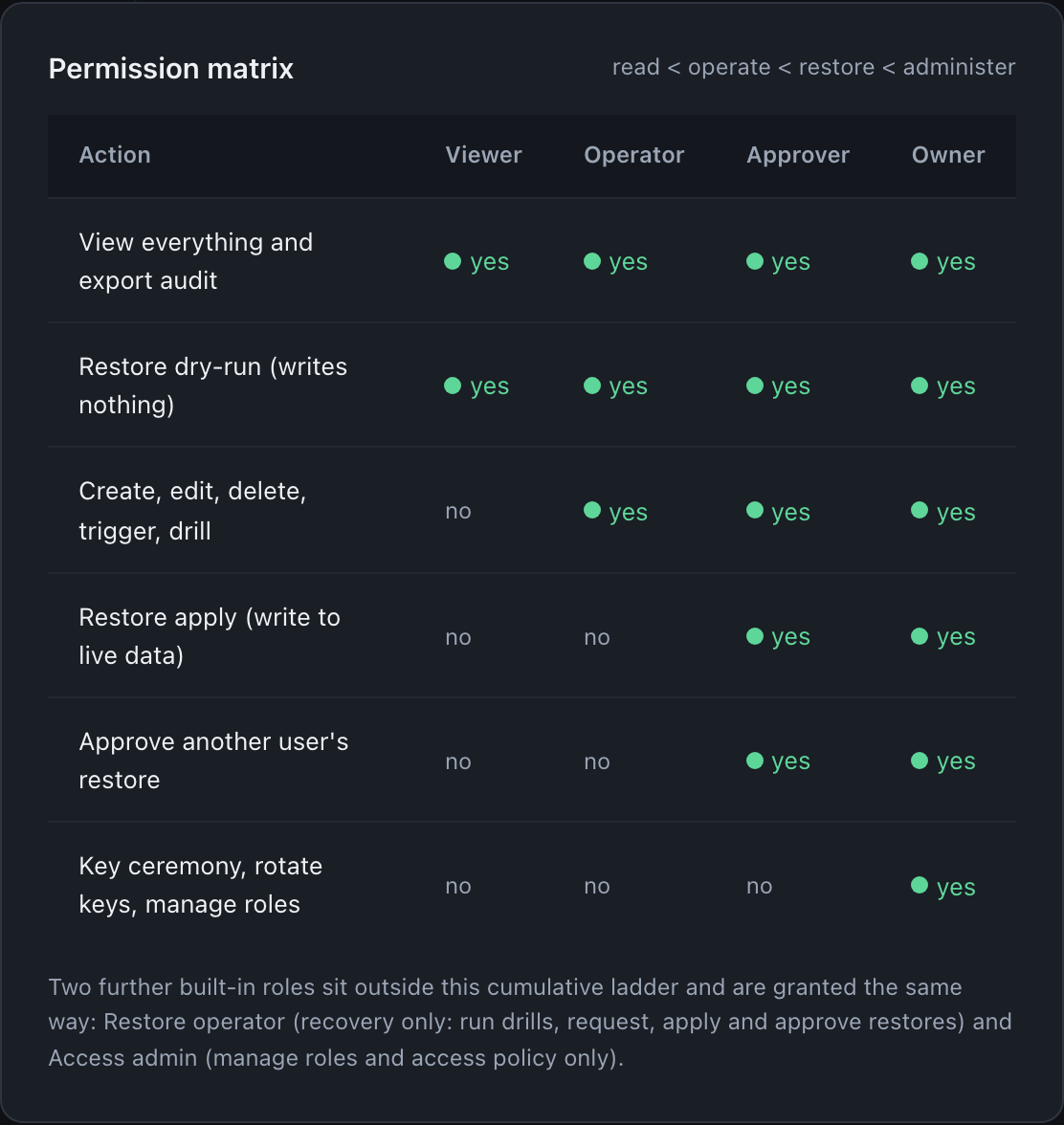
Authority is decided by an explicit capability map, where each role holds a fixed set of named capabilities. A route allows a caller only when the caller’s role holds the capability that route requires. Four of the built-in roles are cumulative.
| Role | What it adds |
|---|---|
viewer | Reads, plus restore dry-run and restore verify. The least-privilege resting role. |
operator | Everything viewer holds, plus managing downpipes, triggering runs, operational config, and recording drill evidence. |
approver | Everything operator holds, plus approving and applying restore requests under dual control. |
owner | Everything, plus managing member roles and group mappings, the key ceremony, and accepting a posture risk. |
The bare ADMIN_TOKEN path resolves to owner unconditionally, because it cannot be attributed, so it is all-or-nothing and not a step on this ladder. Two further narrow roles, restore-operator and access-admin, sit off the cumulative line and each hold a subset of Owner’s capabilities for one duty. Accounts can compose custom roles on top. The role-by-capability table, including the two capabilities reserved to Owner alone, is in roles and capabilities.
When Access carries a groups claim, the engine can resolve a role from a group rather than from a per-email grant. A group-mapped role is combined with any explicit per-email grant, the stronger of the two wins, and an explicit grant breaks a tie. One bar is absolute: Owner can never be conferred by a group. The API rejects mapping a group to Owner, and at resolution time an Owner-valued mapping is clamped to approver as a fallback, so the first authenticated Access caller still bootstraps as Owner by being a person, never by being in a directory group. The narrow access-admin role remains a valid, uncapped group-conferred role, and it outranks approver. The mapping semantics and their limits are in group-to-role mapping.
Two guards keep an Owner reachable
Owner is the role that holds the break-glass, so two separate guards protect it. They answer different questions and it is worth keeping them apart, because one is about authority and the other about availability.
Only an Owner may touch the owner role. An access-admin holds roles.write and manages viewer, operator,
restore-operator, approver and access-admin. It can never grant owner to anyone including itself, and it can
never demote or remove an existing Owner. Both of those are refused with “only an Owner may grant or remove
the owner role”. The caller’s role is resolved from the engine’s own table rather than from a forwarded
header, so asserting owner in a request does not get past it. The same rule covers the passkey path: an
access-admin cannot revoke an Owner’s credential or end an Owner’s sessions, so it cannot lock an Owner out
sideways.
An Owner cannot leave themselves with no way in. If you are the sole Owner, revoking your last passkey is refused with “cannot revoke the last passkey of the sole Owner; enrol another key or appoint a second Owner first”. Enrol a second key on another device, or appoint a second Owner, and the revoke goes through. This one binds even on yourself: an Owner cannot talk the engine into leaving the account with zero Owners or the sole Owner with zero in-app factors.
Revoking a credential that is already gone is a no-op rather than an error, so a repeated revoke after a lost device is safe. A successful revoke is audited and bumps the member’s session epoch, so any session that predates the revocation stops verifying rather than lingering.
If you have lost the device and you are the sole Owner, the way back is a recovery code or Cloudflare Access, not a revoke. Revoking the credential you no longer hold is exactly what the availability guard refuses, and it refuses for your benefit.
Removing the last sign-in path
There is a third guard, and it sits on the connections rather than on the roles. Deleting or disabling a sign-in connection is refused when doing so would leave the account with no way back in at all.
It is deliberately narrow. The refusal fires only when every one of these is true at once: this is the sole enabled connection, Cloudflare Access is not configured, no Owner holds a passkey, no recovery codes are set, and the break-glass token is retired or disabled. If any single one of those still stands, you have a way in and the removal proceeds through its ordinary gates. So this is not a rule that connections cannot be removed; it is a rule that the last one cannot be removed while nothing else can let you in.
The refusal names the ways out rather than leaving you to guess: enable Cloudflare Access, have an Owner register a passkey, generate recovery codes, or keep the break-glass token. Set one of those up, then remove the connection.
Two details of how it behaves.
The check is split across the engine and its scheduler on purpose. The scheduler knows the connection count, whether an Owner holds a passkey and whether recovery codes exist. Cloudflare Access and the break-glass token’s state are environment facts only the engine sees. A scheduler-only decision would refuse legitimately for an Access tenant it cannot observe, so the two halves are combined before anything is refused.
The guard fails open. If its own preflight cannot complete, the removal proceeds rather than being blocked, because a transient internal error must never stand between an operator and a legitimate removal. On that path the guard does not run, so a removal that really was the last way in would go through. The engine records that it happened, so a support pack can tell a lockout that slipped past a failed preflight from one where the account genuinely had another way in.
The flag that removes the shared token
Once Access is fully wired and an Owner has signed in through it, you can remove the shared-token path entirely. With ADMIN_TOKEN_DISABLED set, the engine accepts only a valid, verified Cloudflare Access JWT or a valid session cookie from the engine’s own sign-in (passkey, OIDC or SAML). The ADMIN_TOKEN secret is ignored even if it is still configured.
# engine/wrangler.toml
[vars]
ADMIN_TOKEN_DISABLED = "true"
The engine reports tokenFallbackDisabled: true in GET /admin/status so the console shows the hardened posture. The accepted truthy values are 1, true, yes and on, case-insensitive, and the flag is off by default.
Do not enable ADMIN_TOKEN_DISABLED before Access is proven
This flag is a lockout risk if you enable it too early. Do not turn it on until Access is fully wired and at least one Owner has actually authenticated through Access, so the role table is bootstrapped and you are not locking yourself out. Enabling it on an engine where no Owner can sign in by a method other than the token leaves you with no admitted caller and an engine that refuses every request. It is never required: it is a hardening option for operators who have stood Access up and want the shared-token path gone.
Keep recovery codes and the break-glass key apart
Two different mechanisms answer two different “I am locked out” questions, and conflating them is the most common confusion here.
| Mechanism | What it is for | Where it lives | What it is not |
|---|---|---|---|
| Recovery codes | Admin sign-in when a passkey is lost. Enter one at the sign-in screen to get back in with your normal role for a single use, then enrol a new passkey and regenerate the set. | Salted hashes in the engine; the plaintext is shown once at enrolment and never again. | Not a way to read your backups, and not a way to bypass dual control on a restore apply. |
| The break-glass key | Offline recovery of your archived data with no engine and no vendor in the loop. | The private half is generated in your browser, downloaded to you, and never sent to the engine. | Not an admin credential; it never signs you in to the console. |
Recovery codes are shown once when you enrol your Owner passkey, and the engine stores only salted hashes of them, so there is no way to see them again. If you lose them you regenerate a fresh set, which invalidates the old one. The recovery form asks for two things: the Email your engine knows you by, the same address your account is keyed on and the one your codes were issued against, and one unused recovery code. The engine answers a single generic failure whether the email or the code is wrong, so it never reveals which was off. Recovery-code sign-ins are hard rate-limited and audited, and a successful use or repeated failures raise an alert, so misuse is loud.
Disposing of the admin token never risks your backups, because the break-glass key, which is the thing that opens your data, was never in the account in the first place. The custody scheme for that key, including an M-of-N split across holders, is covered with the key ceremony in the concepts section.
Where this fits
This page is the operations entry point to identity. The detail is in the identity and access section:
- Roles and capabilities is the role-by-capability table, including the two Owner-reserved capabilities and why the bare token is the only subjectless caller.
- Group-to-role mapping covers how an identity-provider group resolves to a role, the strongest-wins combine, and why no group ever confers Owner.
- Custom roles explains how an account composes a named capability bundle on top of the built-in roles, and the guardrails that keep one from exceeding its creator.
- Dual control for restores defines the maker-is-not-checker rule that a restore apply must pass once an owner turns on restore approval, which a recovery code does not bypass.
For where the Access perimeter sits in the deployment, see topology. For the incident discipline that uses the audit trail as the record, see incident response.
Last updated .