
Building custom roles with the composable role builder
A custom role is an account-defined, named bundle of capabilities you compose for your own organisation, for example a recovery-only operator scoped to one source or a read-only compliance seat. It sits alongside the six built-in roles and never replaces them. A custom role is only ever reached by an explicit per-email grant or an identity-provider group mapping that names it.
This page is for a self-hoster composing a role in the console builder. The builder is the friendly surface, but the authority is the capability set, and the engine re-runs every rule at its write boundary. The single fact to remember is that the capability set is the real authority and the per-screen grid is only a hint to the console. Once that is clear, the guardrails below follow naturally.
Custom roles are built from exactly the same capability set as the built-in roles, so a custom role is gated at a request in the same way a built-in role is. There is no second authority model. For the catalogue of capabilities and what each one gates, see roles and capabilities.
What you compose
The builder lives under the Roles and access area and is gated on the access.policy capability, which an owner or an access-admin holds. A composed role has the following parts.
| Part | What it is |
|---|---|
| Name and label | A lowercased name that becomes the storage key and must not match a built-in role name, plus a human display label. |
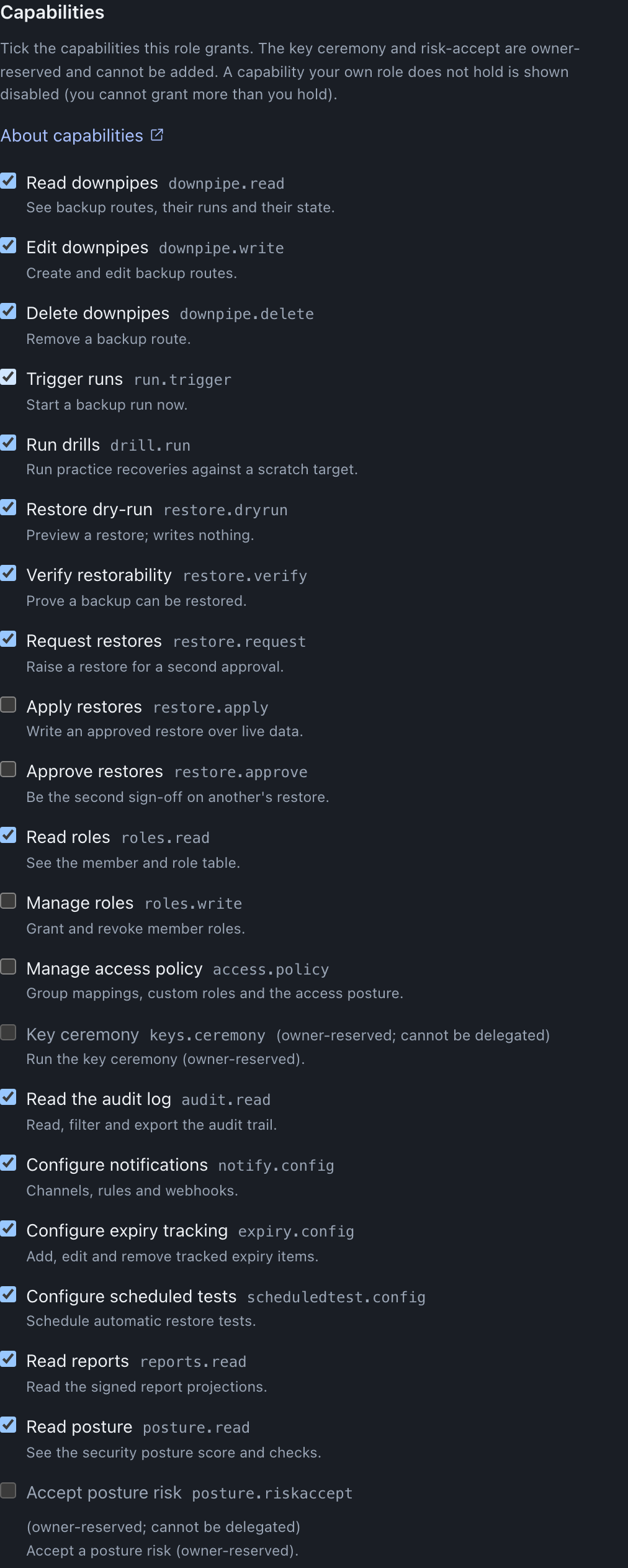
| Capability matrix | The set of capabilities the role grants, ticked from the full capability list, with the two owner-reserved capabilities barred. |
| Per-screen surface grid | For each of ten console screens, a choice of hidden, read-only or editable. A console hint, not the authority. |
| Presentation | A cosmetic skin, either the full technical console or the simplified shiny surface. It carries no authority. |
| Landing | The screen a holder of the role opens on. It cannot be a screen you have hidden. |
You do not have to start from scratch. The six built-in roles are shown as editable presets: pick one to clone its capabilities and screen visibility as a starting point, then tweak. The preset arrives with a blank name, because a custom role must not collide with a built-in name, and any owner-reserved capability is dropped from the clone automatically.
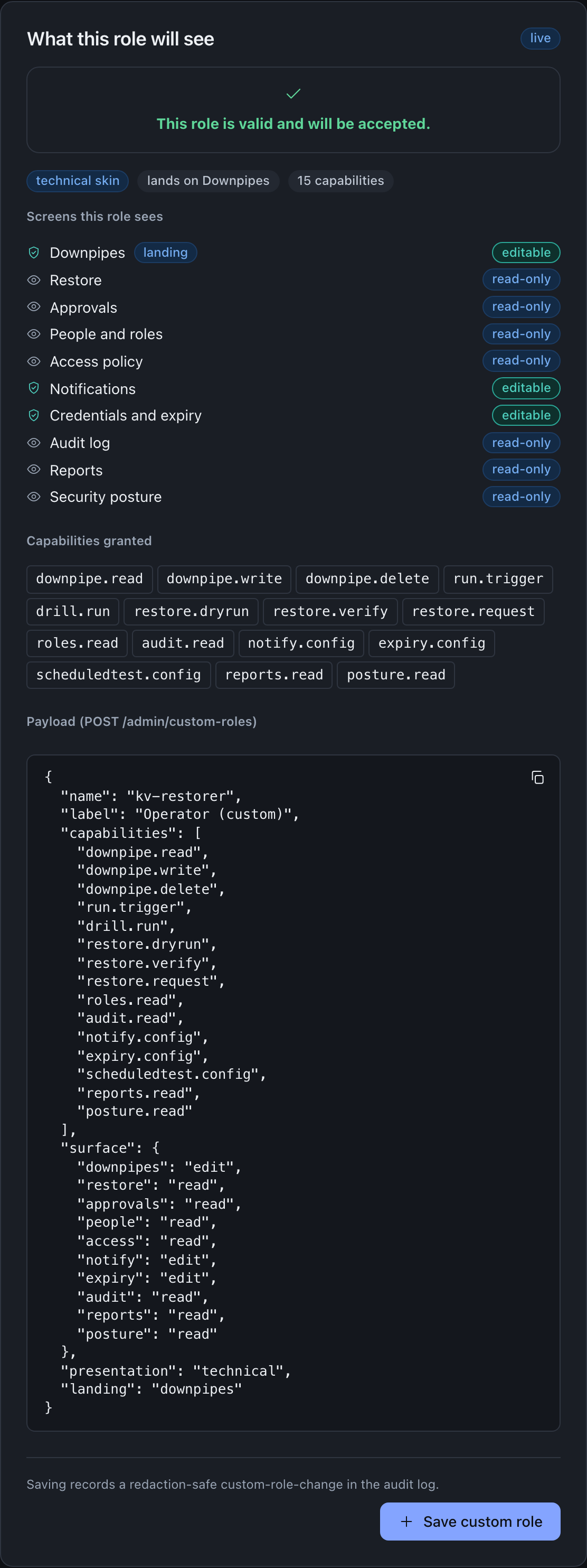
Beside the form is a live preview. It runs the very same pure validateCustomRole the engine runs, against your own capability set, so the preview shows the exact accept-or-reject verdict the engine will return and, on accept, the composed record and the JSON payload that will be sent. The console can therefore never offer you a role the engine would reject.
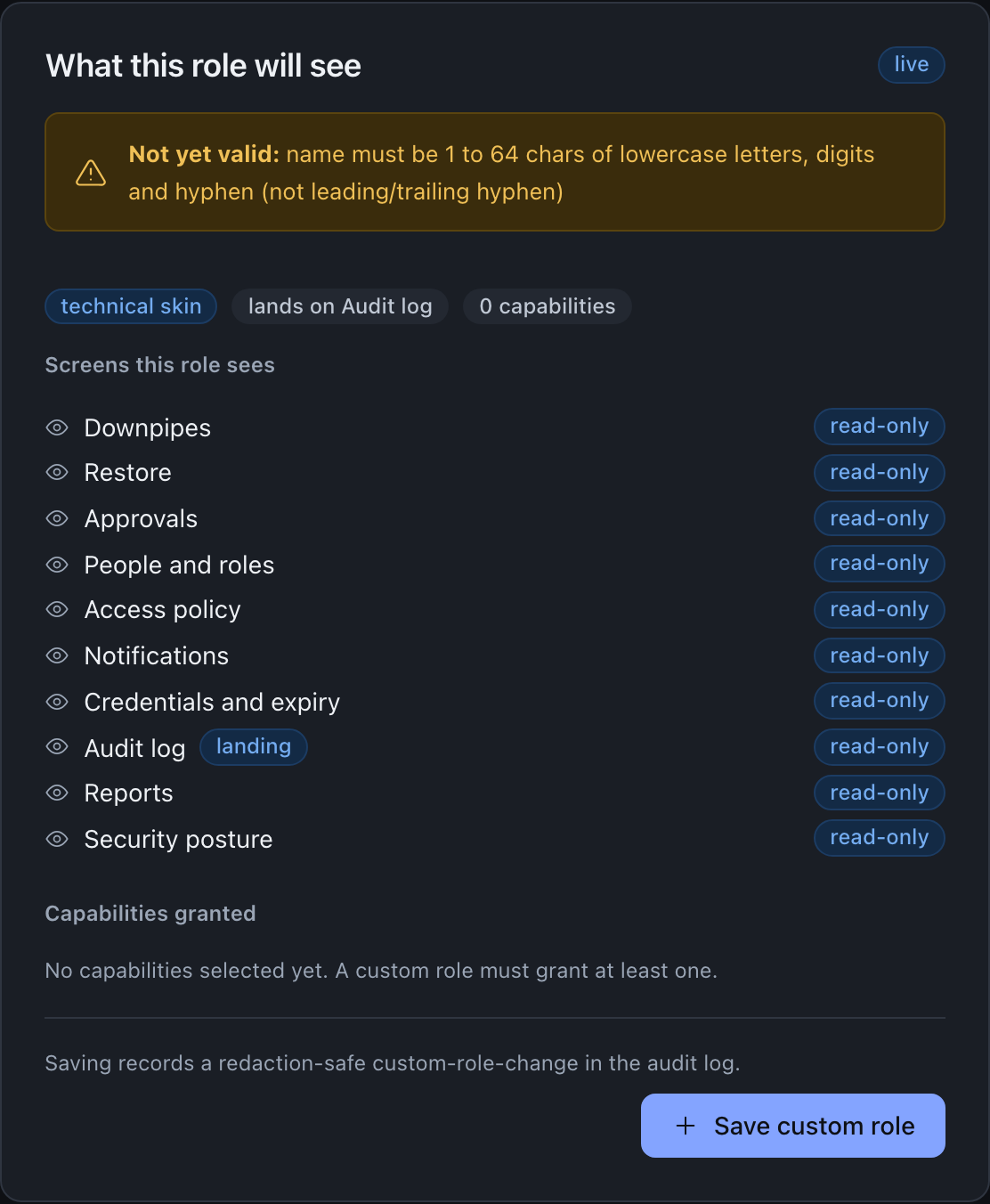
While the composition is incomplete the preview refuses it and gives the reason; once it is valid the same panel flips to accept and shows the exact payload that will be sent.
The three hard guardrails
The engine enforces three guardrails at the custom-role write boundary. The console mirrors them so the builder never offers an invalid composition, but the engine is the enforcement point and re-checks each one on every create.
The first is no privilege escalation. Every capability a custom role grants must be one the creator themselves already holds. A creator cannot mint a role more powerful than they are. In the builder, a capability your own role does not hold is shown disabled.
The second is the owner-reserved bar. The two owner-reserved capabilities, keys.ceremony and posture.riskaccept, may never appear in a custom role. They are the owner’s alone, and the bar holds even when the person composing the role is an owner, because owner is never itself a custom role. The bar is also re-applied when a stored custom role is read, so even a tampered record could not confer them.
The third is edit-requires-write-cap. Declaring a console screen editable is a promise that the role can actually perform that screen’s writes, so the screen’s write capability must be present in the role’s own capability set. A screen with no write side cannot be set to editable at all.
keys.ceremony and posture.riskaccept cannot be granted to a custom role
These two capabilities are barred from every custom role by name. A proposal that lists either one is rejected at create time with a reason, and the bar is re-applied at read time, so there is no path, including a tampered stored record, by which a custom role confers the key ceremony or the acceptance of a posture risk. If a caller can run the key ceremony or accept a posture risk, that caller is the owner.
The capability set is the authority; the grid is a hint
This is the point worth dwelling on, because it is where a reasonable person could draw the wrong boundary. The per-screen surface grid and the presentation skin are read by the console to decide what to show and how to style it. The engine never gates a write on the grid or the skin. It gates every write on the capability set.
Two readings follow from that, and the builder enforces both.
A surface that is more restrictive than the capabilities is allowed. A role may hold downpipe.write yet declare the downpipes screen read-only, which simply means the console hides an editing affordance the engine would have permitted. That is safe.
A surface that claims to be editable without the matching write capability is incoherent and is rejected at create time. You cannot set the people screen to editable unless the role holds roles.write, because the engine would refuse those writes regardless of what the grid said.
The mapping from a screen to the write capability its editable mode implies is fixed and shared between the console and the engine.
| Screen | Write capability that editable implies |
|---|---|
downpipes | downpipe.write |
restore | restore.apply |
approvals | restore.approve |
people | roles.write |
access | access.policy |
notify | notify.config |
expiry | expiry.config |
audit | none; the trail is append-only by the engine, so editable is meaningless |
reports | none; reports are read-only projections |
posture | none; accepting a posture risk is owner-reserved and cannot be in a custom role |
If you untick a write capability in the builder after setting a screen to editable, the builder demotes that screen to read-only for you, so the composition stays self-consistent. The engine would have rejected the inconsistent state anyway.
A custom-role holder is pinned to the viewer floor
When a person’s effective authority is a custom role, the engine pins their built-in role field to the least-privilege viewer floor, and the role’s resolved capability set carries the real authority. This is deliberate. Any code path that reads the built-in role rather than the capability set stays safe, and the owner-escalation guard correctly treats a custom-role caller as a non-owner.
The practical consequence is that you should never reason about a custom-role holder by looking at their built-in role, which will read as viewer. Reason about their capability set. The console shows the role basis: a custom-role holder is shown as holding a custom role conferred by a grant or a group mapping, with its authority being the role’s own capability set, and the built-in role described as the viewer floor.
How a custom role is reached
A custom role is inert until something points a person at it. There are two ways, and they sit alongside the six built-ins rather than layering on top of a built-in grant.
The first is an explicit per-email grant that names the custom role. You make it on the member’s Role picker under Roles and access, where a grantable custom role appears in the same list as the built-in roles you can grant, and it takes the same optional time-boxed expiry a built-in grant takes. The second is an identity-provider group mapping that names the custom role, so that a verified sign-in carrying that group resolves to the role, made on the group mapping’s own Role picker. Either way, the engine never trusts a forwarded capability set: it resolves the set freshly from the named custom role in its own catalogue at request time, the same discipline it uses for group mappings. Both writes are step-up gated, so a cookie-borne session is asked for a fresh passkey assertion before the grant is saved.
You can only hand out a role you could hold yourself
The guardrails above stop you composing a role stronger than you are. Granting is the second door, and it has its own rule: requireGrantWithinAuthority refuses a grant conferring any capability the granter does not themselves hold, whether the role being granted is custom or built-in and whether the target is a person or a group. The check runs on the engine’s own recomputed capability set for the caller, never on anything the client forwarded, so a roles.write holder cannot hand out a strong role somebody else composed and cannot self-grant one.
This is why the picker may not offer you a role you can plainly see in the catalogue. Both pickers offer only the custom roles whose resolved capability set is a subset of your own, because offering one the engine would refuse is a control that fails after you press Save. From console 0.2.7, the pickers apply the same check to the built-in roles, and they offer Owner only to an Owner. An access-admin, for example, is offered Viewer and Access admin, and not Operator, Approver, Restore operator or Owner. The roles held back are named underneath with the reason rather than dropped silently, so the missing role is never mistaken for a save that did not take.
Worked through: an access-admin holds roles.write and access.policy but no downpipe.write. A role conferring downpipe.write is therefore withheld from them, named with the reason, and offered to an owner who does hold it. The fix is to hold the capability yourself or to have someone who does make the grant, and it is never to re-compose the role.
If a member already holds a custom role that has since become unofferable to you, because it was deleted or because it confers more than you hold, the form says what saving would replace instead of quietly preselecting Viewer, so you cannot demote someone by accident while editing something else.
If a custom role is deleted, any grant or mapping still naming it falls back to the viewer floor on the next request. A deleted role drops its holders to least privilege rather than failing open, and it does not remove the members themselves.
Composing and saving a role
Open the builder as an owner or access-admin
From the Roles and access area, open the custom role builder. The action is offered only to a caller who holds the access.policy capability. A caller without it sees a notice stating the required capability and can still read the role catalogue.
Name the role and pick its capabilities
Give the role a lowercased name of one to sixty-four characters using letters, digits and hyphen, not starting or ending with a hyphen, and a display label of one to one hundred and twenty-eight characters. Tick the capabilities it grants. Any capability you do not hold, and the two owner-reserved capabilities, are disabled. Optionally start from a built-in preset and tweak.
Decide what each screen shows
For each of the ten screens choose hidden, read-only or editable. Editable is offered only where the role holds that screen’s write capability. Choose the presentation skin and the landing screen; the landing cannot be a screen you have hidden.
Read the live preview
The preview shows the engine’s exact verdict. A valid role reports that it will be accepted and shows the composed record; an invalid one shows the reason the engine would reject it. Adjust until it is valid.
Save the role
Saving sends the composed payload to the engine, which validates it again, stamps the creator and the creation time, and stores it. A new name saves directly. A name that already exists prompts a confirmation, because saving overwrites the existing role with the new authority. Saving records a redaction-safe change in the audit log.
Assign it to a person or a group
A saved role does nothing until you grant it. Assign it to a member by email, with an optional time-boxed expiry, or map an identity-provider group to it. Both grants are step-up gated, so expect a passkey prompt. The holder gets the role’s authority on their next request. If the role does not appear in the picker, read the authority rule above: you are only offered the roles you could hold yourself.
A save can be queued for a second approver
If four-eyes change control is armed, creating a custom role is a config change like any other, so it is queued for a second authorised approver rather than applied immediately. The builder says the change was queued, with a link to the change-request inbox, rather than reporting a false success. See change control.
The create, delete and assign paths
The builder is a client of the engine’s custom-role endpoints. Reading the catalogue is allowed for any authenticated role, because it is your own role catalogue and carries no secret. Creating, deleting and assigning are gated on the access.policy or roles.write capability server-side.
The create payload is the composed proposal. Every field is client-supplied and untrusted, and the engine validates all of it.
{
  "name": "kv-restorer",
  "label": "KV restorer",
  "capabilities": [
    "downpipe.read",
    "audit.read",
    "restore.dryrun",
    "restore.verify",
    "restore.request"
  ],
  "surface": {
    "downpipes": "read",
    "restore": "read",
    "audit": "read"
  },
  "presentation": "technical",
  "landing": "restore"
}| Field | Type | Meaning |
|---|---|---|
name | string | Lowercased storage-key name; must not match a built-in role. |
label | string | Human display label shown in the catalogue. |
capabilities | array of strings | The granted capabilities; non-empty, deduplicated, each one the creator holds, none owner-reserved. |
surface | object | Screen-to-mode map of hidden, read or edit; an editable screen needs its write capability. Optional. |
presentation | string | technical or shiny; cosmetic only. |
landing | string | The screen a holder opens on; not a hidden screen. |
On success, the engine returns the stored record, stamped with the creator and the creation time. On failure, it returns a rejection with the reason for the guardrail or validation failure.
| Action | Request | Authority |
|---|---|---|
| List the catalogue | GET to the custom-roles endpoint | Any authenticated role |
| Create or overwrite a role | POST the proposal to the custom-roles endpoint | access.policy |
| Delete a role by name | POST the name to the custom-roles delete endpoint | access.policy |
| Assign a role to a member | POST the email and custom-role name to the roles endpoint | roles.write |
| Map a group to a role | POST the group and custom-role name to the group-roles endpoint | access.policy |
Deleting an absent role is idempotent and reports that nothing was deleted. The exact request and response shapes are catalogued in the admin endpoints reference.
Where this fits
- Roles and capabilities is the catalogue of capabilities a custom role draws from, and the home for the two owner-reserved capabilities a custom role can never hold.
- Group-to-role mapping covers mapping an identity-provider group to a custom role you have composed.
- Change control explains why a custom-role save can be queued for a second approver when the four-eyes gate is armed.
- Identity and access overview sets the broader model, including why authority keys on a stable subject and why the console mirror is never the boundary.
Last updated .