
Predicting storage cost and avoiding bill shock
The cost calculator at /costs projects what a downpipe will cost to store at your chosen destination, so you can size a schedule and a retention policy before the bill arrives rather than after. This page is for the self-hoster who pays the destination invoice and wants a defensible planning number.
If you arrived here asking what downpipes costs, this is not the page that answers you, and it cannot be. The calculator is a projection over sources and a schedule you have already configured, so it has nothing to work from before you commit. The commercial answer, what you pay us and what Cloudflare bills you directly, is on licensing and editions. The Cloudflare account costs it depends on are on the prerequisites. Come back here once you are running.
Two things matter before you read a single figure. The calculator is a planning estimate, never a spend cap, a budget, a quote, or a guarantee: it computes locally and enforces nothing. Its default growth model is a full per-run snapshot, so the lever that moves your storage bill is how often a downpipe runs, not how much your data changed between runs. Both facts are built into the maths described below.
What the calculator is, and what it is not
The screen runs entirely in your browser. It computes over sizes, counts, and the destination rates you enter, and it transmits nothing, logs nothing, and stores nothing. It makes no engine write of any kind. It does make a handful of read-only, best-effort engine calls that never block the calculator: a read of your run history to seed Observed mode, an unconditional read of your destinations to prefill pricing, an unconditional read of your downpipes, which gives the Observed-mode cadence and the per-source-type breakdown and, from console 0.2.7, picks the destinations for the pricing list, and, in manual mode with no observed seed, a read of your account estate to seed an initial source size. Every one of these degrades gracefully on failure, the history read falling back to manual entry with an inline note, because a manual estimate needs no engine at all (CostView.load, fetchHistory, seedPricingFromDestinations, fetchDownpipes and seedManualFromEstate, console/src/screens/costs/view.ts).
The maths lives in a pure, deterministic library that the screen consumes rather than reimplements. The library has no DOM access, no engine import, no network, no wall-clock, and no randomness, so the same inputs always produce the same outputs (console/src/lib/cost-model.ts). It never touches a key, a secret, or archive content, only sizes and counts, which is why the calculator sits inside the same no-custody posture as the rest of the product.
Because it enforces nothing, the output is a number to plan against, not a limit the engine will hold you to. The console says so on the headline card and in an always-available assumptions panel.
The calculator does not cap, throttle, or alert on spend. It is an estimate computed in your browser. Your real charges are set by your destination and your real workload, and the engine never stops a backup because a projected figure was exceeded.
Manual mode and Observed mode
The calculator has two modes, and switching between them never loses the figures you entered in either (CostView.switchMode, console/src/screens/costs/view.ts).
| Mode | Where the inputs come from | When it is active |
|---|---|---|
| Observed | Seeded from your real run history (source size, per-run archive bytes and segment size from observed bytes-per-object) and from your downpipe schedules (runs per month), all then editable | The headline mode when at least two recent runs carry the per-run byte and segment counts |
| Manual | Sensible defaults you adjust by hand; needs no engine at all | When there is no run history, when runs lack the observed fields, or when the history read fails |
Observed mode seeds from listAllHistory() and reads the per-run archiveBytesWritten and segmentsWritten from your actual runs, then lets you override every value. The screen states why a given mode is active in plain language, so you always know whether a figure rests on your own throughput or on defaults (CostView.load sets modeReason). The minimum is two seeding runs, so the churn estimate is a real per-run delta rather than a single point (MIN_OBSERVED_RUNS, console/src/screens/costs/helpers.ts).
Where the Observed-mode runs per month come from
Observed mode takes runs per month from the schedule of each downpipe in your run history. It adds up the runs the engine will start on those schedules (deriveAccountCadence, console/src/lib/cost-cadence.ts). A manual run does not change this figure, and two downpipes count as two schedules, not as one downpipe that runs twice as often. The one exception is the fallback at the end of this section, for when the console cannot read your downpipe list.
For each downpipe, the count follows the engine’s own scheduling rules:
- A cadence (no cron). The engine sets the next run to the end of the last run plus the cadence, less a random amount of up to 10 per cent, and it starts runs only on its 15-minute dispatch tick. The count uses the shortest gap this allows, so it is the most runs the downpipe can start. A daily downpipe counts at one run every 21 hours 45 minutes, which is 33.6 runs a month, not 30.4. An hourly downpipe stays at 730.6, because the tick takes up the early start (
shortestCadenceGapSeconds). - A cron. The count is the number of 15-minute ticks the cron’s fires start on over four whole years, scaled to a month. Several fires before one tick start one run. A cron in a time zone the runtime does not know, or a cron that never fires, runs on the cadence instead, as the engine does (
cronRunsPerMonthandscheduledRunsPerMonth).
The count leaves out blackout windows. A window only moves a run later, so the figure stays the most runs your schedules allow. Paused downpipes and downpipes that are no longer configured are left out, because the engine will not start their runs. A downpipe with no run that carries the per-run byte counts is also left out, because its size per run is not known yet. The seed then sets the source size from the average stored bytes per run across the counted downpipes, weighted by their runs per month. Source size times stored ratio times runs per month then equals the sum of each downpipe’s own bytes per run times its own runs.
If the console cannot read your downpipe list, the seed falls back to the median gap between the recorded runs of each downpipe. It leaves out gaps under 7.5 minutes, which is half of the 15-minute dispatch tick, because the engine starts at most one scheduled run a tick. For the same reason it counts at most one run every 15 minutes for each downpipe (runGapRunsPerMonth). The run record does not say whether a person started a run by hand, so on this fallback manual runs further apart can still raise the figure.
A line under Schedule cadence names the downpipes the seed counted, with the runs a month of each (describeCadenceBasis, console/src/screens/costs/cadence-basis.ts). For a cadence, the line also names the gap that the count uses, for example 21 hours 45 minutes for a daily downpipe. When a counted downpipe runs on a cadence, the line says that a run can start up to 10 per cent early. The same line says what the seed left out, or that it used the fallback.
The seeded source size and runs per month describe all the counted downpipes together. If you change the source size to the size of one source, also set the cadence to that source’s schedule. Otherwise the estimate multiplies one source’s size by the runs of every downpipe.
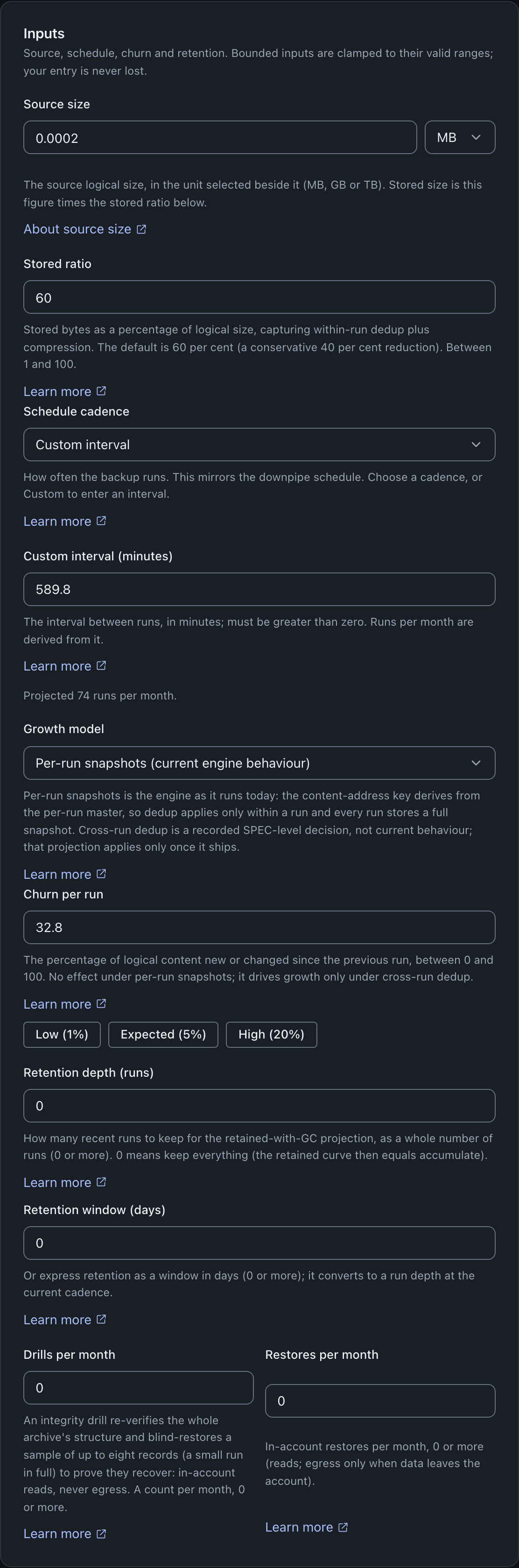
Both modes take the same inputs: a source size with a stored ratio, a schedule cadence, a churn fraction, a retention depth, a count of drills and restores per month, and a count of offline recoveries per month. The destination pricing is shared across both modes, because a destination’s rates do not change with how you happened to seed the inputs.
The inputs accept the following values:
| Input | Accepted values |
|---|---|
| Source size | The source’s logical size as a number plus a unit you pick beside it (MB, GB or TB); in Observed mode it is seeded from your run history, in Manual mode you enter it |
| Stored ratio | A percentage from 1 to 100 (stored bytes as a share of logical size), default 60 |
| Schedule cadence | Every 15 minutes, hourly, every 6 hours, daily, weekly, or custom. A named cadence counts the engine’s early starts, as Observed mode does: every 15 minutes is 2,922 runs a month, hourly 730.6, every 6 hours 132.8, daily 33.6 and weekly 4.83. In Observed mode it starts at the runs per month your downpipe schedules allow, so a daily downpipe on a cadence opens on Daily. When that figure matches none of the named cadences, it opens as a custom interval: a daily downpipe on a cron schedule counts 30.44 runs a month and opens at 1,440 minutes |
| Custom interval (minutes) | A number of minutes greater than zero, shown only when the cadence is set to custom. It counts one run per interval, with no early start |
| Retention depth (runs) | A whole number of runs, 0 or more; 0 keeps everything, so the retained curve equals accumulate |
| Retention window (days) | A whole number of days, 0 or more; converted to a run depth at the current cadence |
| Growth model | Per-run snapshots (how the engine stores runs) or Cross-run dedup (what-if model); anything else falls back to per-run snapshots |
| Churn per run | A percentage from 0 to 100, default 0, with Low (1%), Expected (5%) and High (20%) presets beside it; no effect on stored bytes under per-run snapshots |
| Drills per month | A count of zero or more |
| Restores per month | A count of zero or more; in-account reads, with egress only when data leaves the account |
| Offline recoveries per month | A whole number, zero or more (a fraction rounds to the nearest whole number); each one is priced as egress on the whole archive |
The growth model: storage grows with runs, not churn
This fact surprises people who expect a backup tool to dedup across runs. The live engine derives its content-address key from the per-run master key, so dedup applies only within a single run. Every run stores a full snapshot of the source. Storage therefore grows as runs per period times archive bytes per run, regardless of how little changed between runs (perRunStoredBytes and storedBytesAccumulate, console/src/lib/cost-model.ts).
The calculator defaults to this snapshot growth model because it is what the engine does (DEFAULT_INPUTS.growthModel, console/src/lib/cost-model-rates.ts). Under it, the churn field has no effect on stored bytes, and the calculator’s hint and the churn sensitivity sweep both say so (churnField hint, console/src/screens/costs/inputs-section.ts; the churn sweep is flat under snapshot, sensitivity in console/src/lib/cost-model.ts).
A second growth model, churn-dedup, is offered under the growth-model control, and it is labelled as a what-if model. It models a world where content addressing spans runs so a run stores only its churn. The engine does not dedup across runs, so a figure computed under this model is a projection, not an estimate of your bill. When you select it, the results region prints a prominent note before any number. An unknown growth-model value always falls back to the snapshot default, never silently to the what-if model (buildResults in console/src/screens/costs/results.ts, withDefaults in console/src/lib/cost-model-rates.ts).
Reducing churn does not reduce your stored bytes, because the engine does not dedup across runs. If you want a lower storage bill, the levers are a longer interval (fewer runs), a retention policy that prunes old runs, or a destination with cheaper storage. Churn only matters under the what-if model.
Accumulate versus retained
The library projects two storage curves side by side so you can see the cost of keeping everything against the cost of a retention policy.
The accumulate curve is the default state: with retention enforcement off, nothing is pruned, so every run’s content persists and storage grows roughly linearly with the run count (storedBytesAccumulate). That is a policy setting, not a missing capability. The engine’s manifest-driven segment collection does run and does delete unreferenced segments once you enable retention enforcement; retention and pruning covers deletions and safety rules. On a versioned bucket, and every S3 Object Lock bucket is versioned, a delete only adds a delete marker. The bytes stay, and stay billed, until your bucket’s lifecycle rule for noncurrent versions removes them.
The retained curve projects enforcement: what a policy would save by keeping only the most recent runs, bounding storage at a steady state (storedBytesRetained). The screen labels the accumulate figure as the headline because it is what you are billed for until you turn enforcement on. The screen shows the retained figure as the saving a policy would deliver.

The inline read-amplification guard
Storage is one half of the bill. The other half is operations. The calculator is explicit that a workload of many small records is read-heavy in a way a naive size estimate misses.
Object counts are estimated from the writer’s segment size, which defaults to the engine’s single-segment plaintext ceiling of one gibibyte (DEFAULT_SEG_BYTES, console/src/lib/cost-model.ts; the ceiling is defined as SPEC 14.5’s per-segment cap in engine/src/dest/types.ts, distinct from the roughly 4.995 GiB R2 single-PUT object-size limit). The engine seals one segment, which is one destination object, per record, and does not pack small records together. For many small records, the derived object count is a lower bound on the true count, because each small record is still its own object. The assumptions panel states this. In Observed mode the segment size comes from the bytes per object in your run history instead (assumptionItems, console/src/screens/costs/assumptions.ts).
This guard is a planning prompt about read amplification, not a runtime control. Nothing in the engine enforces a read budget; the calculator simply surfaces the risk so you can plan for it. That distinction, between an estimate that flags a risk and a runtime that enforces a limit, holds across the whole screen.
The other operations inputs are the drills and restores per month, plus the offline recoveries covered under where the rates come from. The estimate prices drills and restores as in-account reads with no egress. A restore reads back the records it writes. A drill is lighter than it sounds: it re-verifies the whole archive’s keyed structural chain, but it only blind-restores a sample of records to prove they decrypt, up to eight at an even stride, or the whole run when the run holds eight records or fewer (DRILL_SAMPLE_MAX, engine/src/admin/drill.ts). A monthly drill’s restore cost is therefore bounded by that sample, not by the full archive size, even though its structural pass covers every record. Set the drill and restore counts to your real cadence; the estimate adds their read cost to the storage half.
The downpipe editor carries its own inline count field, separate from this calculator. When you add or edit a KV downpipe, an Approximate record count projects the KV read cost live as you choose a cadence. It takes digits only, commas are ignored, and the count is used only for that local projection and is never sent to the engine.
The safety margin
A persistent slider pads the whole headline figure so the estimate errs high rather than low, which is the safer direction to be wrong in when you are budgeting. It runs from zero to fifty per cent in steps of five, and starts at twenty per cent (SAFETY_MARGIN_SLIDER_MAX, SAFETY_MARGIN_SLIDER_STEP and SAFETY_MARGIN_DEFAULT, console/src/lib/cost-model-platform.ts). It multiplies the estimate; it changes nothing about your actual spend. As your real bill comes in over the first month or two, tune it down towards zero. The slider is deliberately capped well below the library’s own clamp, so the everyday control cannot reach the far edge the clamp guards.
Where the rates come from
The pricing presets are indicative public list prices, offered as a starting point you then replace with your own contracted rates. Every rate field is editable, in whatever currency your rates are quoted in. Editing any field switches the picker to Custom so it never claims a preset you have edited away from (patchPricing and applyPreset, console/src/screens/costs/pricing-section.ts). Choosing Custom yourself keeps the rates already in the fields, so you edit from those figures rather than from zero.
From console 0.2.7, the pricing list starts with each destination that a downpipe writes to. A downpipe that names no destination writes to the account default. If none of these destinations is still on the account, the list starts with every destination on the account. The list also starts with every destination when you have no downpipes or the console cannot read them (destinationIdsInUse, console/src/screens/costs/helpers.ts; seedPricingFromDestinations, console/src/screens/costs/view.ts).
The presets carry a note about egress. Cloudflare R2 lists no egress fees for data transfer out, so an offline recovery download is not separately billed for egress on R2, and the screen tells you to verify this against your own plan because terms can change. Amazon S3 and a custom destination bill egress at the rate you enter (updateEgressNote, console/src/screens/costs/pricing-section.ts).
The calculator prices every drill and restore as an in-account read with no egress. That holds when the destination is in-account, for example R2 in the same account. A destination that bills egress on reads, such as Amazon S3, also bills it on drill and restore reads, and the estimate leaves that out. An offline recovery downloads the whole recoverable archive and incurs egress at your entered rate (console/src/lib/cost-model-estimate.ts). Set Offline recoveries per month to how often you recover off-account. Until you set it, the default of 0 counts no offline egress (offlineEgressGB, console/src/lib/cost-model-estimate.ts).
Deeper detail: what the figures are computed over, and what does not measure cost
The headline and the basis. The headline is the projected month-twelve recurring monthly cost: the destination-storage ledger plus the Cloudflare-platform cost to run the backup in your own account plus the Workers Paid plan base, padded by a safety margin you control (buildResults and recurringEstimate, console/src/screens/costs/results.ts and console/src/lib/cost-model-platform.ts). The storage / writes / reads / egress split is the destination-storage detail beneath it, all on the accumulate basis. Monthly storage is averaged at the month midpoint for the accumulate regime. The retained regime follows the accumulate curve until the retention depth is reached, then holds at the bounded steady state.
The projection sums each month to the chosen horizon plus the one-off write cost that the first seal adds to an ordinary run (monthlyCost, project and initialWriteCost, console/src/lib/cost-model.ts). The monthly figures already count the writes of every run, the first run included. Under per-run snapshots each run writes a full seal, so this one-off cost is 0.
There are two ledgers. Alongside the destination-storage cost, the calculator estimates the Cloudflare-platform cost to run the backup in your own account, the operations a run spends across Workers, Durable Objects, D1, KV and R2 (platformCost and recurringEstimate, console/src/lib/cost-model-platform.ts). That figure is over-estimated from object counts until Observed mode is active and your runs report exact per-resource op counts. It then uses the measured counts plus an estimated fixed overhead per run for Workers, Durable Objects and D1. A per-source-type breakdown appears once there is run history, and a safety margin you control pads the headline so it errs high rather than under-quoting.
The sensitivity sweeps follow the storage model. The churn sweep is flat under the default snapshot model, because monthly cost is invariant in churn there, and the screen states that rather than hiding a zero-delta series. The retention sweep is always evaluated in the retained regime, because retention depth moves the footprint only under garbage collection (effectiveSensitivityRegime and sensitivity, console/src/lib/cost-model.ts).
This is not the engine’s metering hook. Do not confuse the calculator with engine/src/meter.ts. That hook is subrequest accounting for the sliced seal, primarily to keep a large run inside the platform’s per-invocation budget. Its optional per-resource op counts do feed the calculator’s Cloudflare run-cost ledger above, but it never measures your destination storage bill, which is set by what you store at S3 or R2.
This is not live billing. The calculator does not bill you, and nothing on this screen is connected to a payment processor. Enterprise, Custom and MSP / MSSP never touch a payment processor, because the vendor invoices them off-platform. A Business subscription is the one purchase that goes through a payment processor, on Stripe’s own hosted checkout page (see licensing and the control plane).
The usage beacon is opt-in and off by default: the emitter (runBeaconEmitPass, engine/src/cron/beacon-emit.ts, wired into every cron tick at engine/src/cron/drive.ts) stays silent unless the operator sets both BEACON_URL and BEACON_INGEST_KEY, and once enabled it only POSTs a content-free, aggregate-only payload to the control-plane’s receiver. The payload is your Cloudflare account id as the account tag, the engine and deploy version, and counts, never per-downpipe data. No customer-facing dashboard surfaces this beacon data. None of those surfaces produce a live bill; the calculator produces a local estimate.
Where this fits
The calculator pairs naturally with the parts of the product that set its inputs and live with its trade-offs. For how often a downpipe runs and the floor on that schedule, see the backing-up overview. For the retention policy whose saving the calculator projects, see retention and pruning. For the offline recovery path, whose egress the projection prices from Offline recoveries per month, see the restore flow. For why the screen can compute all of this without sending anything anywhere, see the no-custody trust model. For what downpipes itself costs, as against what it costs to run, see licensing and editions, and for the Cloudflare account charges underneath every figure here, see the prerequisites.
Last updated .